Please Note that Secury 360 Must be setup in accordance with the Secury 360 Platform Recommended settings to ensure reliable operation. Please ensure you have read the instructions and settings’ required @ https://faq.secury-360.com/en. Please ensure that you correctly configure Camera Detection Zones for each camera connected to the S360 Box, failure to configure Camera Zones will mean that no alerts are received by the monitoring station.
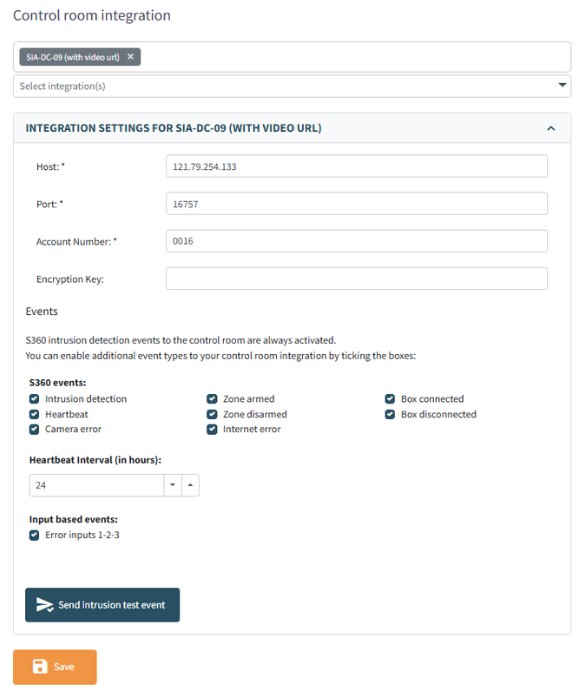
Under Integrations & API Menu Select the Control Room Integration as “SIA-DC09 (with video url)
In Host Box, Enter Alarm Watch IP of 121.79.254.133
In Port Box Enter Port of 16757
In Account Number Box Enter the 4 Digit Account Number supplied by Alarm Watch for the Secury 360 Receiver (Port 41)
Select the S360 Events that should be reported to Alarm Watch and Configure Heartbeat Interval for 24 Hours
Save and Click on “Send Intrusion Test Event”