
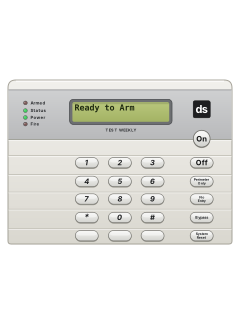
DS7447 / DS7445Keypad

Detection Systems DS7400x manuals
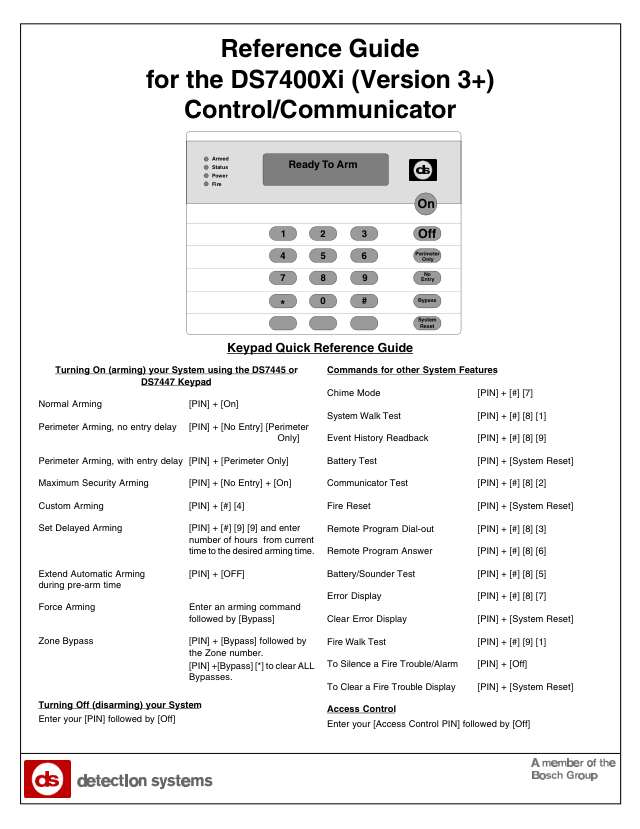
Start hereDS7400Xi (Ver 3+) Ref GuideProgramming · 92 pages · 1.4 MBRead it nowKeypad cheat sheet
Arm (away)your codeOnor#On
- Close up first: the green Status light must be on steady, and a DS7447 must read 'Ready to Arm'.
- Key in your PIN (your code), then press [On].
- The red Armed light flashes and the keypad beeps once; a DS7447 shows 'Exit Now'. Leave; the light goes steady when the exit time ends.
- If your installer turned on Quick Arming, [#] then [On] works without a PIN.
- Your PIN, [No Entry], [On] arms with no entry delay (Maximum Security), so opening any door sets it off.
Arm while homeyour codePerimeter Onlyoryour codeNo EntryPerimeter Only
- Perimeter arming guards only the outside doors and windows, so you can move about inside.
- Your PIN, then [Perimeter Only]: the entry delay still works for someone coming home.
- Your PIN, [No Entry], then [Perimeter Only]: no entry delay, so opening an outside door sets it off at once.
- The red Armed light flashes during the exit time, then stays on. A DS7445 lights its yellow Perimeter light.
- With Quick Arming on, press [#] in place of your PIN.
Disarmyour codeOff
- Come in by your entry door, key in your PIN, then press [Off]. The red Armed light goes out.
- Your PIN and [Off] also silence any alarm, fire alarms included.
- A pulsed tone as you come in, or bells going, means an alarm while you were out. Stay out until emergency services have checked it.
- Under threat, use your duress code and [Off]. It disarms as normal and silently alerts your monitoring company, if set up.
Bypass a zoneyour codeBypasszone
- Each detector or door contact is a zone. Bypass only while disarmed.
- Key in your PIN, press [Bypass], then the 3-digit zone number (such as 001). Enter more zone numbers if needed.
- The green Status light flashes if no other zone is open. Arm as usual when ready.
- Your PIN and [Bypass] lists bypasses. Your PIN, [Bypass], [*] clears them all.
- Bypasses clear on disarming, except for 24-hour zones.
Alarm memoryyour code#89
- Key in your PIN, then [#] [8] [9]. A DS7447 shows the most recent event.
- DS7447: [#] goes back line by line, [9] to the next older event and [6] towards newer ones.
- DS7445: the zone lights 1 to 8 flash for zones that went into alarm since the last check.
- Press [*] to leave. The panel keeps the last 400 events.
- Needs a master or unlimited PIN (level 0 or 1); a general PIN can't do this.
Chime on or offyour code#7
- Chime beeps for 2 seconds when a perimeter or entry/exit zone opens while disarmed.
- Use a master or unlimited PIN (level 0 or 1), then [#] [7]. A DS7447 shows Chime Mode On for 5 seconds.
- Repeat to turn chime off. A DS7447 shows Chime Mode Off.
- Only keypads in your current partition change. On a Master keypad, first use Single Partition Mode.
Reset smoke detectorsyour codeSystem Reset
- After confirming there is no fire, silence the bells with your PIN and [Off].
- Note which smoke detector went off so your monitoring company can check it.
- Enter your PIN, then [System Reset]. This resets smoke detectors, tests the battery and clears system troubles.
- Use a master or unlimited PIN (level 0 or 1); a general PIN cannot reset.
Panic alarm
- On DS7447/DS7445, the three small bottom keys are emergency keys only if your installer has programmed them.
- The manual calls them A (left, fire), B (middle, special emergency) and C (right, panic). The pictured keys are blank.
- Have your installer identify and label them. In an emergency, hold the appropriate key for 2 seconds.
- Your PIN and [Off] cancel or silence the alarm.
Page 23 of the ds7400xi v3 userBlank left emergency key Manual calls this A: fire, if programmed Blank middle emergency key Manual calls this B: special emergency, if programmed Blank right emergency key Manual calls this C: panic, if programmed Change a codemaster code#00user number
- Use a DS7447 and key promptly: a 15-second pause cancels it. Key in your master code, then [#] [0], then [0].
- Key in the 3-digit user number (such as 002), then the authority level: 0 master (user 001 must stay 0), 2 arm and disarm.
- Key in the areas this user may use, then [#]. [#] on its own gives all areas.
- Key in the new PIN (4 digits; 4 or 6 on version 4), then key it in again and press [#]. A long beep means done.
- To remove a PIN: master code, [#] [0], [0], the user number, then [#]. User 001 can't be removed.
Trouble lightsyour code#87
- A flashing green Power light means an error. While disarmed, enter your PIN and [#] [8] [7] to view it.
- A DS7447 shows the message. On a DS7445 a zone light shows which error (see the table).
- Clear it with your PIN and [System Reset], but only once it's fixed or your installer says so.
- Version 4: trouble beeps every 10 seconds can be silenced for 4 hours with your PIN and [Off].
- Reading and clearing errors needs a master or unlimited PIN (level 0 or 1).
Pages 29 and 30 of the ds7400xi v3 userPage 37 of the ds7400xi v4 userLight 1 / AC Power Failure Mains power off; running on battery Light 2 / Battery Trouble Battery problem. After a power cut, wait at least 2 hours, then PIN and [System Reset] to test it Light 3 / Communicator Err Couldn't reach the monitoring company Light 4 / System Fault Fault inside the panel Light 5 / Keypad Fault A keypad isn't responding Light 6 / Keypad Tamper A keypad's cover has been opened Light 7 / Multiplex Bus Fault on the detector wiring bus Light 8 / Aux. Power Fault The power to detectors has shorted Send a test signalyour code#82
- Needs a master or unlimited PIN (level 0 or 1). It works only on a monitored system set up for communicator tests.
- Key in your PIN, then [#] [8] [2]. A long beep starts it; a Test report goes to your monitoring company.
- Another long beep means it worked. It can take several minutes: the panel tries up to 10 times.
- If it fails, the keypad sounds non-stop: press [System Reset] to silence it.
All Detection Systems DS7400x manuals
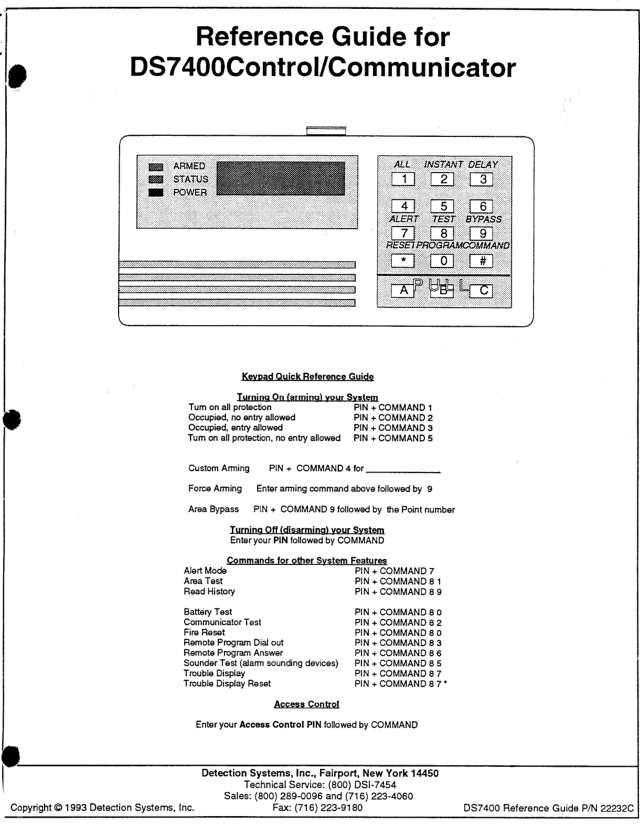
Installer manuals 6
Nothing here matches that.
Try a shorter search, or search every brand.
Is anyone watching your alarm?
An alarm that only makes a noise relies on someone hearing it. A monitored alarm reports to our A1 graded, NZSA approved control room, watched 24/7 by a team that is New Zealand owned and operated. We can monitor most existing alarms, so you may not need a new one. Thinking about a new alarm or security cameras? Ask us for a quote.
Prefer to talk now? Call us on 0800 339 999.
Home: alarm monitoringBusiness: business monitoringInstaller: bureau monitoring


Manuals are the property of their manufacturers and are provided for reference only; their inclusion here does not imply any endorsement by the manufacturer.