

Linear SSD8 manuals
Start hereLinear SSD8 Wireless Security System Installation Instructions and Owners Manual (215583 B, 1998)User guide · 20 pages · 1.9 MBRead it nowKeypad cheat sheet
Arm (away)holdAWAY
- Close doors and windows. A lit sensor light beside the keys means that door or window is open.
- Hold AWAY for 2 seconds. You don't need your code to arm.
- The AWAY light blinks and the console beeps for 45 seconds. Leave by your entry door before that ends.
- Hi-low beeps as it arms mean something is open. That opening can't set off the alarm until it is closed.
- Away arms motion detectors too.
Arm while homeholdHOME
- Home arms the doors and windows but not motion detectors, so you can move about inside.
- From Off or Chime, hold HOME for 2 seconds.
- Hi-low beeps mean a door or window is open. It can't set off the alarm until it is closed.
- Opening a delayed door starts 45 seconds of entry beeps. Disarm before they end, or the siren sounds.
- Already in Home and someone needs to go out? Hold HOME for 2 seconds: a gong, two beeps, then 45 seconds to leave by a delayed door.
Disarmyour codeOFF
- Come in by your entry door (its sensor is set to DELAYED). The console beeps through the 45-second entry time.
- Key in your secret code, then press OFF. Your code then CHIME disarms into Chime mode instead.
- Disarming stops any siren. The siren also stops by itself after 5 minutes.
- Several beeps as you disarm mean there was an alarm while you were out. An intruder may still be inside: take care.
- Pressed a wrong key? Press * to clear what you typed and start again.
Chime on or offholdCHIMEoryour codeCHIME
- Chime mode is disarmed, but opening a protected door or window makes a ding-dong. Motion detectors are off.
- From Off, hold CHIME for 2 seconds.
- From Home or Away, key in your code and press CHIME. This disarms the system.
- To leave Chime mode, key in your code and press OFF, or hold HOME or AWAY for 2 seconds to arm.
Panic alarm
- The console has no panic key. The emergency siren needs the optional two-button remote.
- Press both remote buttons together. It works in any mode.
- A remote must be added to the system before it works. Each one uses a sensor location.
Pages 11, 15 of the Linear SSD8 Wireless Security System Installation Instructions and Owners Manual (215583 B, 1998)Left button Arms to Away, with one chirp Right button Disarms to Off, with two chirps Both buttons together Sounds the emergency siren Change a codeyour code#9HOMEnew codeAWAYthenholdOFF
- Start with the system in Off. Key in your secret code and press #. A gong and four beeps.
- Press 9, then HOME.
- Key in the new code, 1 to 5 digits, and press AWAY. One gong.
- Hold OFF for 2 seconds to finish. The console goes back to Off.
- At least 3 digits is safer. Check it: key in the new code and press OFF.
Test the systemholdCHIME
- Close all doors and windows and put it in Chime mode (from Off, hold CHIME for 2 seconds). Only the CHIME light should be on.
- Open each door and window in turn. Each should ding-dong, and its sensor light stays on while it is open.
- A sensor light blinking slowly shows an earlier alarm: switch to Chime mode again to clear it, then carry on.
- Hold AWAY and wait 45 seconds for the beeps to stop. Open a delayed door: 45 seconds of entry beeps, then the siren.
- Key in your code and press OFF or CHIME to stop the siren.
Trouble lights
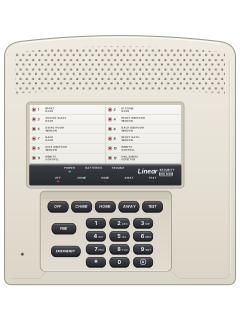
- Each sensor has its own light beside the keys, labelled with its door, window or detector.
- Two 9-volt alkaline backup batteries, if fitted, keep the system going in a power cut.
- After a total power cut with no backup batteries, the system comes back on in Away mode.
Pages 7, 11, 13, 17 of the Linear SSD8 Wireless Security System Installation Instructions and Owners Manual (215583 B, 1998)Sensor light on That door or window is open Sensor light flashing briefly That sensor's battery is low: replace its batteries Sensor light blinking slowly That sensor set off an alarm; it clears when you next arm Mode light blinking Mains power is off (it starts after 30 seconds) AWAY light blinking The exit time is running Hi-low beeps as you arm A door or window is still open Several beeps as you disarm There was an alarm while you were out
Why is my keypad beeping or showing a trouble light?
Most keypads beep or light up a trouble indicator when something needs attention, such as a low backup battery, a power cut or a lost phone or internet connection. Your user guide explains what each light or code means on your model. If it keeps happening, or you are not sure, call your installer or monitoring company.
All Linear SSD8 manuals
User guides 1
Nothing here matches that.
Try a shorter search, or search every brand.
More Linear models
Is anyone watching your alarm?
An alarm that only makes a noise relies on someone hearing it. A monitored alarm reports to our A1 graded, NZSA approved control room, watched 24/7 by a team that is New Zealand owned and operated. We can monitor most existing alarms, so you may not need a new one. Thinking about a new alarm or security cameras? Ask us for a quote.
Prefer to talk now? Call us on 0800 339 999.
Home: alarm monitoringBusiness: business monitoringInstaller: bureau monitoring


Manuals are the property of their manufacturers and are provided for reference only; their inclusion here does not imply any endorsement by the manufacturer.