

Summit manuals
Keypad cheat sheet
Arm (away)AWAYyour code
- Close doors and windows and keep out of detector areas, so the screen shows SYSTEM 1 READY (LED keypad: the READY light).
- Press AWAY, then key in your code when PASSCODE shows.
- The screen shows SYSTEM 1 ARMED and the seconds left to leave. Go before it reaches zero, or the alarm sounds.
- The ARMED light (a padlock) stays on while the system is armed.
- If your installer has turned on one-key arming, press AWAY with no code.
Arm while homeSTAYyour code
- Stay arms only the outside doors and windows, so you can move about inside. It is usually used at night.
- Close the outside doors and windows. Press STAY, then key in your code.
- The screen counts down the exit time. When it ends, the system is armed.
- If your installer has turned on one-key arming, press STAY with no code.
Disarmyour code
- Come in by your usual entry door. The keypad chimes through the entry time.
- Key in your code before the time runs out. No other key is needed. SYSTEM 1 READY shows.
- If the screen shows an alarm when you get home, such as ZONE 4 IN ALARM, leave at once and ring your monitoring company or the police.
- Your code also stops the siren, and disarms if armed. To stop the siren but stay armed: SELECT, 4, 4, then your code.
Bypass a zoneSELECT31your codezoneAWAY
- Each detector or door contact is a zone. A bypassed zone can't set off the alarm. Bypass only while disarmed, and only zones your installer allows.
- Press SELECT, 3, 1, then key in your code and the zone number. The screen lists the bypassed zones.
- If your system has more than 8 zones, it waits for a second digit after 1, 2 or 3. Press MENU/NEXT if there isn't one.
- Press AWAY to finish.
- To undo: SELECT, 3, 2, your code and the zone, then AWAY. SELECT, 3, 9 and your code undoes them all.
Alarm memorySELECT61your code
- After an alarm the screen shows the zone that caused it, until the system is next armed.
- For the event log, press SELECT, 6, 1, then your code. The newest event shows first.
- Press MENU/NEXT for older events and AWAY to leave. The log holds the last 100 events.
- SELECT, 6, 2 and your code clears the log. The flashing ARMED light and the alarm messages clear too.
Chime on or offSELECT33your codezone
- Chime is set zone by zone: a chime zone makes the keypad chime when it opens.
- To turn it on: press SELECT, 3, 3, key in your code, then the zone number.
- To turn it off: press SELECT, 3, 4, key in your code, then the zone number.
Panic alarmholdMENU+PorholdMENU+ForholdMENU+E
- Hold down MENU/NEXT and keep it down.
- Then hold P (the # key) for police, F (the 0 key) for fire or E (the * key) for emergency, for more than 1 second.
- It works whether the system is armed or not. It reports to your monitoring company, if you have one, and sounds the siren if programmed to.
- If your installer has set up a duress code, using it works as normal but also tells the monitoring company you were forced.
Change a code
- Codes are changed from an LCD keypad. Press SELECT, 5, then key in the master code. User 1 shows.
- Press MENU/NEXT until the user you want shows.
- The > marks the field you are changing, and SELECT moves it. With the > before the code, key in the new code (3 to 6 digits).
- Don't start one code with another whole code, such as 123 and 1234: the longer one would never work.
- Press AWAY to finish, or MENU/NEXT for the next user.
Pages 9 and 10 of the Summit 3208GLD User ManualPages 22 and 23 of the Summit 3208GLD Installation ManualUSER 01 User 1 is showing. MENU/NEXT moves to the next user. > before the code The digits you key in change that code. SELECT moves the > on. LEVEL 10 That user's code is the master code Test the systemSELECT421your code
- Walk test: press SELECT, 4, 2, 1, then your code. Open each door and walk past each detector: the keypad chimes for each.
- Open zones don't sound the alarm during the test, but tamper and 24-hour zones still do.
- Press AWAY to end it. It also ends by itself after 4 minutes 15 seconds.
- Siren test: SELECT, 4, 2, 2, then your code. The siren sounds for 1 second.
- Phone test: SELECT, 4, 2, 3, then your code. It sends a test message to your monitoring company.
Trouble lights
- A trouble makes the keypad chime (beep): mains off, low battery, a fire trouble or, on some versions, a phone line fault.
- Press any key to stop the chimes. An LCD keypad's screen shows what the trouble is (see the table).
- LCD keypads have two lights: ARMED (a padlock) and POWER (a lightning bolt). The 3106 LED keypad has more.
- On the 3106 LED keypad, a flashing TROUBLE light means a phone or siren fault. If a trouble stays, call your installer.
Pages 6, 17 to 19 of the Summit 3208GLD Installation ManualPages 4, 14 of the Summit 3208GLD User ManualSYSTEM AC LOSS, POWER light off Mains power is off SYSTEM LOW BATT, POWER light blinking The backup battery is low or disconnected TELEPHONE COMM. FAILURE A report didn't get through, or the phone line is disconnected ZONE 4 TAMPER (or another zone) That zone has been tampered with POWER on Mains and battery are both fine ARMED on The system is armed TROUBLE flashing (3106 LED keypad) A phone or siren fault: call your installer PROGRAM flashing (3106 LED keypad) Waiting for your code after SELECT Send a test signalSELECT423master code
- Press SELECT, 4, 2, 3, then key in the master code (or another code your installer gave test rights).
- A test message goes to each monitoring company the panel reports to. Then the panel goes back to normal.
- The panel takes over the phone line while it sends the test.
Summit keypads
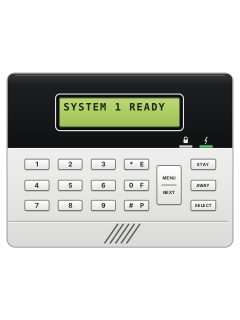
3208GLD 3106 LED / 3108 LCD keypad
2 manuals
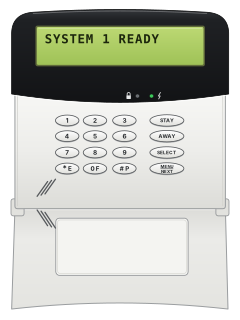
3208GLD 3118 / 3128 LCD keypad
2 manuals
Every Summit manual
User guides 1
Installer manuals 1
Nothing here matches that.
Try a shorter search, or search every brand.










Is anyone watching your alarm?
An alarm that only makes a noise relies on someone hearing it. A monitored alarm reports to our A1 graded, NZSA approved control room, watched 24/7 by a team that is New Zealand owned and operated. We can monitor most existing alarms, so you may not need a new one. Thinking about a new alarm or security cameras? Ask us for a quote.
Prefer to talk now? Call us on 0800 339 999.
Home: alarm monitoringBusiness: business monitoringInstaller: bureau monitoring


Manuals are the property of their manufacturers and are provided for reference only; their inclusion here does not imply any endorsement by the manufacturer.