
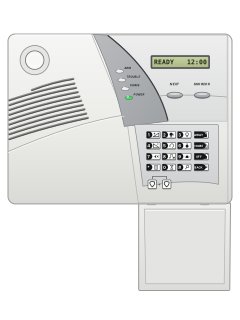
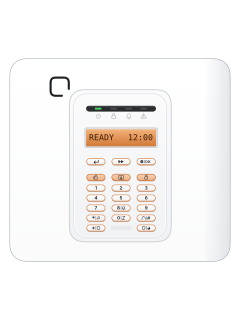
PowerMax (original) all-in-one panel

Visonic Power Max manuals
Start herePowerMax Users GuideUser guide · 24 pages · 1.5 MBRead it nowKeypad cheat sheet
Arm (away)AWAYthe key with a padlock on it
- Original PowerMax: use AWAY. Pro/Complete: use the closed-padlock key under the flap. Start with READY showing.
- If NOT READY shows, use SHOW/OK on the original, or i/OK on Pro/Complete, to identify open zones. Close them first.
- Press the away key, then enter your code if asked. No code is needed only when your installer enables quick arming.
- Leave before the exit time ends. AWAY shows and the ARM light stays on.
Pages 7, 10 and 11 of the PowerMax Pro Partition User GuidePages 2, 6 and 7 of the PowerMax Users GuideOriginal PowerMax AWAY key Pro / Complete Closed-padlock key Pro / Complete with partitions Select #, then the intended partition number before the action Arm while homeHOMEthe key with a house with a person in it on it
- Original PowerMax: use HOME. Pro/Complete: use the house/person key under the flap. HOME arms perimeter zones and leaves interior zones off.
- With the perimeter zones ready, press that key and enter your code if asked. Quick arming without a code must be enabled by your installer.
- Move to an interior zone before exit time ends. The ARM light flashes while armed HOME.
- To change from HOME to AWAY, press AWAY on the original or the closed-padlock key on Pro/Complete, and leave before exit time ends.
Pages 7, 10 and 11 of the PowerMax Pro Partition User GuidePages 6 and 7, 21 of the PowerMax Users GuideOriginal PowerMax HOME key Pro / Complete House/person key Pro / Complete with partitions Select #, then the intended partition number before the action DisarmOFFyour codethe key with an open padlock on ityour code
- Original PowerMax: press OFF. Pro/Complete: press the open-padlock key. Then enter your code before entry time ends.
- The ARM light goes out. READY shows only if the zones are secure; otherwise NOT READY may remain.
- This also stops an alarm. MEMORY after disarming means there is an alarm record to read.
- If a duress code has been arranged for you, using it instead disarms and sends a silent alarm. Ask your installer about your setup.
Pages 4, 7, 10, 12 and 13 of the PowerMax Pro Partition User GuidePages 3, 6, 9 of the PowerMax Users GuideOriginal PowerMax OFF key Pro / Complete Open-padlock key Pro / Complete with partitions Select #, then the intended partition number before the action Bypass a zoneNEXTNEXTSHOW/OKyour code
- Original: NEXT advances; SHOW/OK selects. Pro/Complete: use the double-arrow and i/OK keys. Bypass must be enabled; disarm first.
- Advance to USER SETTINGS, select it and enter your code. At SET BYPASS, select again to open the zone list.
- Advance to the zone. Press the select key; at <OK> TO BYPASS press it again. Check BYPASSED shows.
- To leave, press AWAY on the original or the closed-padlock key on Pro/Complete, then the select key at <OK> TO EXIT.
- The bypass ends at the next disarm. Fire zones cannot be bypassed; Pro/Complete also exclude temperature zones.
Pages 7, 27 and 28 of the PowerMax Pro Partition User GuidePages 6, 15 and 16 of the PowerMax Users GuideAdvance: original NEXT Advance: Pro / Complete Double-arrow key Select: original SHOW/OK Select: Pro / Complete i/OK Alarm memorySHOW/OKor*master codeSHOW/OKOKor*master codeOK
- On the original PowerMax press SHOW/OK; on Pro/Complete press i/OK. Repeated presses read the stored alarm and tamper details.
- MEMORY can alternate with READY or NOT READY after disarming. It clears on the next arming.
- For older events, press *, enter the master code, then press the same select key. Further presses show older events.
- Leave the log with AWAY on the original or the closed-padlock key on Pro/Complete, then the select key at <OK> TO EXIT.
Pages 7, 19, 36 of the PowerMax Pro Partition User GuidePages 6, 11, 18 of the PowerMax Users GuideOriginal PowerMax SHOW/OK reads the next memory item Pro / Complete i/OK reads the next memory item Chime on or off8
- On the original PowerMax, Pro or Complete, press 8. Each press switches between CHIME ON and CHIME OFF.
- The CHIME light is on while chime is on.
- Only zones your installer set as chime zones chime, and only while the alarm is off.
Panic alarmthe key with a plus sign on it+the key with a flame on itthe key with a shield on it+the key with a shield on it
- Original PowerMax: press the two shield buttons below the numbers together. Pro/Complete: press the plus/shield and shield/flame keys together.
- On the PowerMax Complete, panic works only if your installer has turned it on. PANIC ALARM shows; it works armed or disarmed.
- To stop it, press OFF on the original or the open-padlock key on Pro/Complete, then enter your code.
- Fire and emergency are separate alarms. Use your model's own guide for those functions and their availability.
Pages 4, 7 and 8, 12 of the PowerMax Pro Partition User GuidePages 6, 8 of the PowerMax Users GuideOriginal PowerMax Two shield keys below the numbers Pro / Complete Paired plus/shield and shield/flame keys Change a codeNEXTNEXTSHOW/OKmaster code
- Original: NEXT advances; SHOW/OK selects. Pro/Complete: use double-arrow and i/OK. While disarmed, advance to USER SETTINGS and select.
- Enter the master code. Advance to SET USER CODES and select it. The first user slot is 1, the master.
- Advance to the user slot you want (1 to 8), then select. Enter the new 4-digit code and press the select key to save.
- Pro/Complete with partitions: finish the access-to-partition prompts for users 2 to 8 in your own guide before leaving.
- Press AWAY on the original or the closed-padlock key on Pro/Complete, then select at <OK> TO EXIT. Change the factory master code promptly.
Pages 7, 27, 29 and 30 of the PowerMax Pro Partition User GuidePages 1, 6, 15, 17 of the PowerMax Users GuideAdvance: original NEXT Advance: Pro / Complete Double-arrow key Select: original SHOW/OK Select: Pro / Complete i/OK Set the date and timeNEXTNEXTSHOW/OKmaster code
- Original: NEXT advances; SHOW/OK selects. Pro/Complete: use double-arrow and i/OK. Disarm, advance to USER SETTINGS, select, enter master code.
- Pro/Complete: advance to SET TIME&FORMAT and select. Choose EU FORMAT - 24H and select. Enter HHMM, then press select twice.
- Pro/Complete date: advance to SET DATE&FORMAT, select, choose DD/MM/YYYY and select. Enter the date, then press select twice.
- Original: at TIME, select, enter HHMM and * for AM or # for PM, then select twice. At DATE, select, enter MMDDYY, then select twice.
- Leave with AWAY on the original or the closed-padlock key on Pro/Complete, then select at <OK> TO EXIT.
Pages 7, 27, 35 of the PowerMax Pro Partition User GuidePages 6, 15, 17 and 18 of the PowerMax Users GuideAdvance: original NEXT Advance: Pro / Complete Double-arrow key Select: original SHOW/OK Select: Pro / Complete i/OK Trouble lightsSHOW/OKOK
- The TROUBLE light, TRBL on the screen and 3 beeps once a minute mean something needs attention.
- On the original press SHOW/OK; on Pro/Complete press i/OK. Repeated presses show each trouble and its source.
- To quiet trouble beeps for 4 hours, press OFF on the original or the open-padlock key on Pro/Complete, then enter your code.
- After 4 hours the beeps come back. Depending on your installer's setting, they may stay quiet at night (8 PM to 7 AM on the original and Complete).
- The trouble clears once its cause is fixed. Not sure what to do? Ask your installer.
Pages 3 and 4, 7, 19 and 20 of the PowerMax Pro Partition User GuidePages 2 and 3, 6, 12 of the PowerMax Users GuidePOWER light off Mains power is off: the panel is running on its backup battery INACTIVE No signal from that detector for a while LOW BATTERY (LOW BATT on the Pro) A detector or keyfob battery is running down CPU low battery The panel's own backup battery is weak and needs replacing Communication failure A message to the monitoring centre or a phone didn't get through Jammed A radio signal is blocking the detectors from reaching the panel CPU tamper Someone is tampering with the control panel Fuse trouble The siren fuse has blown
Why is my keypad beeping or showing a trouble light?
Most keypads beep or light up a trouble indicator when something needs attention, such as a low backup battery, a power cut or a lost phone or internet connection. Your user guide explains what each light or code means on your model. If it keeps happening, or you are not sure, call your installer or monitoring company.
All Visonic Power Max manuals
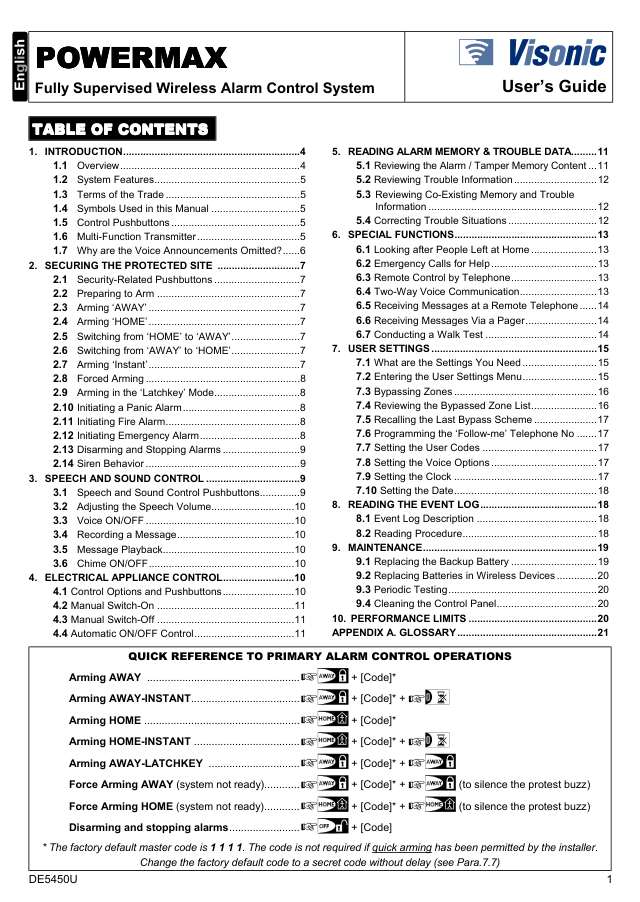
User guides 2
Installer manuals 2
Nothing here matches that.
Try a shorter search, or search every brand.
More Visonic models
Is anyone watching your alarm?
An alarm that only makes a noise relies on someone hearing it. A monitored alarm reports to our A1 graded, NZSA approved control room, watched 24/7 by a team that is New Zealand owned and operated. We can monitor most existing alarms, so you may not need a new one. Thinking about a new alarm or security cameras? Ask us for a quote.
Prefer to talk now? Call us on 0800 339 999.
Home: alarm monitoringBusiness: business monitoringInstaller: bureau monitoring


Manuals are the property of their manufacturers and are provided for reference only; their inclusion here does not imply any endorsement by the manufacturer.