

Altron manuals
Harrier cheat sheet
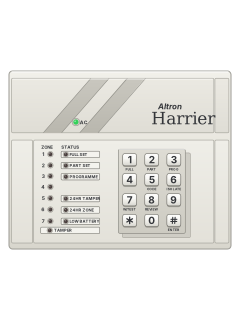
Arm (away)your code1or1#
- Close doors and windows and keep clear of the motion detectors. All the zone lights should be off.
- Key in your code, then press [1] (marked FULL).
- The FULL SET light comes on and the keypad beeps through the exit time. Leave before it ends.
- A zone still open when the exit time ends is isolated automatically.
- If your installer has turned on Quick Set, [1] then [#] arms without a code.
Arm while homeyour code2or2#
- The Harrier calls this Part Set: some zones stay off (your installer picks which) so you can stay inside.
- Close the zones that will be armed: their lights should be off.
- Key in your code, then press [2] (marked PART). The keypad gives 3 quick beeps and the PART SET light comes on.
- If your installer has turned on Quick Set, [2] then [#] part sets without a code.
- Part Set to fully armed: key in your code to leave Part Set, then arm fully (code and [1], or [1] [#] with Quick Set).
Disarmyour code
- Key in your code. The keypad beeps and the FULL SET or PART SET light goes out.
- The [SET] button on the pendant disarms it too.
- If your code doesn't work, wait for a run of 8 quick beeps from the keypad, then key it in again.
Bypass a zonemaster code6zone#
- The Harrier calls this Isolate. Each detector or door contact is a zone.
- Key in the master code, then press [6] (marked ISOLATE). The FULL SET, PART SET and PROGRAMME lights come on.
- Press the numbers of the zones to isolate: their lights come on. Press one again to undo it.
- Press [#] to finish. Isolated zones go back to normal when the system is unset.
Alarm memorymaster code81
- Key in the master code, then press [8] (marked REVIEW). The FULL SET, PART SET and PROGRAMME lights come on.
- Press [1] for the last time the system was set, [2] for the time before, and so on up to [8].
- The zone lights show which zones went into alarm. The first one lights before the others.
- Press [#] to leave.
Chime on or offmaster code9zone#
- Chime makes the keypad beep when a chosen zone is set off while the system is unset.
- Key in the master code, then press [9]. The FULL SET, PART SET and PROGRAMME lights come on.
- Press the numbers of the zones to chime: their lights come on. Press a lit one to turn its chime off.
- Press [#] to finish. After a zone beeps, it needs 30 seconds clear before it can beep again.
Panic alarm*+#
- Press [*] and [#] together.
- It switches on the panel's 24-hour zone output, and sends a duress message if your installer has set up the communicator.
Change a codemaster code5user numbernew code#
- Key in the master code, then press [5] (marked CODE). The FULL SET, PART SET and PROGRAMME lights come on.
- Press the user's slot, [2] to [5]: its light comes on. Key in the new code over the old one, then press [#].
- A user code can't be the same as the master code, or the master code's functions stop working.
- Codes can't be deleted one by one: overwrite them instead.
Test the systemmaster code7
- A walk test checks each detector while the system is unset.
- Key in the master code, then press [7] (marked W/TEST).
- Set off each detector in turn. Its zone light stays on to show it works.
- Press [#] (ENTER) to finish.
Trouble lights
- The keypad's lights show any trouble (see the table). Each problem needs putting right to clear it.
- A tamper sounds the keypad buzzers with the 24-hour tamper output. Master code then [#] (ENTER) resets that output.
- Low battery: the keypad buzzes and won't set. Master code then [4] stops the buzzer and lets you set it.
Page 1 of the Altron Harrier UserPages 3, 5, 9, 14 of the HARRIER InstallerAC light on Mains power is on (normal) AC light off No mains power 24Hr Tamper light on The tamper circuit has been opened Low Battery light on The backup battery is low Buzzing as you set, and it won't set A priority zone (if your installer chose any) is open. Key in your code to stop it 8 siren pulses when you set with the pendant The battery is low, so it won't set 8 quick beeps from the keypad The code wasn't accepted: let the beeps finish, then key it in again
Every Altron manual
User guides 1
Installer manuals 2
Nothing here matches that.
Try a shorter search, or search every brand.










Is anyone watching your alarm?
An alarm that only makes a noise relies on someone hearing it. A monitored alarm reports to our A1 graded, NZSA approved control room, watched 24/7 by a team that is New Zealand owned and operated. We can monitor most existing alarms, so you may not need a new one. Thinking about a new alarm or security cameras? Ask us for a quote.
Prefer to talk now? Call us on 0800 339 999.
Home: alarm monitoringBusiness: business monitoringInstaller: bureau monitoring


Manuals are the property of their manufacturers and are provided for reference only; their inclusion here does not imply any endorsement by the manufacturer.