

Leviton Omnia manuals
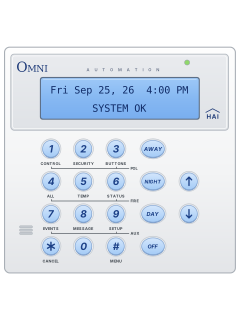
Keypad cheat sheet
Arm (away)AWAYyour codeorAWAYAWAY
- Check the display reads 'SYSTEM OK': everything is closed and there are no troubles.
- Press [AWAY], then key in your 4-digit code. The console beeps once and its light turns red.
- Consoles set to beep do so through the exit delay, twice as fast in the last 10 seconds. Leave and close the door.
- Quick Arm, if turned on (it's off from the factory): press [AWAY] twice, no code needed.
- Away for days? Vacation mode: press [2], [4], then your code.
Arm while homeDAYyour codeorNIGHTyour code
- DAY arms the doors and windows only, so you can move around inside. The entry door keeps its delay.
- NIGHT also arms downstairs (non-sleeping area) motion detectors, and has no entry delay.
- Press [DAY] or [NIGHT], then your code. The console light turns red and the display shows the mode.
- From the security menu ([2]): [5] then your code is Day Instant (no entry delay); [6] then your code is Night Delay (entry delay kept).
DisarmOFFyour code
- Come in by an entry door: the console beeps 4 times a second and shows 'PRESS OFF THEN CODE'.
- Press [OFF], then your 4-digit code. One beep and a green console light mean it's off.
- [OFF] and your code also silence alarms and reset emergency alarms. Three beeps and 'INVALID CODE': try again.
- After a fire alarm, arm in any mode to reset the smoke detectors: the panel cycles their power.
- Alarm sounding when you get home? Don't go in. Call for help from a neighbour's or a mobile phone.
Bypass a zone28zone#your code
- Each detector or door contact is a zone. A bypassed zone isn't checked for alarms.
- Press [2], then [8]. Key in the zone number and [#] (or pick it with the arrow keys), then your code.
- The display shows the zone as 'BYPASSED'. It stays bypassed until you restore it.
- To restore every zone: press [2], [9], [0], [#], then your code.
- If Auto-Bypass is turned on (it's off from the factory), a zone left open at arming is bypassed by itself.
Alarm memory7your code
- Press [7] (EVENTS), then your code if it asks for one. The newest event shows first.
- With High Security Mode on, it always asks, and only a master or manager code opens the log.
- Scroll with the arrow keys. Each entry has the time and date on top and the event below.
- The log keeps the 250 most recent events: arming and disarming, bypasses, alarms and troubles.
- Press [*] to leave.
Chime on or off
- The console beeps once when an entry door opens (Entry/Exit Chime) or a window or outside zone opens (Perimeter Chime), even when off.
- Both chimes are on from the factory. To change them, press [9] (SETUP), your master code, then [5] (ARM on the setup menu).
- Scroll with the arrow keys to the Entry/Exit Chime or Perimeter Chime item.
- Key in your choice and press [#] (the yes/no items on this menu use 0 = no, 1 = yes). Press [*] to back out.
Pages 58, 76 and 77 of the Omni LTE Owners ManualPage 2 of the Omni LTE Quick reference4=DIAL 5=ARM 6=MISC Part of the setup menu: 5 opens the arming options, where both chimes are Panic alarm1+3or4+6or7+9
- Press the two keys together for about 1 second. The emergency keys are always armed.
- [1] and [3]: police emergency. The sirens start at once.
- [4] and [6]: fire emergency, with a 3-pulse siren. [7] and [9]: auxiliary emergency, on the console beeper.
- [*] silences a fire or auxiliary alarm. A police alarm needs [OFF] and your code.
Change a code
- Press [9] (SETUP), key in your master code, then [1] (CODES on the setup menu).
- Scroll with the arrow keys to the code you want, such as 'CODE 2'.
- Key in a new 4-digit code and press [#]. It isn't shown again, so remember it. 0000 disables a code.
- A code already in use gets three beeps and 'INVALID CODE'.
- Press the down arrow next to set its authority (1 master, 2 manager, 3 user) and the times it works.
Pages 58 and 59 of the Omni LTE Owners ManualPage 2 of the Omni LTE Quick referenceCODE 2: The code you're on. Its current digits aren't shown Set the date and time
- Press [9] (SETUP), key in your master code, then [2] (TIME on the setup menu).
- Key in the time as HHMM. On a 12-hour clock, press the up arrow for AM or the down arrow for PM.
- Answer the daylight saving question: [1] if it's on now, [0] if not.
- Key in the date month first, as MMDDYY: 8 February 2026 is 020826.
Pages 58 to 60 of the Omni LTE Owners ManualDAYLIGHT SAVINGS TIME? Asked only when you set the time. After that the clock moves for daylight saving by itself Trouble lights*
- A trouble shows on the bottom line and the console beeps twice a second. Press [*] to silence it.
- Several troubles show in turn, two seconds each. [*] acknowledges them all; one that comes back beeps again.
- 'TRBL NOW' means it's still there; 'HAD TRBL' means it happened and has cleared.
- The event log ([7], then your code if asked) lists each trouble, and TRBL RST when it cleared.
- BATTERY LOW stays until the hourly battery test. To test now, press [6] (STATUS), then [4] (TEST on the status menu).
Pages 22 and 23, 43 to 45, 81 of the Omni LTE Owners ManualZONE NAME TRBL That zone's wiring reads wrong. Call your installer if the cause isn't obvious AC POWER OFF TRBL Mains off for over 3 minutes. Check the plug-in transformer and socket BATTERY LOW TRBL Backup battery low. Check it's connected COMMUNICATOR TRBL Couldn't reach the monitoring company. Call your installer FUSE TRBL The auxiliary power fuse tripped. It resets once the fault clears PHONE LINE DEAD TRBL Phone line dead for over a minute NO CONTROLLER DATA The console's alarm functions have stopped, maybe a wiring fault. Call your installer
Every Leviton Omnia manual
Installer manuals 2

Nothing here matches that.
Try a shorter search, or search every brand.










Is anyone watching your alarm?
An alarm that only makes a noise relies on someone hearing it. A monitored alarm reports to our A1 graded, NZSA approved control room, watched 24/7 by a team that is New Zealand owned and operated. We can monitor most existing alarms, so you may not need a new one. Thinking about a new alarm or security cameras? Ask us for a quote.
Prefer to talk now? Call us on 0800 339 999.
Home: alarm monitoringBusiness: business monitoringInstaller: bureau monitoring


Manuals are the property of their manufacturers and are provided for reference only; their inclusion here does not imply any endorsement by the manufacturer.