
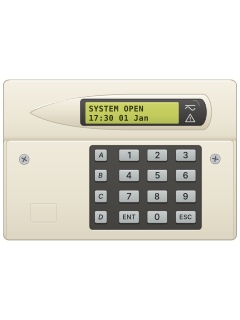
TS700 remote LCD keypad
Menvier TS700 / TS790+ / TS900+ manuals
Start hereMenvier TS790+ TS900+ User Manual 496594User guide · 57 pages · 443 KBRead it nowKeypad cheat sheet
Arm (away)your code
- Menvier calls this full setting. Close up, then key in your passcode.
- After 5 seconds the exit tone starts and the display counts down the exit time.
- 9999 instead means it sets once you open and close the final exit door (then press the exit button outside, if you have one).
- When the tone stops the system is set: SET (SYSTEM SET on an LCD keypad) shows for 5 seconds.
- A circuit left open shows on the display, with a broken tone: close it. Key in your passcode again to stop setting.
Arm while homeyour codeAoryour codeBoryour codeC
- Use A, B or C down the left of the keypad for part setting.
- Your installer or master user chooses what A, B and C cover. Key in your passcode, then press A, B or C within 5 seconds.
- Wait longer and it full sets instead. For silent part setting, press 8 straight after A, B or C.
- After setting, TS700 shows the omitted area; TS790+/TS900+ shows the set wards. Silent setting still gives a final set tone.
- To full set silently, press 8 within 5 seconds of your passcode, without A, B or C.
Disarmyour code
- Come in by your entry route and go straight to the keypad. The sounder beeps during the entry time.
- Key in your passcode. The sounder stops and OPEN shows.
- Too late? The internal sounders go off and a second entry time starts. After that comes a full alarm.
- Under threat, swap your passcode's first two digits (2580 becomes 5280) for a silent duress alarm, unless they match or your installer turned it off.
Bypass a zoneyour codeENT7
- Only circuits your installer allows can be omitted.
- Key in your passcode, press ENT within 5 seconds, then 7 (Omit Circuits).
- TS790+ or TS900+: key in the 2-digit circuit number, press B to switch it to Omitted, then ENT.
- TS700: each circuit shows with N (not omitted) or Y; press 0 to change it, then ENT.
- Press ESC, then 0 to full set, or A, B or C to part set, straight from the menu. TS790+/TS900+: omits end when the system is unset.
Chime on or offyour codeENT50ENT
- Chime makes a two-tone sound when a circuit set up for chime opens.
- Key in your passcode, press ENT within 5 seconds, then 5 (Enable Chime).
- Press 0 to switch between on and off, then ENT to accept.
- TS790+ or TS900+: keys 1 to 5 choose a setting instead, such as 4 for chime only while unset.
Reset after an alarmyour codeESC
- After an alarm, unsetting shows the circuit that caused it, such as ALARM 03. The system must then be reset.
- User reset: key in your passcode, then ESC within 5 seconds. OPEN shows.
- CALL ENGINEER instead means you can't reset it yourself: call your installer, or use remote reset if you have it. Your passcode stops the beeps.
- Remote reset: on a TS790+ or TS900+ key in your passcode twice; on a TS700, your passcode, ENT, then 3.
- Phone your alarm company and read them the 4-digit code shown. Key in the code they give back, press ENT, then ESC.
Change a codeyour codeENT4new codeENT
- Key in your passcode, press ENT within 5 seconds, then 4 (Change Passcode).
- Key in your new 4-digit passcode and press ENT.
- A multi-tone means it's accepted. A low tone means that code is taken: try another.
- The master user can add and delete other users' codes from User Menu 2.
Set the date and timemaster codeENTENT2timeENT
- Master users only: key in your passcode, press ENT, then ENT again for User Menu 2.
- Press 2, key in the time on the 24-hour clock (5 pm is 1700), then press ENT.
- Press 3 for the date: key in the day and month (28 April is 2804), then press ENT.
- A TS790+ or TS900+ then asks for the day: 1 Sunday to 7 Saturday, then ENT.
- Press ESC to go back.
Test the systemyour codeENT2
- Walk test: key in your passcode, press ENT within 5 seconds, then 2.
- Open doors and walk past detectors. Each circuit shows as it's set off, with a two-tone sound.
- Press ESC when you've finished. A TS790+ or TS900+ then lists the tested circuits; ESC again to leave.
- Bell test: press 1 instead of 2. The sounders, bells and strobes run for 9 seconds each.
Trouble messages
- The green power light flashes when mains power is off, and is steady when it's on.
- The red light by the warning triangle shows what your alarm company set it for, such as a fault.
- On a TS790+ or TS900+, mains off, a phone line fault or a power supply overload sounds an alarm: your passcode silences it.
- Messages show on the display. Most mean call your installation company; alarms need a reset.
- CCTS ISOLATED on the display means 24-hour circuits are omitted.
Pages 6 and 7, 49 and 50 of the Menvier TS790+ TS900+ User Manual 496594Page 13 of the Menvier TS700 Starburst User Operating InstructionsMAINS POWER OFF (A.C. OFF) Mains off. A TS790+ or TS900+ runs at least 8 hours on its battery: call your installation company if it's off longer PHONE LINE FAULT (LINE FLT) Phone line fault: your passcode silences it BATTERY FAULT (BATT FLT) The standby battery is faulty FUSE BLOWN The auxiliary supply fuse has blown SERVICE REQUIRED A service visit is due; the system still works CODE TAMPER Four wrong passcodes were keyed in: a reset is needed CCTS FAILED TEST Circuits failed a test: the system can still be set SYSTEM IS BUSY Someone is using another keypad
Why is my keypad beeping or showing a trouble light?
Most keypads beep or light up a trouble indicator when something needs attention, such as a low backup battery, a power cut or a lost phone or internet connection. Your user guide explains what each light or code means on your model. If it keeps happening, or you are not sure, call your installer or monitoring company.
All Menvier TS700 / TS790+ / TS900+ manuals
User guides 2
Nothing here matches that.
Try a shorter search, or search every brand.
More Menvier models
Is anyone watching your alarm?
An alarm that only makes a noise relies on someone hearing it. A monitored alarm reports to our A1 graded, NZSA approved control room, watched 24/7 by a team that is New Zealand owned and operated. We can monitor most existing alarms, so you may not need a new one. Thinking about a new alarm or security cameras? Ask us for a quote.
Prefer to talk now? Call us on 0800 339 999.
Home: alarm monitoringBusiness: business monitoringInstaller: bureau monitoring


Manuals are the property of their manufacturers and are provided for reference only; their inclusion here does not imply any endorsement by the manufacturer.