

Optex Genesys manuals
Start hereGenesys USERUser guide · 4 pages · 576 KBRead it nowKeypad cheat sheet
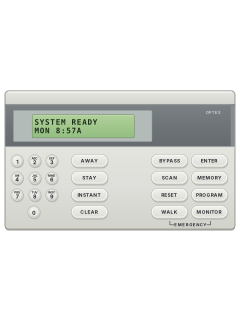
Arm (away)your codeAWAY
- Check the green Ready light is on: every zone (each door, window or detector) is closed.
- Key in your PIN, then press AWAY. The red Armed light flashes during the exit delay, then stays on.
- A 2-second error tone means the PIN was wrong: key it in again.
- Ready light off? PIN then AWAY shows the open zone (6 shows the next). Close it or press BYPASS, and when nonE shows, press AWAY again.
- If a quick-arm number has been set up, press the ↑ key (bottom left), that number, then AWAY.
Arm while homeyour codeSTAYoryour codeINSTANT
- STAY arms the outside doors and windows; the inside zones do what your installer set. The entry and exit delays still run.
- Key in your PIN, then press STAY.
- INSTANT arms the same way with no entry delay: opening an entry door sets off the alarm at once. Use it when you're staying in and nobody else is coming.
- To let someone out or in while Stay is on, key in your PIN and STAY again. You get the exit delay, then Stay carries on.
Disarmyour code
- Come in by your entry door. The keypad may beep through the entry delay.
- Key in your PIN before the entry delay runs out, or the alarm goes off.
- Keyed a wrong digit? Press # and key in the PIN again.
- A pulsing entry tone, or the Alarm bar on the display blinking once you've disarmed, means an alarm went off while you were out.
Bypass a zoneyour codeBYPASS2-digit zone
- Each detector or door contact is a zone. Key in your PIN, then press BYPASS.
- The Bypass bar on the display blinks for 15 seconds. In that time key in the zone number as 2 digits: 0 then 4 for zone 4.
- Two beeps, and the display shows the zone as bypassed (04:BY). You can key in more zone numbers the same way.
- Bypasses end when you arm and then disarm. To undo one sooner, open Scan Mode (PIN, ↑, 6), press 6 until that zone shows, then press BYPASS.
- Your installer decides which zones can be bypassed, and not every PIN is allowed to bypass.
Alarm memoryyour code↑4
- Key in your PIN, press the ↑ (shift) key at the bottom left, then 4.
- The latest alarm scrolls across the display with the time it happened.
- Press 4 again for each older one. The keypad keeps the last 16.
- Press # to go back to normal.
Reset smoke detectorsyour code↑2
- Key in your PIN, press the ↑ (shift) key at the bottom left, then 2. This resets the smoke detectors.
- TRBL on the display means a fault in the two-wire smoke detector circuit: call your installer.
Panic alarmhold3+AWAYorhold6+STAYorhold9+INSTANT
- Press and hold both keys together for at least 2 seconds: 3 and AWAY for police, 6 and STAY for fire, 9 and INSTANT for emergency.
- The small PANIC, FIRE and EMER symbols between the keys show the pairs.
- They only work if your installer has turned them on. They send the alarm to your monitoring centre.
- If your installer has set a duress PIN, it arms and disarms as normal but also sends a duress signal.
Change a codemaster code↑81user number↑
- Only a level 1 PIN can do this. Key in the PIN, press ↑ (bottom left), then 8. PRG shows.
- Press 1 for PINs, then the 2-digit user number (01 to 16), then ↑.
- Press the access level (1 to 5), then ↑. Level 1 can do everything; level 5 can arm but not disarm. User 1 is always level 1.
- Key in the new 4-digit PIN and press ↑ to save it.
- It moves on to the next user. Press # to leave PIN programming, then # again to go back to normal.
Set the timemaster code↑83time↑##
- The display shows the time of day when nothing else is going on.
- Key in a level 1 PIN, press ↑ (bottom left), then 8. PRG shows.
- Press 3, then key in the time on the 24-hour clock: 3:30 pm is 1 5 3 0.
- Press ↑ to save it, then # twice to go back to normal.
Trouble lightsyour code↑5
- A trouble makes the keypad sound and lights the bar above Trouble. The display shows what it is.
- Key in your PIN to silence it. The display goes back to normal, but the Trouble bar stays on.
- To see a silenced trouble again: your PIN, ↑, then 5. Press # to go back.
- Call your installer about anything you can't fix, and about ERR (a major fault).
Pages 1 and 2, 4 of the Genesys USERAC Mains power is off: check your breakers and that the transformer is plugged in BATT The backup battery is low COMM The panel couldn't get through to your monitoring centre TLM No phone line at the panel BELL A fault on the siren or bell circuit TRBL A fault on the two-wire smoke detector circuit BUS A problem with an extra keypad, zone expander or fire module 01:T A trouble on that zone (here zone 1), such as a broken wire
All Optex Genesys manuals
User guides 1
Installer manuals 1
Nothing here matches that.
Try a shorter search, or search every brand.
More Optex models
Is anyone watching your alarm?
An alarm that only makes a noise relies on someone hearing it. A monitored alarm reports to our A1 graded, NZSA approved control room, watched 24/7 by a team that is New Zealand owned and operated. We can monitor most existing alarms, so you may not need a new one. Thinking about a new alarm or security cameras? Ask us for a quote.
Prefer to talk now? Call us on 0800 339 999.
Home: alarm monitoringBusiness: business monitoringInstaller: bureau monitoring


Manuals are the property of their manufacturers and are provided for reference only; their inclusion here does not imply any endorsement by the manufacturer.