

Optex MDC-16 manuals
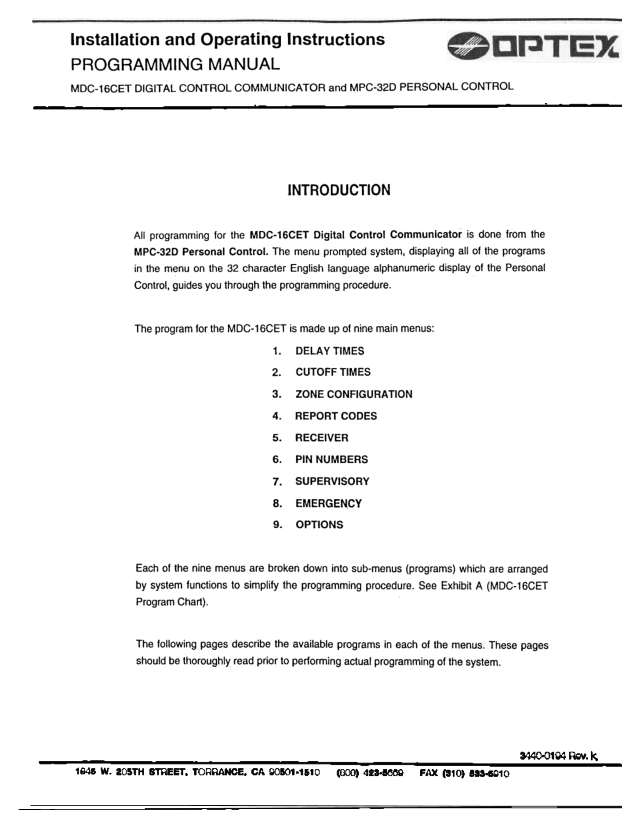
Start hereOptex Morse MDC-16CET Installation and Operating Instructions - Programming ManualUser guide · 20 pages · 1.6 MBRead it nowKeypad cheat sheet
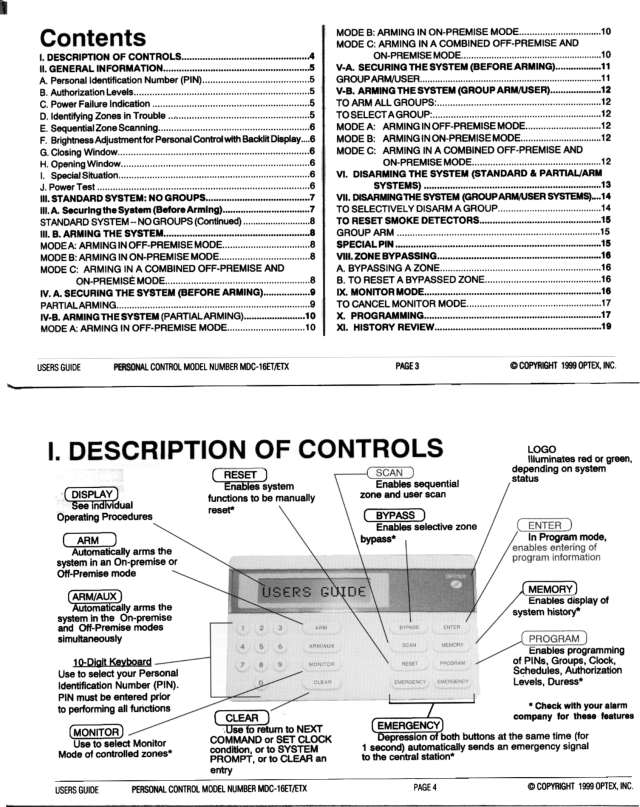
Arm (away)your codeARM
- The display should show the date and time over ZONES NORMAL (your installer may have changed the words). A blank bottom line means a zone is open.
- Key in your 4-digit PIN, then press ARM. The display reads SYSTEM ARMING EXIT NOW.
- Leave by your delay door before the exit time ends. The display then shows SYSTEM ARMED.
- XX ZONES NOT READY? Press SCAN to see each open zone. Close or bypass them, press CLEAR, then arm again.
- Partial arming: choose the group after ARM. Group Arm/User: PIN, ARM/AUX within 5 seconds, group numbers, then ARM.
Arm while homeyour codeARMoryour codeARM/AUX
- Enter your PIN, press ARM and stay inside. With partial arming, choose the group when it scrolls.
- Once the delay ends, the inside zones are off and every door is instant. It reads ARMED ON PREMISE (Group Arm/User: SYSTEM ARMED).
- Someone still to come home, or leaving? Press ARM/AUX after your PIN instead.
- The inside zones are off, but the delay door still gives time to get in. It reads ARMED AUXILIARY (Group Arm/User: SYSTEM ARMED).
- Group Arm/User: to choose groups, use PIN, ARM/AUX within 5 seconds, group numbers, then ARM or ARM/AUX for the mode you want.
Disarmyour code
- Come in by the delay door. The keypad sounds to remind you to disarm before the entry time ends.
- Key in your PIN. The display reads NEXT COMMAND. Press CLEAR, or wait 15 seconds, for the date and time.
- A pulsing tone as you come in means alarms happened while you were out.
- With groups, your PIN shows DISARM? and your groups: CLEAR (or 15 seconds) disarms them all, or press a group's number to disarm only that one.
- A duress code, if you have one, arms or disarms as usual but also sends a silent emergency signal.
Bypass a zoneyour codeSCANBYPASS
- Key in your PIN, then press SCAN until the zone you want shows (ZONE X IS...).
- Press BYPASS. It reads ZONE X IS BYPASSED. SCAN moves on to other zones.
- Press CLEAR (NEXT COMMAND), then ARM or ARM/AUX. The bypass lasts until the system is armed and then disarmed.
- To undo one: your PIN, SCAN until it shows, then RESET. It reads ZONE X IS NORMAL, unless it's open or in trouble.
- Bypass is a feature your alarm company sets up, and only level 1 and 2 PINs can bypass.
Alarm memoryyour codeMEMORY
- After an alarm, disarming shows XX ALARMS OCCURRED. Press SCAN for the first zone that went off, and SCAN again for the rest in order.
- Later on, key in your PIN, then MEMORY once. It shows any alarms in memory: SCAN steps through them.
- MEMORY twice shows ALL HISTORY, and three times OPEN CLOSE HISTORY. SCAN steps through; CLEAR until the date and time show.
- Level 1 to 3 PINs can view history, if your alarm company has set it up.
Chime on or offyour codeMONITOR
- Optex calls chime Monitor mode: while it's on, the keypad sounds when a monitored zone opens.
- Key in your PIN, then press MONITOR. The display reads MONITOR MODE until you cancel it.
- Depending on set-up, you hear a 1-second tone, maybe with the zone shown, or a tone that keeps going until you press RESET for that zone.
- To cancel it, key in your PIN (NEXT COMMAND), then press CLEAR.
- It covers only the zones your alarm company set up for it.
Reset smoke detectorsyour codeRESET
- If your alarm company has set up smoke reset, enter your PIN and press RESET. NEXT COMMAND shows.
- Press CLEAR to go back to the normal display.
Panic alarmholdEMERGENCY+EMERGENCY
- Press both EMERGENCY buttons together for 1 second.
- An emergency signal goes to your monitoring centre.
- Check with your alarm company that this is set up on your system.
Change a codeyour codePROGRAM1new codeENTER
- Only a level 1 PIN can change codes (user 1 is always level 1), if your alarm company has allowed it.
- Key in your PIN, press PROGRAM, then 1. The display starts at user 1: USER NUMBER, with the level and 4-digit PIN below.
- To change user 1's PIN, key in 4 new digits (they flash), then ENTER. Made a mistake? Press CLEAR and key them in again.
- For another user, press SCAN until they show, key in their level (1 to 4) and a 4-digit PIN, then ENTER.
- To delete a PIN, SCAN to it, then press RESET and ENTER. CLEAR takes you back.
Trouble lightsyour codeSCAN
- Logo flashing without POWER TEST IN PROGRESS? Check the circuit breaker and that the alarm transformer is plugged in.
- XX ZONES IN TROUBLE? Key in your PIN and press SCAN to see each zone.
- If you can't fix it, tell your alarm company.
Pages 2 and 3, 6 and 7 of the Optex Morse MDC-16 Users Guide (MDC-16ET-ETX personal control)Logo flashing Running on the backup battery: the mains power is off Logo flashing and POWER TEST IN PROGRESS, 2 minutes after disarming An optional battery test: nothing else works until it ends XX ZONES IN TROUBLE Key in your PIN and press SCAN to see which zones Bottom line blank under the date and time A zone is open XX ALARMS OCCURRED Alarms happened while it was armed: press SCAN to see them ZONES BYPASSED One or more zones are bypassed NO RESPONSE FROM EXP BRDS, with a tone Tell your alarm company
All Optex MDC-16 manuals
User guides 2
Nothing here matches that.
Try a shorter search, or search every brand.
More Optex models
Is anyone watching your alarm?
An alarm that only makes a noise relies on someone hearing it. A monitored alarm reports to our A1 graded, NZSA approved control room, watched 24/7 by a team that is New Zealand owned and operated. We can monitor most existing alarms, so you may not need a new one. Thinking about a new alarm or security cameras? Ask us for a quote.
Prefer to talk now? Call us on 0800 339 999.
Home: alarm monitoringBusiness: business monitoringInstaller: bureau monitoring


Manuals are the property of their manufacturers and are provided for reference only; their inclusion here does not imply any endorsement by the manufacturer.