
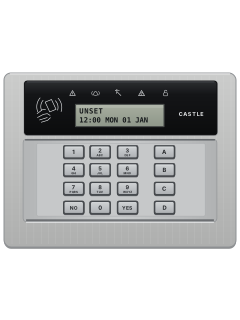
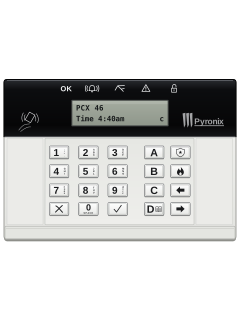
EURO LCD prox keypad, satin chrome (Castle badged)
Pyronix Euro 46 manuals
Start hereRINS1531-2 EURO 46 V9 User ManualUser guide · 52 pages · 1.8 MBRead it nowKeypad cheat sheet
Arm (away)your codeYES
- Pyronix calls arming setting. Key in your code, or hold your tag to the tag symbol left of the screen.
- Set Areas? shows. Make the letters in brackets the areas you want, using the A, B, C and D keys, then press YES.
- The screen asks you to wait while it sets the wireless devices, then the exit time starts.
- Leave the way your engineer showed you: close the final exit door, leave before the timer ends, or press the push-to-set button.
- Unable To Set means an input is open, such as a window or a pet moving. Check it, or omit it.
Disarmyour codeYESoryour code
- Pyronix calls disarming unsetting. Come in by the entry route and the entry time starts.
- Key in your code or present your tag, then press YES. With areas, choose them first.
- If your engineer has turned off flexi-unset, your code or tag alone unsets.
- After an alarm, your code silences it and the screen names the input that set it off. Press NO to reset.
- A number starting with G: write it down and ring your monitoring company for a reset code. Restore Required: ring your engineer.
Bypass a zoneyour codeYESthenYESzoneA
- Pyronix calls a zone an input, and bypassing it omitting. Your engineer must make an input omittable.
- Key in your code and press YES to start setting.
- Once the exit time starts, press YES, then choose the inputs to omit.
- Press A. After 10 seconds the exit time carries on.
Alarm memoryDyour code
- After an alarm, key in your code: the alarm symbol flashes and the screen names the input that went off.
- For the log, press D and key in your code.
- Press B or NO until REVIEW LOGS shows, then press YES twice.
- The newest event shows. B and D step through the log; C shows more, such as which input.
- Press NO until a main menu name in capitals shows, then press A to leave.
Chime on or offC
- Your engineer chooses which inputs chime.
- With the time showing, press C. A small c appears at the right of the screen.
- Press C again to turn chime off.
Panic alarmhold1+7
- Pyronix calls this a hold-up alarm. Your engineer must turn it on, as silent or full alarm.
- Press and hold 1 and 7 together. Your engineer sets how long.
Change a codeDmaster code
- Press D and key in the Master Manager code. Press B or NO until EDIT USERS shows, then YES.
- At Add New User press YES, pick a user number with B or D and press YES. Key in the code or present a tag, then YES.
- Then set User or Manager, the areas, what they can do, flexi-set and a name, with YES after each.
- To change or delete a user: at Add New User press NO, then YES. Pick the user and press YES, then YES to delete or NO and YES to change.
- Master code: at Delete/Change User press NO, then YES. Enter the new code, press YES and confirm the remaining user settings.
Set the date and timeDmaster code
- Press D and key in the Master Manager code.
- Press B or NO until SET DATE & TIME shows, then YES.
- Key in the year (2 digits), month, day, hours (24-hour) and minutes, pressing YES after each.
- Last, choose the daylight saving adjust with B or D, then press YES.
Test the systemDyour code
- Press D and enter your code. Press B or NO until WALK TEST shows, then YES.
- Select one area only. Press YES to test all its inputs, or NO to select one input.
- For one input, choose it with B or D, then press YES and trigger it.
- For a full test, trigger each input shown. Walk Test Completed appears when all have worked.
- SIREN TEST in the same menu sounds the siren and strobe. Press YES to start it, then YES to end it.
Trouble lights
- A flashing Alert light means there is something for you to see. Key in your code or present your tag to show it.
- If a tone is sounding, your code or tag also stops it. The display then says why, such as Low Volts.
- Press YES when you've read it; the message also clears by itself after 3 minutes.
- You may still be able to set with a fault: code, area, then YES. Call your engineer about any fault.
Pages 6, 21 of the RINS1531-2 EURO 46 V9 User ManualPages 7, 12 and 13 of the RINS1943-1 EURO 46 V10 User ManualAlert flashing There is information for you: key in your code to see it Alarm An alarm happened Tamper Wiring or equipment has been tampered with Fault A technical fault Unset steady for 5 seconds Every area is unset Unset flashing Some areas are still set Unset on while setting Setting is under way; it goes off once set Call Engineer on the display Contact your alarm company's engineer
Why is my keypad beeping or showing a trouble light?
Most keypads beep or light up a trouble indicator when something needs attention, such as a low backup battery, a power cut or a lost phone or internet connection. Your user guide explains what each light or code means on your model. If it keeps happening, or you are not sure, call your installer or monitoring company.
All Pyronix Euro 46 manuals
User guides 2
Installer manuals 1
Nothing here matches that.
Try a shorter search, or search every brand.
More Pyronix models
Is anyone watching your alarm?
An alarm that only makes a noise relies on someone hearing it. A monitored alarm reports to our A1 graded, NZSA approved control room, watched 24/7 by a team that is New Zealand owned and operated. We can monitor most existing alarms, so you may not need a new one. Thinking about a new alarm or security cameras? Ask us for a quote.
Prefer to talk now? Call us on 0800 339 999.
Home: alarm monitoringBusiness: business monitoringInstaller: bureau monitoring


Manuals are the property of their manufacturers and are provided for reference only; their inclusion here does not imply any endorsement by the manufacturer.