

Roiscok manuals
Keypad cheat sheet
Arm (away)ARMorARMmaster code
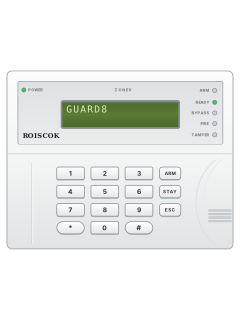
- Close doors and windows. The READY light comes on when everything is closed.
- READY off? The display shows what's open as Z1 to Z8. Each door, window or detector is a zone.
- Press [ARM]. One beep starts the exit delay (30 seconds unless your installer changed it). Leave now.
- Once armed, the ARM light is on. Three short beeps instead mean a mistake: start again.
- If your installer set up code arming, press [ARM], then the master code.
Arm while homeSTAYorSTAYmaster code
- [STAY] arms the outside doors and windows but leaves the inside zones off, so you can move about.
- Your installer decides which zones count as inside. As supplied, zones 7 and 8 are the inside ones.
- Press [STAY]. One beep starts the exit delay.
- If your installer set up code arming, press [STAY], then the master code.
Disarmyour code
- Come in by the entry door. The keypad beeps through the entry delay (30 seconds unless your installer changed it).
- Key in your 4-digit code before the delay runs out, or the alarm goes off.
- Three short beeps and an error message mean a wrong key. Press [ESC] and key in your code again.
- Alarm sounding? Key in your code to silence it.
- Under threat? Add 1 to the last digit (7890 becomes 7891). It disarms and sends a silent alarm to the monitoring centre.
Bypass a zoneholdzoneor*1your codezone
- A bypassed zone stays off when you arm. The zones are numbered 1 to 8.
- With the system off, hold the zone's number key for 2 seconds. The display shows By Pass Z3 (for zone 3).
- Do the same again to put it back: Cancel BP Z3 shows.
- If your installer set up code bypassing: press [*], [1], your code, then the zone number.
- The BYPASS light is on while a zone is bypassed. Bypasses end by themselves when you disarm.
Alarm memory
- A flashing ARM light, or Z1 to Z8 on the display, means an alarm has gone off.
- Coming home to that? Wait for the police or security company to check before you go in.
- To see what happened: press [*], [9], the master code, then an event number from 1 to 50. The newest comes first.
- The display shows the date, time, an event code (see the table) and the zone or user number.
Pages 6 and 7, 13, 16 of the Roiscok GUARD8 User Manual11 A zone went into alarm 10 The zone went back to normal 21 Keypad panic alarm 22 Keypad fire alarm 23 Keypad medical alarm 51 or 50 Armed or disarmed (the last number is the user) 53 The system armed itself on a timer Chime on or off*8master code2
- Chime makes the keypad beep once when a chime door opens while the system is off. Your installer picks the doors.
- With the system off, press [*], [8], the master code, then [2].
- Do the same again to turn it off.
Panic alarmhold1+2orhold4+5orhold7+8
- These keys work any time, armed or not.
- Panic: hold [1] and [2] together for at least 2 seconds. It's silent: no siren sounds.
- Fire: hold [4] and [5] together for at least 2 seconds. The siren sounds.
- Medical: hold [7] and [8] together for at least 2 seconds. This one only helps if your system is monitored.
Change a code*5master codeuser numbernew code
- The system must be off. Change the factory master code to your own straight away; your installer can tell you if it is still set.
- Press [*], [5] and the master code. Then [0] for the master code, or [1] to [9] for a user code.
- Key in the new 4-digit code. A beep confirms it's saved.
- To delete a user code: [*], [5], the master code, the user number, then [#]. A one-second tone confirms.
- There are 10 codes: the master code and 9 user codes. The master code can be changed but not deleted.
Set the date and time*61master codedateor*62master codetime
- Date: press [*], [6], [1], the master code, then month, day and year, 2 digits each (5 March 2027 = 030527).
- Time: press [*], [6], [2], the master code, then the 24-hour time as 4 digits (7:05 pm = 1905).
- Press [*], [4] to check. The date shows month first.
- No Clock in the trouble list means the clock needs setting.
Trouble lights*3
- Three short beeps every so often, and a flashing POWER light, mean a fault. The beeps stop once it's fixed.
- Press [*], [3] to show the fault on the display.
- No Clock: set the date and time (see Set the date and time). For other faults, call your installer.
- A continuous beep can mean the keypad's back tamper switch isn't in place: have your installer check it.
Pages 4 to 7, 14 of the Roiscok GUARD8 User ManualPage 4 of the Roiscok GUARD8 Installation ManualBattery Low The backup battery is low AC Power Mains power is off No Clock The clock needs setting No Communication The panel's communication has a fault No Siren The siren connection has a fault POWER light off No power at all, mains or battery READY light flashing The panel is in programming mode TAMPER light flashing A detector or the keypad has been tampered with
Every Roiscok manual
User guides 1
Installer manuals 6
Nothing here matches that.
Try a shorter search, or search every brand.










Is anyone watching your alarm?
An alarm that only makes a noise relies on someone hearing it. A monitored alarm reports to our A1 graded, NZSA approved control room, watched 24/7 by a team that is New Zealand owned and operated. We can monitor most existing alarms, so you may not need a new one. Thinking about a new alarm or security cameras? Ask us for a quote.
Prefer to talk now? Call us on 0800 339 999.
Home: alarm monitoringBusiness: business monitoringInstaller: bureau monitoring


Manuals are the property of their manufacturers and are provided for reference only; their inclusion here does not imply any endorsement by the manufacturer.