
SimpliSafe manuals
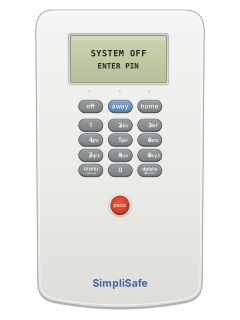
Keypad cheat sheet
Arm (away)away
- Close all doors and windows.
- Press the away button. Every sensor is on, motion sensors included.
- You have 60 seconds to leave, unless your settings were changed. Pressing off during that time cancels it.
- A door or window left open gets a warning, and isn't protected until it's closed.
Arm while homehome
- Close all doors and windows, then press the home button.
- Door and window sensors, glass-break sensors and panic buttons are on straight away.
- Motion sensors normally stay off, so you can move about inside.
Disarmoffyour code
- When a sensor is set off while armed, the keypad beeps and asks for your PIN. You have 30 seconds.
- Press the off button, then key in your 4-digit PIN.
- Wrong digit? delete takes one back; off starts again.
- Siren already going? Key in your PIN to stop it.
- Stop it within a few seconds and the dispatch centre drops it. Otherwise they phone to check: have your safe word ready.
Alarm memoryoff
- After an alarm the keypad shows Alarm: and the type of sensor that set it off. Take care going in.
- Pressing off clears the message.
- After an alarm the system re-arms itself, but the sensor that set it off stays out until you disarm and arm again.
Panic alarmholdpanic
- Hold the red panic button, below the number keys, for 1 second to start an alarm.
- To stop it, key in your PIN at the keypad.
Change a codemenumaster codeawaynew codeawaynew codeaway
- A new system comes with a factory PIN: change it straight away.
- Press menu, then enter your current master PIN when prompted.
- At 1) Change PIN, press away, which works as enter in the menu.
- Key in a new 4-digit PIN and press away. Key it in again and press away to confirm.
- In the menu, off and home move left and right, and menu leaves.
Test the systemmenumaster codehomehomehomehomeawaythenoff
- Press menu and enter your master PIN when prompted. From 1) Change PIN, press home four times to reach 5) Test, then away.
- Test each sensor as the manual describes, such as opening and closing each door and window. The base station names each one it hears.
- With monitoring, the test signal shows in your online account. After the 72-hour practice mode, a dispatcher also phones to confirm it arrived.
- Press off to leave test mode. The base station announces any errors.
Trouble lights
- A problem shows as a message on the keypad, and the blue light on the base station flashes.
- Voice prompts from the base station also warn you when batteries are low.
- The base station light is off when the alarm is off, and glows steadily when armed.
Pages 4, 19, 22 of the SimpliSafe Owners Manual v2.1 (SS2)1 Entry Sensor open A door or window may be open: close it Alarm: and a sensor type There was a recent alarm: take care going in. Press off to clear it Low Keypad battery Slide the keypad up off the wall and fit 4 new AA batteries Keypad out of range The keypad and base station may be too far apart Error, Sensor # and a number A sensor isn't responding: check its battery or move it closer Power outage The base station runs on its backup battery for about 8 hours No link to Dispatcher Can't reach the dispatch centre: check the subscription or the signal Send a test signalmenumaster codehomehomehomehomeaway
- Test mode sends a test signal to SimpliSafe's dispatch centre, if you have their monitoring service.
- Press menu and enter your master PIN when asked. From 1) Change PIN, press home four times to reach 5) Test, then away.
- The test signal shows in your online account. After the 72-hour practice mode, a dispatcher also contacts you to confirm it arrived.
- In test mode the base station light is bright with good reception, dim with poor. Press off to leave.
Every SimpliSafe manual
User guides 1
Nothing here matches that.
Try a shorter search, or search every brand.










Is anyone watching your alarm?
An alarm that only makes a noise relies on someone hearing it. A monitored alarm reports to our A1 graded, NZSA approved control room, watched 24/7 by a team that is New Zealand owned and operated. We can monitor most existing alarms, so you may not need a new one. Thinking about a new alarm or security cameras? Ask us for a quote.
Prefer to talk now? Call us on 0800 339 999.
Home: alarm monitoringBusiness: business monitoringInstaller: bureau monitoring


Manuals are the property of their manufacturers and are provided for reference only; their inclusion here does not imply any endorsement by the manufacturer.