
SUPA manuals
Also known as Pinkerton SUPA 8
Keypad cheat sheet
Arm (away)your code9or#9
- Open the hinged lid to reach the keys. Close doors and windows. The zone lights should be off, except the door you leave by.
- Press * to clear, key in your code, then press 9 (ON). After your code, all zone lights flash while the keypad waits for a key.
- The ON light comes on. The keypad beeps through the exit time, or gives three beeps at the end if the exit beep is off.
- Need to go back inside? Turn it OFF, then ON again as you leave.
- If your installer allows quick arming, # then 9 arms without a code.
Arm while homeyour code8or#8
- Open the hinged lid to reach the keys. Supa 8 calls this Home mode. Only the zones set as Home zones are armed.
- Press * to clear, key in your code, then press 8 (Home).
- The ON light flashes while the system is on in Home mode.
- If your installer allows quick arming, # then 8 does the same.
- From the factory, Home mode leaves zones 5 and 6 off.
Disarmyour code0
- Open the hinged lid to reach the keys. Key in your code, then press 0 (OFF). The ON light goes out.
- This also stops the siren and strobe, and brings back any isolated zones.
- A flashing zone light means that zone went into alarm. It flashes until you turn the system off; Review shows it afterwards.
- Four wrong codes lock the keypad for 60 seconds: all zone lights on and a steady beep.
Bypass a zoneyour code6zone*
- Open the hinged lid to reach the keys. Supa 8 calls this isolating. Each detector or door contact is a zone.
- Press * to clear, key in your code, then press 6. The ON-LINE, LOW BAT, AC FAIL and ON lights come on.
- Press the zone's number (1 to 8). Its light comes on: that zone is isolated. Press it again to undo.
- Press * to finish, then turn the system on as usual.
- Isolated zones come back the next time you turn the system off.
Alarm memoryyour code4or#4
- Open the hinged lid to reach the keys.
- Key in your code, then 4 (Review), or press # then 4. The ON-LINE, LOW BAT, AC FAIL and ON lights come on.
- The zone lights show past zone alarms. The first zone that was set off flashes.
- Press 2 for other alarms, such as panic or power failure, and 3 for other events.
- Press 0 to clear the memory, or * to leave.
Panic alarm#1oryour code1
- Open the hinged lid to reach the keys. Press # then 1, or key in your code then 1 (Panic).
- It sounds the siren or strobe, or calls out, as your installer has set it.
- # then 2, or your code then 2 (Duress), sets off the duress alarm instead.
Change a codemaster code7user numbernew code*
- Open the hinged lid to reach the keys. Key in the master code, then 7. The ON-LINE light flashes: you are in programming mode.
- Key in the code's 3-digit address: 008 for user code 2, 012 for user code 3, and so on to 060 for user code 15.
- Any code already there shows digit by digit. Lights 7 and 8 on means that user has no code.
- Key in the new four digits slowly, waiting for a beep after each. Then press * to leave.
- Never give two users the same code: only the lower-numbered one works.
Test the systemyour code5
- Open the hinged lid to reach the keys. With the system off, key in your code, then 5 (Walk Test).
- Walk past each detector and open each door. The siren squawks and that zone's light stays on.
- Press 1 to sound the siren, 2 for the strobe and 3 to turn them off. Press 0 to clear the zone lights.
- Press * to leave the walk test.
- If you are monitored, your code then 3 (Test) sends a test call to the monitoring company.
Trouble lights
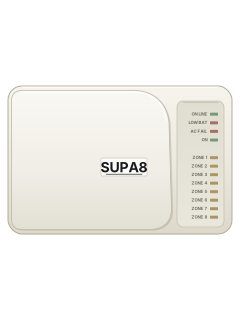
- The lights run down the right-hand side of the keypad; the keys are under the hinged lid.
- AC FAIL on: the mains is off. The battery runs the system for many hours and recharges once power is back.
- ON-LINE flashing: the dialler couldn't get a call through. It keeps flashing until you next turn the system off.
- Past troubles: your code, 4 (Review), then 2. Light 4 means low battery, 5 a power cut, 7 a failed call.
- A long beep means a wrong key or something not allowed right now.
Pages 10 to 12, 14 and 15, 27 of the Supa 8 User ManualON light on / flashing On in Away mode / on in Home mode AC FAIL on / flashing No mains power / there has been a power cut LOW BAT on / flashing Battery voltage low / the battery has been low ON-LINE on / flashing The dialler is calling / it had trouble calling out Zone light on That zone is open, or isolated Zone light flashing That zone went into alarm All zone lights flashing Code accepted: press a function key within 10 seconds All zone lights on, steady beep Locked out for 60 seconds after 4 wrong codes Send a test signalyour code3or#3
- Open the hinged lid to reach the keys. Key in your code, then press 3 (Test), or press # then 3.
- It sends a test call to the programmed phone numbers. It works only if your system reports to a monitoring company.
- ON-LINE is on while the dialler calls. If the call fails, it flashes until you next turn the system off.
Every SUPA manual
User guides 1
Installer manuals 1
Nothing here matches that.
Try a shorter search, or search every brand.










Is anyone watching your alarm?
An alarm that only makes a noise relies on someone hearing it. A monitored alarm reports to our A1 graded, NZSA approved control room, watched 24/7 by a team that is New Zealand owned and operated. We can monitor most existing alarms, so you may not need a new one. Thinking about a new alarm or security cameras? Ask us for a quote.
Prefer to talk now? Call us on 0800 339 999.
Home: alarm monitoringBusiness: business monitoringInstaller: bureau monitoring


Manuals are the property of their manufacturers and are provided for reference only; their inclusion here does not imply any endorsement by the manufacturer.