
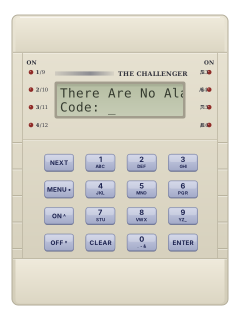
TS0801LCD arming station

Tecom Challenger 10 manuals
Start hereMAUSER-TS1016 R03 Challenger Series Users ManualUser guide · 28 pages · 503 KBRead it nowKeypad cheat sheet
Arm (away)your codeONyour code#Armyour codeenter #
- TS0801/CA1116: use the labelled keys. TS0804: ON/ENTER = #, OFF/MENU = *. TS0006/TS1162: use their own guides.
- Key in your code, then press ON (or ENTER). After arming, leave before the exit time ends.
- If areas are listed, press 0 then ENTER for all, or an area number then ENTER. MENU closes the list. Area lights, if fitted, come on.
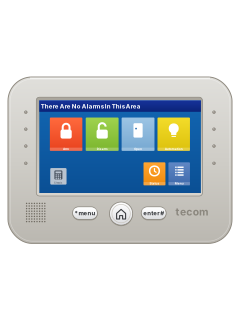
- TS1001: touch Arm, enter your code, then press enter #. If areas appear, touch All or the area you want.
- Seven quick beeps can mean an invalid code or an open input. If Unsealed shows, close or isolate that input before arming.
Disarmyour codeOFFyour code*Disarmyour codeenter #
- TS0801/CA1116: use the labelled keys. TS0804: ON/ENTER = #, OFF/MENU = *. TS0006/TS1162: use their own guides.
- Key in your code, then press OFF, before the entry time ends. If areas appear, press 0 then ENTER for all, or an area number then ENTER.
- Area lights, if fitted, go out. On LCD button keypads, press MENU or CLEAR, where fitted, to close the area list.
- TS1001: touch Disarm, enter your code, then press enter #. If areas appear, touch All or the area you want.
- If your installer enabled duress, raising only your code’s last digit by one (9 becomes 0) sends a silent alarm while disarming normally.
Bypass a zoneMENUyour codeENTER10ENTERzoneENTER*your code#10#zone#Classic*your code#10#zone#
- LCD keypads: TS0804 uses * for MENU and # for ENTER. TS1001: choose Classic, if available. TS0006/TS1162: use their own guides.
- Press MENU, your code, ENTER, then 10 and ENTER. In TS1001 Classic, use * for MENU and # for ENTER.
- Challenger calls zones inputs. Enter the input number, then ENTER, to isolate it. MENU shows more; Classic uses # and *.
- Press ENTER when done, then 0 and ENTER to leave the menu.
- Once the fault is fixed, use option 11 the same way to de-isolate it.
Alarm memoryENTERENTER##Status
- For LCD button keypads (TS0804: ENTER = #). TS1001: touch Status for alarms or history. Keypads without a display: see their own guides.
- On LCD button keypads, a blank top line and a flashing area light indicate an alarm. Press ENTER twice to list the inputs.
- NEXT (or *) updates the list. Reset by arming or disarming the area, or with your code then ENTER, depending on your set-up.
- With no active alarm and Code: showing, ENTER twice opens history. ENTER shows earlier alarms; 1 scrolls long text; 0 exits.
- On TS0801 and TS0804 keypads, NEXT shows later alarms in the history list.
Local alarmENTERENTER##Status
- For LCD button keypads (TS0804: ENTER = #). TS1001: touch Status to see alarms; see its guide to reset. No display: see its own guide.
- Local Alarm means an alarm while the area is in use, such as a fire door. It is not sent to your monitoring company.
- The area light flashes and the keypad may beep continuously. Press ENTER twice to see the inputs; NEXT (or *) shows others.
- Fix the cause, such as closing the door. If a reminder timer is enabled, the alarm repeats unless the cause is fixed.
- On LCD button keypads, if code-free reset is enabled, press ENTER twice, then 0, then ENTER.
Set the date and timeMENUyour codeENTER15ENTER2ENTER*your code#15#2#Classic*your code#15#2#
- LCD keypads: TS0804 uses * for MENU and # for ENTER. TS1001: choose Classic, if available. TS0006/TS1162: use their own guides.
- Press MENU, your code, ENTER, then 15, ENTER, 2, ENTER. In Classic, use * for MENU and # for ENTER.
- Key in the hours (24-hour clock), minutes, seconds, day of the month, month and year, pressing ENTER after each.
- Check the time shown and press ENTER to save, or 0 then ENTER to abandon it.
- Press 0 then ENTER until the display shows Code: again.
Test the systemMENUyour codeENTER12ENTERzoneENTER*your code#12#zone#Classic*your code#12#zone#
- LCD keypads: TS0804 uses * for MENU and # for ENTER. TS1001: choose Classic, if available. TS0006/TS1162: use their own guides.
- Press MENU, your code, ENTER, then 12, ENTER, the input number, ENTER. In Classic, use * for MENU and # for ENTER.
- Walk in front of the detector, or open and close the door. The display should show UNSEALED, then SEALED.
- The keypad sounds while it is unsealed. The input cannot set off an alarm while in test.
- Press ENTER when finished. Otherwise the test stops after the test time, 5 minutes by default.
Trouble lights
- Area lights, where fitted: on means armed, off disarmed, flashing an alarm or fault. On CA1116 and TS1001 a slow flash is while disarmed, fast while armed.
- On a keypad with a display, a system alarm shows its type on the top line, such as DGP tamper.
- Some system alarms reset once fixed, such as mains power coming back. Others need a code allowed to reset system alarms.
- Continuous beeping: a local alarm (see Local alarm), or an area about to rearm, shown as ending. Disarm it again to restart its timer, or leave.
- A buzzer with Suppression Ending means a door opened by code is still open: close it, or key in your code again for more time.
Pages 8 and 9, 18, 20 and 21, 23 of the MAUSER-TS1016 R03 Challenger Series Users ManualPages 11 and 12 of the MAADMN-TS1016 R04 Challenger Series Administrators ManualFault light flashing (CA111x keypads) A system fault: comms, keypad, DGP, battery test or tamper Alarm light flashing (CA111x keypads) An access, 24-hour or secure alarm Comms light (TS0804 keypads) The panel cannot reach your monitoring centre RAS light (TS0804 keypads) A keypad (arming station) is off-line DGP light (TS0804 keypads) An access controller or data gathering panel is off-line Battery light (TS0804 keypads) The backup battery was low after the mains power went off Access, 24 Hr or Secure light (TS0804) An alarm in an area in use, on a 24-hour input, or in an armed area Tamper light (TS0804 keypads) An alarm was caused by tampering
Why is my keypad beeping or showing a trouble light?
Most keypads beep or light up a trouble indicator when something needs attention, such as a low backup battery, a power cut or a lost phone or internet connection. Your user guide explains what each light or code means on your model. If it keeps happening, or you are not sure, call your installer or monitoring company.
All Tecom Challenger 10 manuals
User guides 5
Installer manuals 8


Nothing here matches that.
Try a shorter search, or search every brand.
More Tecom models
Is anyone watching your alarm?
An alarm that only makes a noise relies on someone hearing it. A monitored alarm reports to our A1 graded, NZSA approved control room, watched 24/7 by a team that is New Zealand owned and operated. We can monitor most existing alarms, so you may not need a new one. Thinking about a new alarm or security cameras? Ask us for a quote.
Prefer to talk now? Call us on 0800 339 999.
Home: alarm monitoringBusiness: business monitoringInstaller: bureau monitoring


Manuals are the property of their manufacturers and are provided for reference only; their inclusion here does not imply any endorsement by the manufacturer.