
X10 Powerhouse manuals
Keypad cheat sheet
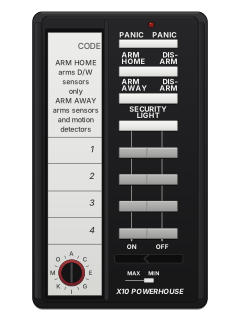
Arm (away)ARM AWAY
- Arm from your remote: ARM AWAY on the SH624, or ARM on the HT544 or keychain remote. ARM on the console works too.
- With the remote's MIN/MAX (delay) switch at MIN, arming is instant: the console gives two tones and its ARMED light comes on.
- For time to leave, set that switch to MAX first. The console chimes for about a minute, then beeps once it's armed.
- The keychain remote always arms instantly. The console's own ARM button always gives the delay.
- Only sensors set to MAX, usually doors, give an entry delay (about 30 seconds). Sensors set to MIN alarm at once.
Arm while homeARM HOME
- This needs the SH624 remote and the newer SP554A motion detectors, each with the right-hand switch on its back set to Home/Away.
- Press ARM HOME. The door and window sensors arm but the motion detectors don't, so you can move about inside.
- With older SP554 motion detectors, ARM HOME arms everything, the same as ARM AWAY.
- With the HT544 or keychain remote, set the left switch on the back of an SP554A to OFF to leave it out when you arm.
DisarmDISARM
- If you armed with the delay, opening a door set to MAX makes the console give a warning beep. Press DISARM on your remote within about 30 seconds.
- If the alarm is going, DISARM stops the siren. House lights that were flashing stay on.
- Lost a remote? Re-install the whole system so the lost one stops working.
Bypass a zone
- Each sensor or motion detector is a zone. You can bypass a zone that is stopping the system from arming.
- Arm from your remote (ARM AWAY on the SH624). A repeating trouble tone means a zone is open or has a problem, so it hasn't armed.
- While the tone sounds, press BYPASS on the console, then arm from your remote again.
- On the console, the bypassed zone's light flashes fast and that zone isn't protected. Every other zone arms.
- Close a bypassed window later and that zone arms by itself.
Pages 16, 18, 29 of the X10 Powerhouse PS561 Supervised Wireless Security Console Owners ManualPage 1 of the X10 SH624 Security Home Automation Remote InstructionsRepeating tone after you arm A zone is open or has a fault. Press BYPASS on the console, then arm from your remote again. Alarm memorySECURITY LIGHT
- After an alarm the console's ARMED light flashes, and its light for the zone that was set off stays on.
- No zone light on? It was one of zones 9 to 16: press BYPASS on the console to see which.
- To clear the lights, press SECURITY LIGHT ON or OFF on the SH624, or LIGHT ON or LIGHT OFF on the HT544 or keychain remote.
- The siren stops after 4 minutes, or sooner when you disarm.
Chime on or off
- Chime is set by the Install/Run switch on the console, not by a button.
- At Run 2 the console chimes when a door or window opens while disarmed. At Run 1 there's no chime.
- Armed, Run 1 and Run 2 work the same. Don't leave the switch at Install: the system only arms at Run 1 or Run 2.
Pages 16, 29 of the X10 Powerhouse PS561 Supervised Wireless Security Console Owners ManualSwitch at Run 2 Chime on while disarmed Switch at Run 1 No chime Switch at Install For adding sensors and remotes: the system won't arm Panic alarmPANIC
- SH624 remote: press PANIC. HT544 or keychain remote: press ARM and DISARM together.
- The alarm sounds even if the system isn't armed.
- It only dials out if the system was armed first.
- Press DISARM to stop it.
Test the systemARM AWAYthenDISARM
- Tell the people your console calls that you're testing.
- Arm from your remote (ARM AWAY on the SH624), then open an armed door or walk past a motion detector.
- The siren sounds, house lights flash, and the console calls the first number and plays your message three times.
- If they press 0 the siren stops and they can listen in for 75 seconds. Press DISARM on your remote to end the alarm.
- To check a sensor without an alarm, set the console to Run 2 and press TEST on the sensor: the console chimes.
Trouble lights
- The lights in the table are on the console, not the remote. Its zone lights show zones 1 to 8.
- A repeating trouble tone when you arm means it didn't arm. DISARM on your remote stops it; fix the problem, then arm again.
- Zones 9 to 16 show only as that tone. Hold BYPASS on the console to see which: that also bypasses it.
- Change the console's 9-volt backup battery at least once a year, with the console still plugged in, or it forgets every sensor and remote.
Pages 16, 18, 27 to 29, 31 of the X10 Powerhouse PS561 Supervised Wireless Security Console Owners ManualZone light on That door or window is open Zone light off That door or window is closed Zone light flashing slowly That sensor hasn't reported in for 4 hours: check its battery Zone light flashing fast That zone is bypassed ARMED light flashing There has been an alarm Battery Low light on The console's backup battery needs replacing Repeating tone when you arm A zone is open or has a problem, so it didn't arm
Every X10 Powerhouse manual
User guides 1
Installer manuals 1
Nothing here matches that.
Try a shorter search, or search every brand.










Is anyone watching your alarm?
An alarm that only makes a noise relies on someone hearing it. A monitored alarm reports to our A1 graded, NZSA approved control room, watched 24/7 by a team that is New Zealand owned and operated. We can monitor most existing alarms, so you may not need a new one. Thinking about a new alarm or security cameras? Ask us for a quote.
Prefer to talk now? Call us on 0800 339 999.
Home: alarm monitoringBusiness: business monitoringInstaller: bureau monitoring


Manuals are the property of their manufacturers and are provided for reference only; their inclusion here does not imply any endorsement by the manufacturer.