Yale manuals
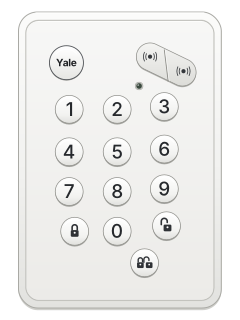
Keypad cheat sheet
Arm (away)the key with a padlock on it
- Press the Arm button on the keypad: the closed padlock, left of 0. It has no word on it. No PIN is needed.
- You have 30 seconds to leave, unless that time has been changed in the Yale app.
- In full arm every sensor is on guard. Most start an entry countdown when set off (the factory setting).
- A door or window left open doesn't stop it arming; the app warns you about it.
- If there is a system fault, press Arm a second time to arm anyway.
Pages 6 and 7, 21, 24, 31 and 32 of the Smart Home Alarm Manual (MZ-1, MZ-8)Smart Hub's top light red Armed Outside siren: 5 beeps as you arm Low battery or a tamper fault Arm while home
- Press Part Arm: the button with two padlocks, below 0. No PIN is needed.
- Part arm is usually for night: it guards the ground floor while you are upstairs.
- Which sensors stay on in part arm is set for each device in the Yale app.
- If there is a system fault, press Part Arm a second time to arm anyway.
Pages 6 and 7, 19, 24 of the Smart Home Alarm Manual (MZ-1, MZ-8)Smart Hub's top light flashing red Part armed Disarmthe key with an open padlock on ityour code
- Press Disarm: the open padlock, right of 0. Then key in your 4-digit PIN.
- Coming in while it is armed starts the entry countdown: disarm before it ends.
- PINs are set in the Yale app, up to 10 of them. Change the factory PIN there.
Pages 6, 10, 18, 21, 24 of the Smart Home Alarm Manual (MZ-1, MZ-8)Smart Hub's top light green Disarmed Panic alarm
- Press the two panic buttons at the top right of the keypad together, and hold them for 3 seconds. They have a siren symbol, no words.
- This sets off the alarm.
- To stop it, press Disarm, then key in your PIN.
- A key fob's panic button also sets off the alarm straight away. Stop it with your PIN at the keypad.
Pages 6 and 7, 22, 24 of the Smart Home Alarm Manual (MZ-1, MZ-8)Smart Hub's middle light flashing red The alarm is going off Smart Hub's middle light red An alarm was set off Trouble lights
- The Smart Hub has three lights: the top one shows the arm state, the middle one alarms and faults, the bottom one the internet link.
- The hub beeping on and off means a device's battery is low. The app shows which; it has about a month left.
- The beeping stops once that device has new batteries. Disarm first, then follow the app's battery wizard.
- Bypassing that device in the app's device settings also stops the beeping, but then it won't set off the alarm.
- The keypad's own light flashing as you press keys means the keypad battery is low.
Pages 6, 12, 26, 29, 31 of the Smart Home Alarm Manual (MZ-1, MZ-8)Top light red / flashing red Armed / part armed Top light green / flashing green Disarmed / learn mode Middle light red / flashing red An alarm was set off / the alarm is still going Middle light yellow A device fault (tamper or low battery) Middle light flashing yellow Mains power has failed Bottom light yellow / flashing yellow Network problem / not connected to Yale's server Bottom light green All normal Outside siren: 5 beeps as you arm Low battery or a tamper fault
Every Yale manual
User guides 1
Nothing here matches that.
Try a shorter search, or search every brand.
Is anyone watching your alarm?
An alarm that only makes a noise relies on someone hearing it. A monitored alarm reports to our A1 graded, NZSA approved control room, watched 24/7 by a team that is New Zealand owned and operated. We can monitor most existing alarms, so you may not need a new one. Thinking about a new alarm or security cameras? Ask us for a quote.
Prefer to talk now? Call us on 0800 339 999.
Home: alarm monitoringBusiness: business monitoringInstaller: bureau monitoring
Manuals are the property of their manufacturers and are provided for reference only; their inclusion here does not imply any endorsement by the manufacturer.