

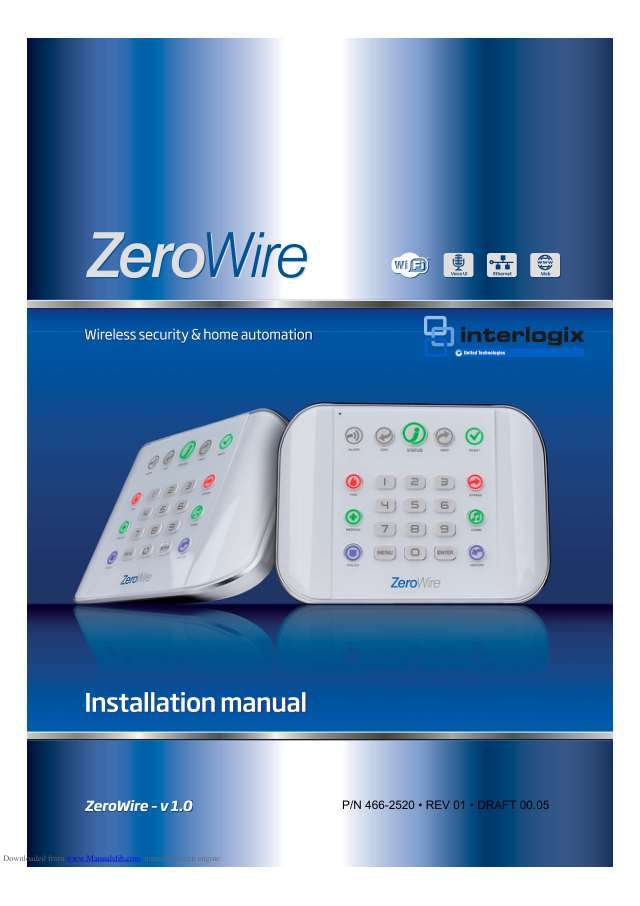
Zero Wire manuals
Keypad cheat sheet
Arm (away)AWAYyour codeENTERorAWAY
- Check READY and STATUS are green. If STATUS isn't, touch it to hear which zones are open.
- Touch AWAY, key in your PIN, then touch ENTER. The exit delay beeps start: leave.
- If your installer has turned on quick arm, AWAY on its own arms it. Touch AWAY again to quieten the exit beeps.
- READY flashing green means some zones are open but you can still arm. What happens if they're still open when the exit time ends depends on your installer's setup.
- The AWAY key lights red while the system is armed.
Arm while homeSTAYyour codeENTERorSTAY
- Stay arms the doors and windows but leaves out the inside zones your installer set for Stay, so you can move about.
- Check STATUS is green and close the doors and windows. Anyone in rooms outside Stay should leave them.
- Touch STAY, key in your PIN, then touch ENTER (with quick arm on, STAY alone does it). The STAY key lights yellow.
- Touch STAY again for Stay Instant (no entry delay; STAY flashes yellow). A third touch gives Night mode, which also arms your Night zones (STAY flashes red).
- In Stay, a zone set off gives a warning tone and a timer before the sirens. In Stay Instant and Night mode the sirens sound at once.
Disarmyour codeENTER
- Come in by your usual entry door. Once you're detected, the ZeroWire beeps and repeats a warning.
- Key in your PIN and touch ENTER before the entry delay runs out. Any bypassed zones go back to normal.
- ALARM lit red means the system is in alarm: key in your PIN and touch ENTER to turn it off, then touch STATUS to hear why.
- Three wrong PINs lock out every login for 90 seconds.
Bypass a zoneBYPASSyour codeENTERzoneENTER0MENU
- Each detector or door contact is a zone. Disarm first. A bypassed zone can't set off an alarm.
- Touch BYPASS, key in your PIN and touch ENTER. Your PIN must be allowed to bypass.
- Key in the zone number and touch ENTER, then 0 to switch it between bypassed and not. Touch MENU to finish.
- Then arm in Away or Stay. STATUS shows yellow while a zone is bypassed; touch it to hear which.
- Bypasses clear when you next disarm.
Alarm memoryHISTORYmaster codeENTER1thenMENU
- Touch HISTORY, key in the master code and touch ENTER.
- Press 1 to hear the zone or zones that last set the alarm off.
- Or press 2 to hear every event: ENTER plays the next one, 0 the one before.
- Touch MENU to leave. Standard users can't review the history.
Chime on or offCHIME0MENU
- Touch CHIME, then 0 to switch chime mode on or off. Touch MENU to finish.
- In chime mode the ZeroWire chimes when a zone in the chime group opens. It never sets off an alarm.
- To add or remove a zone: touch CHIME, key in the zone number, touch ENTER, then 0. Touch MENU to finish.
- The chime group stays set when you arm and disarm.
Panic alarmholdPOLICEorholdFIREorholdMEDICAL
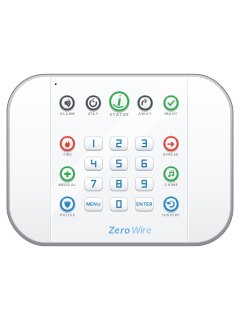
- The emergency keys are FIRE, MEDICAL and POLICE (duress), down the left side. If they aren't lit, they aren't set up on your system.
- Touch and hold one for two seconds to send that alarm. Use them only in a real emergency needing the monitoring station.
- To cancel, key in the master code and touch ENTER.
- Ask your alarm company what response each key brings.
Change a codeMENU3master codeENTER1user numberENTERnew codeENTERMENUMENUMENU
- You need the master code, and the system must be disarmed.
- Touch MENU, then 3 (User Configuration). Key in the master code and touch ENTER.
- Press 1 (user PIN), key in the user number and touch ENTER.
- Key in the new PIN (4 to 8 digits) and touch ENTER. Touch MENU three times to leave.
- Every PIN must be different: PIN code is occupied means pick another. Change the factory master PIN straight away if it's still set.
Test the systemMENU4master codeENTER4thenSTATUSMENUMENUMENU
- Test at least once a week. Touch MENU, then 4 (System Test). Key in the master code and touch ENTER.
- Press 4 for a walk test. Walk past each motion detector, and open and close each door and window.
- The siren chirps and the ZeroWire names each zone as it's set off.
- Touch STATUS to hear how each tested zone did, then MENU three times to leave.
Trouble lights
- The colour of the STATUS key shows whether anything needs attention. Touch it to hear the messages.
- If you can't fix it, call your alarm company.
Pages 11, 18, 39, 70 of the ZeroWire User ManualSTATUS green Ready to arm STATUS yellow A message, such as a bypassed zone: touch STATUS to hear it STATUS red A trouble: touch STATUS to hear what it is READY off Not ready to arm: touch STATUS to hear why READY flashing green Zones are open, but forced arming is allowed AC power fail Mains power is off. It can take 5 minutes to clear once power is back Battery test fail The backup battery needs replacing. Not cleared in 24 hours? Call your installer Time and date loss The clock needs setting: Menu 8 with the master code Send a test signalMENU4master codeENTER2thenMENUMENUMENU
- This sends a test message to your monitoring company. It only works if your system reports to one, and no sirens sound.
- Ring your monitoring company first and tell them you're doing a communicator test.
- Touch MENU, then 4 (System Test). Key in your master code, touch ENTER, then touch 2 for the communicator test.
- They confirm they got it. Touch MENU three times to leave. If it fails, tell your alarm company.
Every Zero Wire manual
User guides 1
Installer manuals 5
Nothing here matches that.
Try a shorter search, or search every brand.










Is anyone watching your alarm?
An alarm that only makes a noise relies on someone hearing it. A monitored alarm reports to our A1 graded, NZSA approved control room, watched 24/7 by a team that is New Zealand owned and operated. We can monitor most existing alarms, so you may not need a new one. Thinking about a new alarm or security cameras? Ask us for a quote.
Prefer to talk now? Call us on 0800 339 999.
Home: alarm monitoringBusiness: business monitoringInstaller: bureau monitoring


Manuals are the property of their manufacturers and are provided for reference only; their inclusion here does not imply any endorsement by the manufacturer.