

Ademco Accord XPC manuals
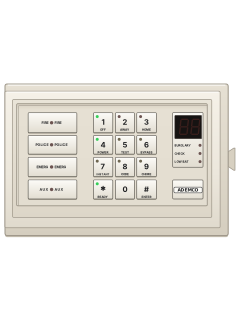
Start hereAdemco Microtech Accord XPC User InstructionsUser guide · 8 pages · 140 KBRead it nowKeypad cheat sheet
Arm (away)your code1
- The panel calls this Full Set. Shut the doors and windows, and make sure no detector is picking up movement.
- Key in your user code, then press 1. If Easy Set is available on your system, # then 1 also sets it.
- A steady exit tone starts and the DAY light flashes (a DAY symbol on the LCD keypad). The tone breaks up as you pass each detector on your way out.
- The tone goes steady again after the last detector on the exit route. Two beeps mean the system has set.
- To stop it setting, press * during the exit time. Once the system has set, * no longer does this.
Arm while homeyour code2oryour code3
- Part Set (2) and Night Set (3) protect the zones agreed with your installer. Night Set can leave bedrooms unarmed.
- Key in your user code, then press 2 for Part Set or 3 for Night Set.
- Part Set has the same exit tone as Full Set. Night Set is silent; its DAY light flashes as you pass exit-route detectors.
- On the LCD keypad, the DAY symbol flashes during the Night Set exit time.
- Two beeps mean it has set. Press * during the exit time to stop it setting.
Disarmyour code
- The panel calls this unsetting. Come in by your usual route, go straight to the keypad and key in your user code.
- In an alarm, your code stops it and the keypad shows the zone that started it. Key in your code again to reset.
- Some systems need an engineer's code to reset after an alarm. If yours won't reset, ring your alarm company.
- All lights on, then a 5-digit number in lights? (LCD: cE and the zone, then cE and the number.) Give that number to your monitoring company.
- Key in the code they give you back. It resets the system.
Bypass a zoneyour code6zone*
- The panel calls this omitting a zone. Each detector or door contact is a zone.
- Key in your user code, press 6, then each zone number, for example 6, 7 and 8.
- Press * to finish, or wait 5 seconds. The omitted zones' lights flash (on the LCD, their numbers flash).
- Then set the system as usual. Unsetting brings every zone back.
- Fire, PA and silent PA zones can't be omitted. Omitted the wrong zone? Key in your code, press 6, then *.
Alarm memoryyour code0
- Key in your user code, then press 0.
- The last 16 alarm zones show, newest first, on the zone lights (as numbers on the LCD), with a single beep.
- Straight after an alarm, your code silences it and the keypad shows the zone that set it off.
Chime on or offyour code9zone*oryour code9*
- A chime zone gives 2 beeps at the keypad and 2 from the inside sounder when that zone is triggered.
- To add one: key in your user code, press 9, then the zone number. Press * or wait for the beep.
- To turn chime off on every zone: your code, 9, then *. It can't be turned off for one zone alone.
- Chimes are also cleared each time the engineer goes in and out of programming.
Panic alarm*+#or7+9or4+6
- These hot keys work only if your installer has turned them on.
- Press * and # together for a panic (PA) alarm. All the keypad lights come on (PA on the LCD).
- Press 7 and 9 together for a fire alarm, with a pulsing tone, or 4 and 6 to call for assistance.
- Key in your user code to stop the alarm.
Change a codeyour code8user numbernew code
- User 1 is the master code. The system holds up to 8 user codes.
- Key in your code, press 8, your user number, then the new code. For the master code, two beeps confirm it.
- The master code can set any user's code: master code, 8, the user number (2 to 8), then their code.
- To delete your own code: your code, 8, your user number, then *. The master code can delete any code.
- User 8 may be set up as a duress code. It works as normal but sends a silent alert to your monitoring station.
Set the date and timeyour code#0datetime
- Key in your user code, then press # then 0.
- Key in the day, month, year, hour and minute, 2 digits each, in that order (ddmmyyhhmm).
- Two beeps mean it was accepted. The clock stamps each event the system records.
Trouble lights
- These are the LED keypad's lights. The LCD keypad shows a symbol for each instead, listed in the manual.
- A steady DAY light means the system is unset; flashing means it is set, or setting.
Page 5 of the Ademco Microtech Accord XPC User InstructionsZone light on That zone caused an alarm, or was tested Zone light flashing That zone is omitted TAMPER light on Tamper on zone 9 TAMPER and a zone light flashing That zone's tamper was set off TELEPHONE light on Phone line fault TELEPHONE light flashing A report didn't get through BAT light on Backup battery low or missing POWER light off Mains power has failed
Why is my keypad beeping or showing a trouble light?
Most keypads beep or light up a trouble indicator when something needs attention, such as a low backup battery, a power cut or a lost phone or internet connection. Your user guide explains what each light or code means on your model. If it keeps happening, or you are not sure, call your installer or monitoring company.
All Ademco Accord XPC manuals
Nothing here matches that.
Try a shorter search, or search every brand.
More Ademco models
Is anyone watching your alarm?
An alarm that only makes a noise relies on someone hearing it. A monitored alarm reports to our A1 graded, NZSA approved control room, watched 24/7 by a team that is New Zealand owned and operated. We can monitor most existing alarms, so you may not need a new one. Thinking about a new alarm or security cameras? Ask us for a quote.
Prefer to talk now? Call us on 0800 339 999.
Home: alarm monitoringBusiness: business monitoringInstaller: bureau monitoring


Manuals are the property of their manufacturers and are provided for reference only; their inclusion here does not imply any endorsement by the manufacturer.