
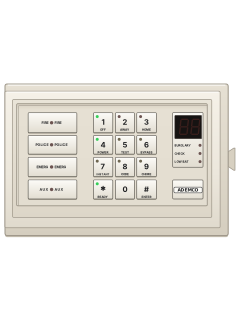
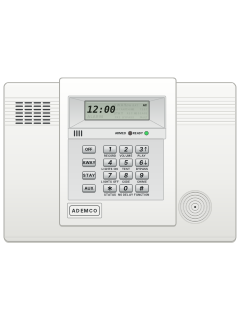
5621 / 5600Master console

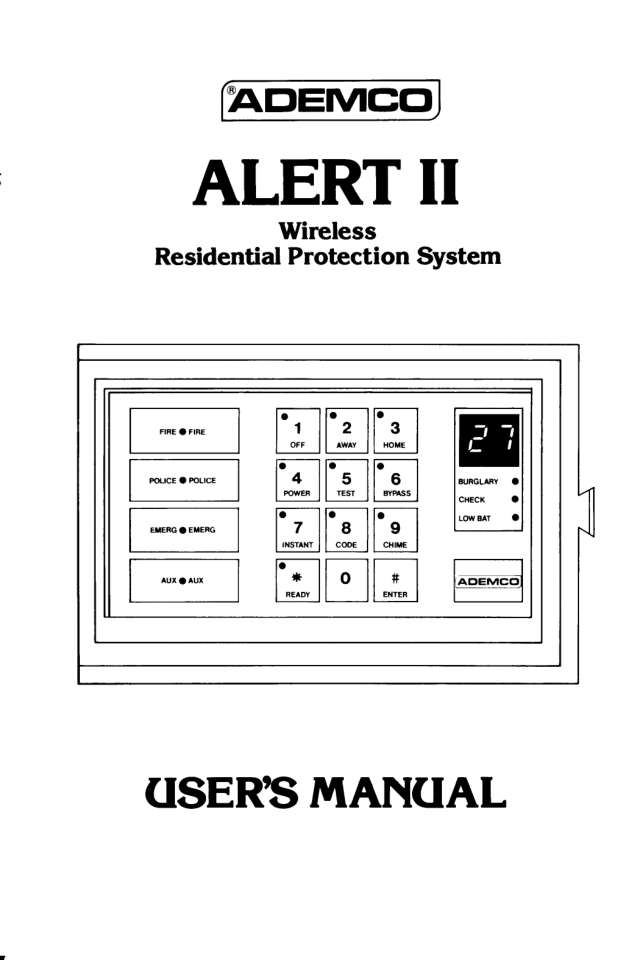
Ademco Alert II manuals
Start hereAdemco 5600 Alert 2 UserUser guide · 34 pages · 2.1 MBRead it nowKeypad cheat sheet
Arm (away)your codeAWAY
- Check the green READY light on the Master Console is on. If it's off, press READY (the * key) to see the open sensor's number.
- Key in your code, then press AWAY (the 2 key). Leave no more than 2 seconds between keys, or the entry is wiped.
- The red AWAY light comes on and the console beeps twice.
- Leave by your exit door before the exit delay ends. Your installer set it at 15 to 120 seconds.
Arm while homeyour codeHOMEoryour codeHOMEINSTANT
- Home arms the doors and windows but not the inside, so you can move around indoors.
- With the green READY light on, key in your code, then press HOME (the 3 key).
- The red HOME light comes on and the console beeps three times.
- For no entry delay, such as when everyone's asleep, press INSTANT (the 7 key) straight after HOME. The amber INSTANT light comes on too.
- With INSTANT on, opening a main door sets off the alarm straight away.
Disarmyour codeOFF
- Come in by a delay-zone door. The console beeps slowly while the entry delay runs.
- Key in your code, then press OFF (the 1 key).
- The red light goes out, the green OFF light comes on and the console beeps once.
- Fast beeping or a red BURGLARY light as you come in means there was a break-in. Leave and call the police from a safe place.
Bypass a zoneyour codeAWAYBYPASSoryour codeHOMEBYPASS
- Use the Master Console: the optional wireless keypad has no BYPASS or READY key. Alert II calls each detector a sensor.
- An open sensor keeps READY off; press READY (the * key) to see its number. Still showing after you open and close it again? Call your service company.
- To arm without it, key in your code, press AWAY or HOME, then BYPASS (the 6 key). Every open sensor is left out.
- The arming light and the amber BYPASS light come on, with two beeps (AWAY) or three (HOME).
- The bypass ends when you disarm. Going straight from HOME to AWAY, or back, also ends it and the system disarms.
Alarm memoryyour codeOFFthenyour codeOFF
- A red BURGLARY light, or fast beeping when you get home, means an alarm went off while you were out. Don't go in: call the police.
- Once it's safe, key in your code. The console's beeping stops at the first digit; finish the code and press OFF within 10 seconds or it starts again.
- The display shows the number of the sensor that went off. The card in the console's pull-out drawer tells you where it is.
- Key in your code and press OFF again to clear the display.
Chime on or offyour codeCHIME
- Chime works while the system is disarmed: opening a door or window gives one beep and shows its number.
- Key in your code, then press CHIME (the 9 key). The Master Console's amber CHIME light comes on.
- Do the same again to turn it off. The CHIME light goes out.
Reset smoke detectorsyour codeOFF
- Get everyone out safely first. If there are no flames or thick smoke, look for the cause.
- Key in your code, then press OFF, to silence the alarm.
- Still sounding? Check the smoke and heat detectors for smoke or something hot nearby, and remove it.
- Smoke may still be inside the detector: fan it for about 30 seconds, then key in your code and press OFF again.
- If you are monitored, ring your monitoring company to tell them it's a false alarm.
Panic alarmEMERG+EMERGorPOLICE+POLICEorFIRE+FIRE
- Press both keys of a pair on the Master Console together: EMERG for a personal emergency, POLICE for police, FIRE for fire.
- Your installer set POLICE as a silent or loud alarm. The AUX pair may sound an alarm or turn on some lights.
- On an optional hand-held wireless keypad, press LIGHTS and ENTER together. It sends a silent or loud alarm, depending on how it was set up.
- To stop an alarm, key in your code, then press OFF.
- Forced to disarm? Use your code with its last digit swapped for your installer's duress digit, then OFF. It disarms and, if monitored, sends a silent alarm.
Set a temporary codemaster codeCODEnew code
- You can add one extra code, for a babysitter or cleaner. Your installer programs the master code.
- Key in the master code, press CODE (the 8 key), then the new 4-digit code.
- The amber CODE light stays on while a temporary code is set.
- If the master code armed the system, the temporary code can't disarm it.
- To remove it, key in the master code, press CODE, then the master code again.
Trouble lights
- Troubles come with fast beeping. Key in your code and press OFF (within 10 seconds) to silence it.
- Low battery: replace that sensor's battery or call your service company. Then trigger that sensor once (open its door or press its button), arm, and disarm.
- POWER light out: check your circuit breakers or fuses, and that the plug-in transformer is in. Once power is back, code and OFF turn the light on.
- CHECK and a number: set off that sensor, then key your code and press OFF. If CHECK keeps returning, call for service.
Pages 8 and 9, 11, 23 and 24, 27 of the Ademco 5600 Alert 2 UserGreen READY light off A door, window or sensor is open: don't arm yet Red BURGLARY light and a number A break-in while armed; the number shows which sensor Red LOW BAT light and a number That sensor's battery is low (30 or 31: a panic button; 00: a wireless keypad) Red CHECK light and a number The system isn't hearing from that sensor Green POWER light off No mains power OC on the display, steady low tone A long power cut has shut the system down. The 4 key silences the tone
Why is my keypad beeping or showing a trouble light?
Most keypads beep or light up a trouble indicator when something needs attention, such as a low backup battery, a power cut or a lost phone or internet connection. Your user guide explains what each light or code means on your model. If it keeps happening, or you are not sure, call your installer or monitoring company.
All Ademco Alert II manuals
User guides 1
Nothing here matches that.
Try a shorter search, or search every brand.
More Ademco models
Is anyone watching your alarm?
An alarm that only makes a noise relies on someone hearing it. A monitored alarm reports to our A1 graded, NZSA approved control room, watched 24/7 by a team that is New Zealand owned and operated. We can monitor most existing alarms, so you may not need a new one. Thinking about a new alarm or security cameras? Ask us for a quote.
Prefer to talk now? Call us on 0800 339 999.
Home: alarm monitoringBusiness: business monitoringInstaller: bureau monitoring


Manuals are the property of their manufacturers and are provided for reference only; their inclusion here does not imply any endorsement by the manufacturer.