
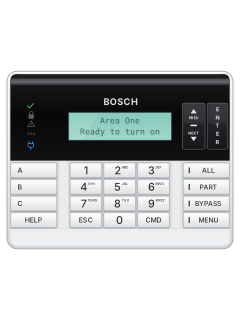
B920 two-line keypad (and red B925F / B926F)
Bosch G Series Panel manuals
Start hereBosch Bx512G Bx512 OperationUser guide · 228 pages · 1.3 MBRead it nowKeypad cheat sheet
Arm (away)MENU111your codeENTER
- Bosch calls this All On. Close up first: the green tick is on when it's ready (on a B91x, the house light with the person outside goes green).
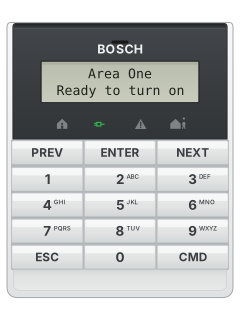
- Press MENU (Menu softkey on a B93x; CMD then 8 on a B91x), then 1, 1, 1: On/Off, All On, All On Delay.
- Key in your passcode, then press ENTER. Exit Now shows; the keypad beeps through the exit time, faster in the last 10 seconds.
- If nobody leaves, the system switches itself to Part On.
- B942 touch screen: press the green Ready to arm icon. It starts turning on with a delay; icons on screen let you change how.
Arm while homeMENU121
- Bosch calls this Part On: only the part points turn on, usually the outside doors and windows.
- Press MENU (CMD then 8 on a B91x), then 1, 2, 1: On/Off, Part On, Part On Delay.
- Key in your passcode and press ENTER only if the keypad asks (a B93x or B942 does). It shows Part On Delay (Part On Dly on a B92x or B91x).
- Once Part On has started, your passcode and ENTER turn the system off again.
- Part On Instant (MENU, 1, 2, 2) has no entry delay: opening a part point sets off the alarm at once.
Disarmyour codeENTER
- Come in through your entry door. The keypad beeps through the entry time.
- Key in your passcode and press ENTER within 8 seconds. This turns off every area you're allowed to control.
- B942 touch screen: press the red On icon (yellow if Part On), key in your passcode, then press Enter.
- Wrong door, or too slow? Silence the alarm with your passcode and ENTER, then ring your monitoring company.
Bypass a zoneMENU151orCMD0
- Bosch calls zones points. A bypassed point can't set off an alarm or send a report.
- With the area off, press MENU (CMD then 8 on a B91x), then 1, 5, 1: On/Off, Bypass, Bypass Points.
- Choose the point to bypass, then press ESC to leave. CMD then 0 (or BYPASS on a B92x) is the quick way into Bypass.
- Points stay bypassed until you unbypass them (MENU, 1, 5, 2), though some come back when the area is turned off.
Alarm memoryMENU71orCMD40
- During an alarm, key in your passcode and press ENTER to silence it.
- To see what happened: MENU (CMD then 8 on a B91x), then 7, 1 (View Event Memory). CMD then 4, 0 also shows alarms.
- Event memory holds the alarms and troubles since the system was last turned on. Turning it on clears it.
- MENU, 7, 3 shows the whole log: press ENTER (Go to last event on a B93x or B942) for the newest event, then PREV and NEXT. ESC leaves.
Chime on or offMENU51your codeENTERENTERorCMD6
- Bosch calls this Watch Mode: while off, the keypad chimes once and names the point when a watched door or window opens.
- Press MENU (CMD then 8 on a B91x), then 5, 1: Settings, Watch Mode. Key in your passcode and press ENTER.
- Press ENTER to switch it on or off (on a B93x or B942, press Turn On or Turn Off). The display says which, then press ESC.
- CMD then 6 is the quick way into Watch Mode.
Reset smoke detectorsMENU31your codeENTERorCMD47
- Smoke and shock sensors may need a reset after an alarm. The reset briefly cuts their power.
- Press MENU (CMD then 8 on a B91x), then 3, 1: Actions, Reset. Key in your passcode and press ENTER.
- 'Sensors resetting' shows for about 3 seconds, then the display goes back to normal.
- If a sensor goes straight back into fault, check for smoke or fire. Still stuck? Call your security company.
Change a codeMENU41your codeENTERnew codeENTERnew codeENTERorCMD55
- Press MENU (CMD then 8 on a B91x), then 4, 1: Users, Change Passcode. CMD then 5, 5 also gets you there.
- Key in your current passcode and press ENTER.
- Key in the new passcode (3 to 6 digits) and press ENTER, then again to confirm. 'Passcode changed' shows.
- It can't match, or be within 2 of, another passcode: if 1234 is in use, 1232 to 1236 are ruled out.
Set the date and timeMENU521your codeENTERdateENTER2timeENTER
- Press MENU (CMD then 8 on a B91x), then 5, 2, 1: Settings, Date/Time, Set Date. Key in your passcode and press ENTER.
- Key in the date in the format shown and press ENTER. 'Change complete' shows.
- Press 2 (Set Time; on a B93x or B942, then Set), key in the time and press ENTER. On a 12-hour clock, choose AM or PM.
- ESC deletes a wrong digit. If your system updates its time automatically, that can overwrite your change.
Trouble lights
- A trouble sounds three tones and a pause, over and over. Press ENTER to silence it.
- System troubles show as messages starting SERV or Service, such as Service AC Failure. They clear once the fault is fixed.
- A communication failed message means reports aren't getting through: tell your security company.
- A B91x keypad has two house lights instead of the tick, lock and GAS lights.
Pages 20, 27 and 28, 126 and 127, 132 of the Bosch Bx512G Bx512 OperationYellow caution light on A system, device or point trouble Blue power plug flashing No mains power: running on the battery Blue power plug off No power to the control panel Green tick off A point is faulted: not ready to turn on Red lock flashing All areas on, with an alarm going Blue GAS flashing Gas alarm: leave the building B91x: house, person inside Green: ready for Part On. Red: Part On B91x: house, person outside Green: ready for All On. Red: All On
Why is my keypad beeping or showing a trouble light?
Most keypads beep or light up a trouble indicator when something needs attention, such as a low backup battery, a power cut or a lost phone or internet connection. Your user guide explains what each light or code means on your model. If it keeps happening, or you are not sure, call your installer or monitoring company.
More Bosch G Series models
Is anyone watching your alarm?
An alarm that only makes a noise relies on someone hearing it. A monitored alarm reports to our A1 graded, NZSA approved control room, watched 24/7 by a team that is New Zealand owned and operated. We can monitor most existing alarms, so you may not need a new one. Thinking about a new alarm or security cameras? Ask us for a quote.
Prefer to talk now? Call us on 0800 339 999.
Home: alarm monitoringBusiness: business monitoringInstaller: bureau monitoring

Manuals are the property of their manufacturers and are provided for reference only; their inclusion here does not imply any endorsement by the manufacturer.