

MCM Icon 16 manuals
Start hereMCM Icon 16STU User ManualUser guide · 16 pages · 100 KBRead it nowKeypad cheat sheet
Arm (away)your codeON
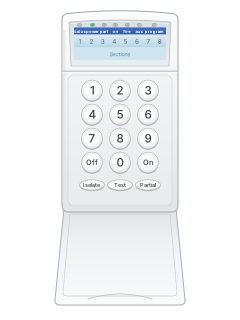
- MCM calls zones sections. Every section light in the area must be out, or that section isolated.
- The Power light should be steady, not flashing.
- Key in your code and press [ON]. This arms every area your code controls. The keypad beeps while the exit timer runs.
- Leave through your exit/entry door before the timer ends. On a keypad with area lights, the area light flashes, then stays on once armed.
- To arm only some areas, press [PARTIAL] after your code, then the area numbers, then [ON].
Disarmyour codeOFF
- Come in through your exit/entry door. This starts the entry timer; on a keypad with area lights, the area light double flashes.
- Key in your code and press [OFF] before the timer ends. This disarms every area your code controls.
- The same keys silence the siren and strobe after an alarm.
- To disarm only some areas, press [PARTIAL] after your code, then the area numbers, then [OFF].
Bypass a zoneyour codeISOLATE2-digit zoneON
- MCM calls bypassing isolating. Key in your code and press [ISOLATE]. Sections already isolated flash slowly.
- Key in each section as 2 digits, such as 04 and 07.
- Press [ON] to arm with those sections isolated.
- Isolated sections clear when you turn the area off, except 24-hour sections.
- Your installer can set a code so it cannot isolate. If yours cannot, ask them.
Alarm memoryyour codeTEST5
- Turn all areas off. Key in your code and press [TEST].
- Press [5]. The sections from the last alarm flash until you press another key.
- Press [OFF] to leave test mode.
- Test mode needs a code your installer has allowed to use it.
Change a codemaster codeONuser numbernew codeONOFF
- Turn all areas off. Key in the 6-digit master code and press [ON].
- Key in the 2-digit user number, then the new 4-digit code and [ON]. For the master code, use 00 and a new 6-digit code.
- To delete a code, press [ISOLATE] in place of the new code, then [ON]. Press [OFF] to finish.
- A new code cannot match another code or be one higher or lower.
- If your installer has set up duress, your code with its last digit one higher sends a silent duress alarm.
Set the date and timemaster codeON97timeONOFFormaster codeON98dateONOFF
- Turn all areas off. Key in the master code and press [ON].
- For the time, press [9] [7], then 4 digits in 24-hour time (1930 is 7.30 pm), then [ON].
- For the date, press [9] [8], then 6 digits: day, month, year (041097 is 4 October 1997). Then [ON].
- Press [OFF] to finish.
Test the systemyour codeTEST1
- Turn all areas off. Key in your code and press [TEST].
- Press [1] for a walk test. Walk past each detector; the beeper sounds and its section light comes on.
- Press [2] to sound the siren for 3 seconds, or [3] to test the strobe.
- Press [OFF] to finish. Test mode ends by itself after 10 minutes.
- Test mode needs a code your installer has allowed to use it.
Trouble lights
- When mains power fails, the keypad beeps. Press any key to stop the beeping.
- If the mains stays off for more than 60 minutes, the panel reports it to the monitoring centre.
- On a keypad with area lights, each area has its own light (see the table).
Pages 4 and 5 of the MCM Icon 16STU User ManualPage 8 of the Icon16 installers manual2Power light steady Mains power and backup battery are fine Power light single flash Mains power has failed Power light double flash The backup battery is low Power light fast flash The keypad is in programming mode Area light on That area is armed Area light single flash Armed, and the exit timer is running Area light double flash A section is in alarm, or the entry timer is running Section light flashing while armed That sensor has set off an alarm Send a test signalyour codeTEST9
- On a panel with a dialler, test 9 sends a test message to your monitoring centre.
- Turn all areas off. Key in your code, press TEST, then 9. Test mode then ends by itself.
- Your code must be allowed to use test mode, and the account and phone numbers must be programmed.
Why is my keypad beeping or showing a trouble light?
Most keypads beep or light up a trouble indicator when something needs attention, such as a low backup battery, a power cut or a lost phone or internet connection. Your user guide explains what each light or code means on your model. If it keeps happening, or you are not sure, call your installer or monitoring company.
All MCM Icon 16 manuals
User guides 1
Installer manuals 1
Nothing here matches that.
Try a shorter search, or search every brand.
More MCM models
Is anyone watching your alarm?
An alarm that only makes a noise relies on someone hearing it. A monitored alarm reports to our A1 graded, NZSA approved control room, watched 24/7 by a team that is New Zealand owned and operated. We can monitor most existing alarms, so you may not need a new one. Thinking about a new alarm or security cameras? Ask us for a quote.
Prefer to talk now? Call us on 0800 339 999.
Home: alarm monitoringBusiness: business monitoringInstaller: bureau monitoring


Manuals are the property of their manufacturers and are provided for reference only; their inclusion here does not imply any endorsement by the manufacturer.