
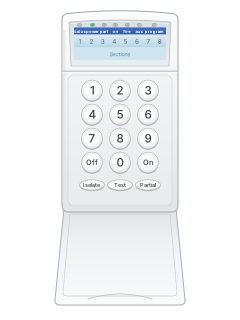
IC8VLED keypad

MCM Icon 8 manuals
Start hereIcon8UsersManual2User guide · 16 pages · 163 KBRead it nowKeypad cheat sheet
Arm (away)your codeOn
- MCM calls zones sections. Every section light must be out, or that section isolated, or it won't arm.
- The Power light should be steady, not flashing. The Program, Fire and Aux lights, if fitted, should be out.
- Key in your code and press ON. The On light flashes and the beeper warns while the exit timer runs.
- Leave only through your exit/entry door before the timer ends.
- Still open when the timer ends? The siren and strobe sound for 2 seconds and the entry timer starts: turn it off before that ends.
Arm while homeyour codePartial
- Partial mode arms only the sections your technician set up for it; the rest stay off.
- The lights of the sections being armed must be out.
- Key in your code and press PARTIAL. The Part light flashes and the beeper warns while the exit timer runs.
- The Part light stays on while the system is partly armed.
Disarmyour codeOff
- Coming in through an exit/entry door starts the entry timer. Key in your code and press OFF before it ends.
- The same keys silence the siren and strobe after a fire, panic or tamper alarm.
- Fire, panic and tamper inputs, if fitted, stay armed all the time.
- If duress is enabled, add one to your code’s last digit; a final 9 becomes 0. This sends a silent duress signal.
Bypass a zoneyour codeIsolatezoneOnoryour codeIsolatezonePartial
- MCM calls bypassing isolating. Key in your code and press ISOLATE. The Program light flashes.
- Key in each section number, such as 04 then 07. A single digit (4) works too.
- Press ON to arm, or PARTIAL for partial mode, with those sections isolated.
- Isolations clear when the system is turned off. Your technician may have them reported to the monitoring centre.
Alarm memoryyour codeTest5
- Turn the system off first. Key in your code and press TEST.
- Press 5. The last alarm is shown flashing until you press another key.
- Press OFF to leave test mode.
- Test mode can't start until all alarm messages have been sent.
Reset smoke detectorsyour codeTest6
- If smoke detectors are fitted: turn the system off, key in your code and press TEST.
- Press 6. Power to the smoke detectors is cut for 5 seconds, which resets them.
- Press OFF to leave test mode.
Panic alarmholdOn+Off
- Hold ON and OFF down together for 3 seconds.
- If your system is monitored, a report goes to the monitoring station. Your installer decides whether the sirens sound too.
Change a codemaster codeOnuser numbernew codeOnOff
- Turn the system off. Enter the 6-digit master code, then press On to enter program mode.
- Key in the 2-digit user number, such as 01, then the new 4-digit code and ON. Repeat for any other user.
- Press OFF to leave program mode.
- A code can't match, or be one away from, another code or the first 4 digits of the master code.
- The master code only changes codes; it can't arm or disarm. To change it, use 00 in place of a user number, then the new 6 digits.
Test the systemyour codeTest1
- Turn the system off. Key in your code and press TEST.
- Press 1 for a walk test: walk past each detector. The beeper sounds and its section light comes on.
- Press 2 for a 3-second siren test, 3 for the strobe, or 4 to turn on every light and the beeper. Not every panel has every test.
- Press OFF to finish. Test mode lasts 10 minutes at most.
- Press 9 to send a test report. With monitoring set up, three beeps mean the monitoring station answered.
Trouble lights
- Mains fail: the Power light single flashes and the keypad beeps. Press any key to stop the beeping.
- With the system off, a section light on means that detector or door is active, such as a door left open.
- When armed, a flashing section light shows which sensor set off the alarm.
- A flashing Fire light must be acknowledged within 30 seconds (your code, then ON or OFF), or the alarm is reported.
- Not every panel has the Fire and Aux lights.
Pages 5 and 6 of the Icon8UsersManual2Page 24 of the Icon8InstallersManual2Power light steady Plug pack power and backup battery are fine Power light single flash Mains power has failed Power light double flash Backup battery low (the mains may be off too) Program light flashing Program, isolate or test mode is on On or Part light single flash Armed, and the exit timer is running On or Part light double flash Armed, and the entry timer is running Fire light flashing, then on Fire input triggered; on means it has been reported Aux light single / double flash Tamper input / panic input activated Send a test signalyour codeTest9
- With a dialler fitted, test 9 sends a test report to your monitoring centre. Your installer must have programmed the account and phone numbers.
- Turn the system off. Test mode won't start until any alarm messages have been sent.
- Key in your code, press Test, then 9.
- Three beeps mean the monitoring station answered. If your installer set up tape dial, they only mean the dialling has finished.
- Press Off to leave test mode.
Why is my keypad beeping or showing a trouble light?
Most keypads beep or light up a trouble indicator when something needs attention, such as a low backup battery, a power cut or a lost phone or internet connection. Your user guide explains what each light or code means on your model. If it keeps happening, or you are not sure, call your installer or monitoring company.
All MCM Icon 8 manuals
User guides 1
Installer manuals 2
Nothing here matches that.
Try a shorter search, or search every brand.
More MCM models
Is anyone watching your alarm?
An alarm that only makes a noise relies on someone hearing it. A monitored alarm reports to our A1 graded, NZSA approved control room, watched 24/7 by a team that is New Zealand owned and operated. We can monitor most existing alarms, so you may not need a new one. Thinking about a new alarm or security cameras? Ask us for a quote.
Prefer to talk now? Call us on 0800 339 999.
Home: alarm monitoringBusiness: business monitoringInstaller: bureau monitoring


Manuals are the property of their manufacturers and are provided for reference only; their inclusion here does not imply any endorsement by the manufacturer.