

Satel PERFECTA manuals
Start herePERFECTA Control Panel User ManualUser guide · 31 pages · 422 KBRead it nowKeypad cheat sheet
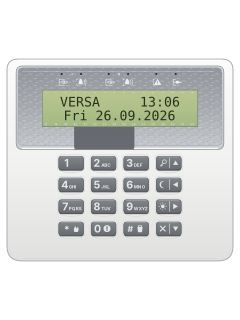
Arm (away)your code▲
- Key in your code, then press ▲ (the key with the key symbol) to arm in full mode. Three short beeps.
- The partition's green light flashes during the exit delay and stays on once it's armed.
- Two partitions? Press 1 or 2 first, then ▲. The keys flash: key in your code and press # (or ▲ again).
- System not ready 1=Arm 2=Check: press 2 to see why, 1 to arm anyway (if offered), or * to cancel.
- To end the exit delay early, hold ▲, ◄ or ► for about 3 seconds.
Arm while homeyour code◄oryour code►
- PERFECTA has night and day modes: only the zones your installer chose for that mode are armed, so you can stay inside.
- Key in your code, then press ◄ (the moon key) for night mode, or ► (the sun key) for day mode.
- If your installer hasn't chosen zones for a mode, that mode isn't available.
- Nobody leaving? After your code, hold the mode key for about 3 seconds instead: no exit delay and no exit beeps.
Disarmyour code▼
- During the entry delay the keypad may give two short beeps every second.
- Key in your code, then press ▼ (the key with the X). Three short beeps: disarmed, and any alarm cleared.
- Two partitions? Press 1 or 2, then ▼. The keys flash: key in your code and press ▼ or #.
- To clear an alarm but stay armed: your code, then ▲, ◄ or ►.
- A code with the duress right, if one has been set up, sends a silent alarm to your monitoring station.
Bypass a zoneyour code*41then#
- PERFECTA calls a bypass until the next disarm inhibiting. The zone's partition must be disarmed, and your code needs the right.
- Key in your code and press * for the user menu, then 4 and 1 (Inhibit).
- Scroll the zones with ▼ and ▲. Press any number key to mark a zone to be inhibited; press again to undo.
- Press # to inhibit the marked zones.
- 4 then 2 (Isolate) works the same way, but the zone stays bypassed until you put it back.
Alarm memoryyour code*5
- A partition's red light shows an alarm or an alarm memory. Its flash pattern shows the type, such as fire or tamper.
- Key in your code, press *, then 5 (Event log). The newest event shows, with its time.
- Press ► for more detail, such as the zone. Scroll with ▲ and ▼.
- Holding 9 for about 3 seconds switches the display to zone symbols, if your installer allows it.
Chime on or offhold8
- Chime is five short beeps when a zone such as a door or window opens. Your installer picks the zones.
- Hold 8 for about 3 seconds, if your installer lets users switch it.
- Four short beeps and a long one: chime on. Three short beeps: chime off.
Panic alarmhold#
- Hold # (the key with the shield) for about 3 seconds, if your installer allows alarms from the keypad.
- Hold * (with the flame) for a fire alarm, or 0 (with the exclamation mark) for a medical alarm.
- Your installer decides whether the panic alarm is loud or silent.
Change a codeyour code*1new code#
- Key in your code and press * for the user menu, then 1 (Change code).
- Key in your new code and press # to save it. * leaves without saving.
- Three wrong codes may lock the keypad for 90 seconds.
- Change the factory user code before the system is used.
Set the date and timeyour code*6time#date#
- Key in your code and press * for the user menu, then 6 (Set time).
- The panel's time shows: key in the new time and press #.
- The date shows next: key in the new date and press #.
Trouble lightsyour code*7
- When the yellow light flashes, key in your code, press *, then 7 to see why. Scroll with ▼ and ▲.
- A flashing M means that trouble has ended. Press * to leave; at 'Clear trouble memory? 1=Yes', press 1.
- The yellow light goes off while a partition is armed.
- With your installer's Grade 2 option on, the keypad shows and sounds less about alarms and troubles.
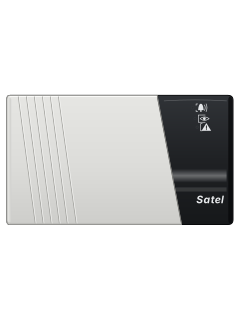
Pages 8 and 9, 11, 22 and 23 of the PERFECTA Control Panel User ManualGreen eye light on That partition is armed Green eye light flashing Exit delay running in that partition Red bell light Alarm or alarm memory in that partition Yellow triangle light flashing The system needs attention, such as a trouble Blue spanner light on or flashing Service mode is running Two short beeps every 3 seconds Trouble or trouble memory Short beep every half second Warning alarm Long beep every second Fire alarm
Why is my keypad beeping or showing a trouble light?
Most keypads beep or light up a trouble indicator when something needs attention, such as a low backup battery, a power cut or a lost phone or internet connection. Your user guide explains what each light or code means on your model. If it keeps happening, or you are not sure, call your installer or monitoring company.
More Satel models
Is anyone watching your alarm?
An alarm that only makes a noise relies on someone hearing it. A monitored alarm reports to our A1 graded, NZSA approved control room, watched 24/7 by a team that is New Zealand owned and operated. We can monitor most existing alarms, so you may not need a new one. Thinking about a new alarm or security cameras? Ask us for a quote.
Prefer to talk now? Call us on 0800 339 999.
Home: alarm monitoringBusiness: business monitoringInstaller: bureau monitoring

Manuals are the property of their manufacturers and are provided for reference only; their inclusion here does not imply any endorsement by the manufacturer.