
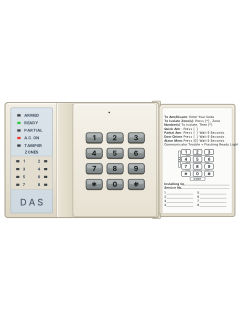
LED code pad

DL100 manuals
Start hereDL100 User ManualUser guide · 10 pages · 99 KBRead it nowKeypad cheat sheet
Arm (away)your codeor3
- Close the doors and windows. The green READY light must be on, or the system will not arm.
- Key in your 4-digit code. Each key press gives a short beep.
- The red ARMED light comes on. Leave before the exit delay runs out.
- Three beeps means the code was not accepted. Press [#] and key it in again.
- If your installer has turned on Quick Arm, pressing [3] arms the system. It cannot disarm.
Arm while home2
- The DL100 and DL150 call this Partial Arm. It works if your installer has turned it on.
- Press [2]. After 5 seconds the ARMED and PARTIAL lights come on.
- Some zones are left off. If a watched zone trips, the keypad sounds for a set time before the siren.
- That gives you time to key in your code if it was an accident.
- To turn Partial Arm off, key in your code. The ARMED and PARTIAL lights go out.
Disarmyour code
- Come in through your usual entry door. The keypad gives a steady tone during the entry delay.
- Key in your code before the delay ends, or the alarm goes off.
- The ARMED light goes off and the tone stops.
- If the ARMED light is flashing when you come in, the alarm went off while you were away.
- In that case leave straight away and call your alarm company or the police.
Bypass a zone*zone*
- Each detector or door contact is a zone. The DL100 and DL150 call bypassing isolating.
- With the system disarmed, press [*], the zone number (1 to 6), then [*] again.
- For several zones, key them in a row: [*] [1] [3] [4] [*] isolates zones 1, 3 and 4.
- An isolated zone's light stays on steady. That zone is not protected.
- All isolated zones go back to normal when you next disarm.
Alarm memory0
- Press [0] and wait 5 seconds.
- The zones that set off the last alarm flash for 5 seconds.
- The memory stays until the next alarm.
- A flashing ARMED light also tells you an alarm happened while the system was armed.
Chime on or off1
- Chime works on the zones your installer has picked for it.
- Press [1]. After 5 seconds a tone tells you chime is on.
- While the system is disarmed, opening a chime zone gives a 1-second beep at the keypad.
- Press [1] again to turn chime off.
Reset smoke detectors#
- This works if your installer has set up smoke detector reset.
- With the system disarmed, press [#]. The panel briefly cuts power to the smoke detectors so they reset.
- On some setups this only happens while the smoke detector's zone light is on or blinking.
Panic alarm*+#
- This works if your installer has turned it on.
- Press [*] and [#] together for one second. The siren sounds.
- If your alarm is monitored, a report can also go to the monitoring centre.
- Some panic alarms are set to be silent at the premises.
- If set up, [1]+[3] held for one second starts a fire alarm, and [4]+[6] a medical alarm.
Change a code*user number#master code*user number#new code*user number#
- Only the master code, user 1, can change codes. Every code has 4 digits.
- Press [*], the user number and [#], then key in the master code.
- Press [*], the user number and [#] again, then key in the new code.
- Finish with [*], the user number and [#]. Other users are 2 to 7 (DL100) or 2 to 15 (DL150).
- To remove a code, give that user the master code as their new code.
Trouble lights
- Keying in your code quietens a pulsing keypad. It does not arm or disarm the system.
- Non-stop beeping after you key in your code means the POWER (or A.C. ON) light is off: no mains power. Key in your code again to quieten it.
- If the keypad seems stuck, press [#] to reset it. If the problem stays, call your service company.
Pages 3, 5, 7 and 8 of the DL100 User ManualPages 4, 11 of the DL150 User ManualREADY light blinking Communicator trouble, such as a lost phone line. If set up, the keypad beeps or the siren sounds too. POWER or A.C. ON light off No mains power. Restore it if you can. POWER or A.C. ON light blinking The backup battery is low TAMPER light on The tamper switch on the panel box has been set off ARMED light blinking An alarm happened while the system was armed Zone light blinking That zone is open Zone light steady That zone is isolated Keypad pulsing A day zone opened, a fire zone has trouble, or you armed or disarmed with mains power off Send a test signal7+9
- If your installer has set it up as a test, pressing [7] and [9] together sends a test report to your monitoring company.
- On the DL100 it is a silent report: no siren sounds.
- It is off from the factory and your installer chooses what it sends, so ask your alarm company before you use it.
Why is my keypad beeping or showing a trouble light?
Most keypads beep or light up a trouble indicator when something needs attention, such as a low backup battery, a power cut or a lost phone or internet connection. Your user guide explains what each light or code means on your model. If it keeps happening, or you are not sure, call your installer or monitoring company.
All DL100 manuals
User guides 1
Installer manuals 3
Nothing here matches that.
Try a shorter search, or search every brand.
More DAS DL100 - 200 models
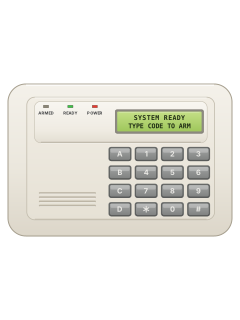
9050 / 9060E LCD code pad (DL300: 9060E only)
DL250
7 manuals
Also fitsDL200, 3 manualsDL300, 6 manuals
9050 / 9060E LCD code pad (DL300: 9060E only)
DL300
6 manuals
Also fitsDL200, 3 manualsDL250, 7 manuals
9050 / 9060E LCD code pad (DL300: 9060E only)
DL200
3 manuals
Also fitsDL250, 7 manualsDL300, 6 manuals
LED code pad
DL150
2 manuals
Also fitsDL100, 4 manualsDL200, 3 manualsDL250, 7 manualsDL300, 6 manuals100L, 1 manual
LED code pad
100L
1 manual
Also fitsDL100, 4 manualsDL150, 2 manualsDL200, 3 manualsDL250, 7 manualsDL300, 6 manuals
Is anyone watching your alarm?
An alarm that only makes a noise relies on someone hearing it. A monitored alarm reports to our A1 graded, NZSA approved control room, watched 24/7 by a team that is New Zealand owned and operated. We can monitor most existing alarms, so you may not need a new one. Thinking about a new alarm or security cameras? Ask us for a quote.
Prefer to talk now? Call us on 0800 339 999.
Home: alarm monitoringBusiness: business monitoringInstaller: bureau monitoring


Manuals are the property of their manufacturers and are provided for reference only; their inclusion here does not imply any endorsement by the manufacturer.