

ICT EliteSuite manuals
Start hereEliteSuite Alphanumeric LCD Keypad User ManualUser guide · 24 pages · 928 KBRead it nowELT-KLCD LCD keypad cheat sheet
Arm (away)your code
- EliteSuite calls this regular arming. Close the doors and windows: the Ready light (the tick) must be on.
- Key in your code. Four tones confirm it and the exit delay starts.
- The keypad beeps in pairs while you leave, faster once only 10 seconds are left.
- If your installer or property manager has turned on quick arming, holding the key with the closed padlock (Arm) also arms.
- Ready light off because of a motion detector near the keypad? If it is a force zone, press FORCE, then your code.
Arm while homeSTAYyour codeorholdSTAY
- Stay arming arms the doors and windows but leaves the stay zones, such as motion detectors, off.
- Close everything that isn't a stay zone. Press STAY, then key in your code. The exit delay starts.
- Holding STAY for 2 seconds also stay arms, if your installer or property manager has turned on one key arming.
- Leaving after all? Hold FORCE, or the key with the closed padlock (Arm), to start the exit delay and arm fully.
Disarmyour code
- Opening the entry door starts a steady tone. You have until the entry time runs out.
- Key in your code. Four tones confirm it is disarmed.
- In an alarm, the Armed light (the padlock) flashes. Your code stops the alarm and disarms.
- Under threat, use user 8's code. It arms or disarms as usual and sends a silent duress message.
Bypass a zone
- Each detector or door contact is a zone. A bypassed zone is ignored the next time you arm; disarming clears it.
- Press BYPASS and key in your code. Scroll to a zone with the up and down keys and press BYPASS to change it.
- Press the key with the return arrow (Enter) to save and leave.
- Same zones each time? After BYPASS and your code, hold BYPASS for 2 seconds to load the last ones, then save.
Pages 15 and 16 of the EliteSuite Alphanumeric LCD Keypad User ManualReturn-arrow key (Enter) Saves the bypasses and leaves X key (Clear) Leaves without changes FORCE Takes every bypass off BYPASS held 2 seconds Loads the zones bypassed last time Alarm memoryholdMEMORYorMEMORYyour code
- After an alarm, the display switches between its usual screen and Alarm Memory [MEMORY] To view.
- Hold MEMORY for 2 seconds, or press MEMORY and key in your code.
- Scroll through the alarms with the up and down keys. CLEAR (the X) leaves.
- It is also item 3 in the main menu: press the key with the stacked pages (Menu), then your code.
- The alarm memory clears itself the next time you arm.
Chime on or off
- A chime zone, such as the front door, sounds a tone each time it opens.
- Press the key with the stacked pages (Menu), key in your code, then press 1 for the chime menu.
- Scroll to a zone with the up and down keys. The key with the return arrow (Enter) turns its chime on or off.
Pages 5, 17 of the EliteSuite Alphanumeric LCD Keypad User ManualStacked-pages key (Menu) Opens the main menu, after your code 1 in the main menu Chime zones Return-arrow key (Enter) Turns the zone's chime on or off FORCE Takes chime off every zone X key (Clear) Leaves the menu Fire alarmyour code
- A fire alarm sounds three tones every 2 seconds until someone keys in a valid code.
- Key in your code to reset it.
- On a delayed fire zone, the report waits 30 seconds. A key press in that time quiets the alarm for 90 seconds.
- No fire? Ring your property manager or security company straight away to stop a call-out.
- Your installer or property manager has to turn the fire features on.
Panic alarmhold1+3
- Hold 1 and 3 together for 3 seconds for a panic alarm.
- Hold 4 and 6 for a medical alarm, or 7 and 9 for a fire alarm, the same way.
- Depending on set-up, sirens sound or a silent alarm goes to your monitoring station or property manager.
- Your installer or property manager has to turn these keys on.
Change a code
- Only a master code can change codes. As standard, user 01 is the master.
- Press the key with the stacked pages (Menu), key in the master code, then press 5. The display shows Select user.
- Scroll to the user with the up and down keys, press the key with the return arrow (Enter), then press 1 for Modify Code.
- Key in the new four-digit code and press Enter. Key it in again and press Enter to confirm.
- To delete a code instead, press FORCE while the old code shows.
Pages 5, 9 and 10 of the EliteSuite Alphanumeric LCD Keypad User ManualStacked-pages key (Menu) Opens the main menu, after your code 5 in the main menu User setup 1 in user setup Modify Code Return-arrow key (Enter) Picks the user, then saves the code FORCE Deletes the code shown Trouble lights
- A flashing power/trouble light (the top one) means a trouble. The keypad may beep every 120 seconds.
- Press the key with the stacked pages (Menu), key in your code, then press 4. Scroll through the troubles with the up and down keys.
- Viewing the trouble stops the beeping. X leaves the menu.
- Troubles clear themselves once fixed. Tell your property manager or security company when one shows.
Pages 5 to 8 of the EliteSuite Alphanumeric LCD Keypad User ManualPower/trouble light on Powered and working normally Power/trouble light flashing A trouble: see it in the main menu, item 4 Power/trouble light off Complete power failure Host Comms The link to the host system is offline, for maintenance or a fault Zone Fault A zone or its wiring has a fault: have the system serviced Cover Tamper The system's cover is open and may be damaged Timer Loss Power failed completely and the time was lost. It updates itself Fire Loop A fire detector or its wiring has a fault
All ICT EliteSuite manuals
Nothing here matches that.
Try a shorter search, or search every brand.
More ICT models
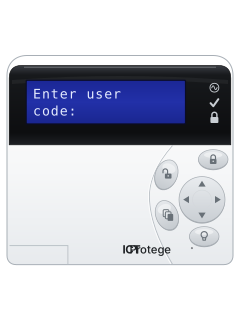
PRT-KLCDAlphanumeric LCD keypad
Protege GX
6 manuals
Also fitsProtege Keypads, 4 manualsProtege SE, 5 manualsProtege LE, 3 manualsProtege WX, 4 manuals
PRT-KLCDAlphanumeric LCD keypad
Protege SE
5 manuals
Also fitsProtege Keypads, 4 manualsProtege GX, 6 manualsProtege LE, 3 manualsProtege WX, 4 manuals
PRT-KLCDAlphanumeric LCD keypad
Protege Keypads
4 manuals
Also fitsProtege GX, 6 manualsProtege SE, 5 manualsProtege LE, 3 manualsProtege WX, 4 manuals
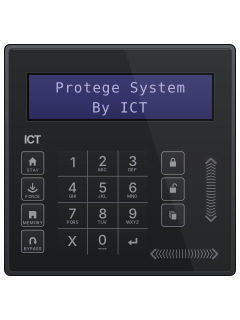
PRT-KLCDAlphanumeric LCD keypad
Protege LE
3 manuals
Also fitsProtege Keypads, 4 manualsProtege GX, 6 manualsProtege SE, 5 manualsProtege WX, 4 manuals
Is anyone watching your alarm?
An alarm that only makes a noise relies on someone hearing it. A monitored alarm reports to our A1 graded, NZSA approved control room, watched 24/7 by a team that is New Zealand owned and operated. We can monitor most existing alarms, so you may not need a new one. Thinking about a new alarm or security cameras? Ask us for a quote.
Prefer to talk now? Call us on 0800 339 999.
Home: alarm monitoringBusiness: business monitoringInstaller: bureau monitoring


Manuals are the property of their manufacturers and are provided for reference only; their inclusion here does not imply any endorsement by the manufacturer.