
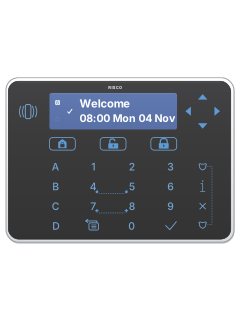
Elegant touch keypad (RPKEL / RPKELP)

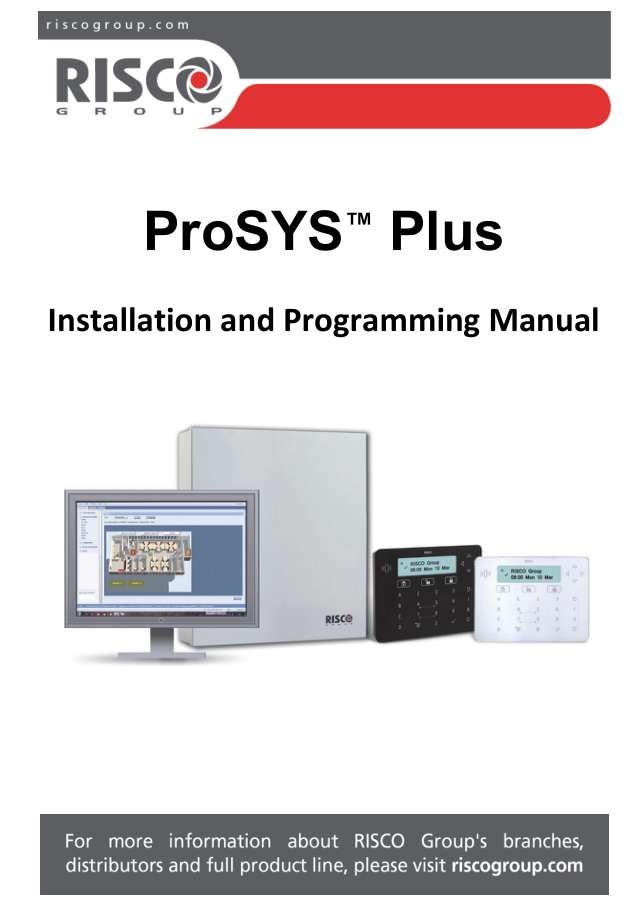
Risco ProSYS Plus manuals
Start hereElegant Keypad User GuideUser guide · 8 pages · 390 KBRead it nowElegant keypad cheat sheet
Arm (away)the key with a padlock on it
- Check the tick (Ready) icon is on. A slowly flashing tick means ready, with the entry/exit door still open.
- Elegant keypad, if quick arming is enabled: touch the closed-padlock key. For the LCD keypad, see its own guide.
- The padlock icon flashes slowly during the exit time, then stays on once the system is armed.
- If quick arming is off, a code is needed; ask your installer for the sequence.
Pages 3 and 4 of the Elegant Keypad User GuidePage 82 of the ProSYS Plus Installer ManualClosed-padlock key Away (full) arming Padlock icon flashing slowly Exit time running Padlock icon on Armed Arm while homethe key with a house on it
- Stay arming leaves off the zones your installer set up as inside zones, so you can move about indoors.
- Elegant keypad, if quick arming is enabled: touch the house key. For the LCD keypad, see its own guide.
- The house icon comes on, and the padlock icon shows the system is armed.
- If quick arming is off, ask your installer for the code sequence.
Pages 82, 106, 108 of the ProSYS Plus Installer ManualPages 3 and 4 of the Elegant Keypad User GuideHouse key Stay arming House icon on, padlock icon on Stay armed Disarmyour codethe key with an open padlock on it
- Elegant keypad: key in your code, then touch the open-padlock key. For the LCD keypad, see its own guide.
- The padlock icon goes out. A fast-flashing padlock means an alarm has gone off.
- Under threat, key in the duress code your Grand Master set up, then the open padlock. The panel stays silent and your monitoring company is alerted.
- Three wrong codes in a row are reported to your monitoring company.
Pages 3 and 4 of the Elegant Keypad User GuidePages 74, 83 of the ProSYS Plus Installer ManualOpen-padlock key Disarm, after your code Padlock icon off Disarmed Padlock icon flashing fast An alarm has gone off Panic alarmholdthe key with a shield on it+the key with a shield on itorhold4+5orhold7+8
- On the Elegant keypad, hold the pair for the alarm you need, listed below, together for at least 2 seconds.
- The LCD keypad (RP432KP) may use other keys: see its own guide.
- Your installer can turn these keys on or off for each keypad.
- A panic alarm is silent at the house unless your installer set the sirens to sound. A report always goes to the monitoring station.
Pages 5 and 6 of the Elegant Keypad User GuidePages 49, 58, 83, 199 of the ProSYS Plus Installer ManualThe two shield keys (top and bottom right) Panic alarm 4 and 5 Fire alarm 7 and 8 Emergency alarm Trouble lightsholdi
- On the Elegant keypad, hold the i key for 2 seconds to see the system status.
- A fast-flashing power icon means a trouble. The View menu lists troubles under Trouble.
- A speaker wired to the panel can beep while there is a trouble; your installer sets its volume.
- Only professional installers should service the system: call yours about any trouble.
Pages 3 and 4 of the Elegant Keypad User GuidePages 21, 49, 98, 211 of the ProSYS Plus Installer ManualPower icon on Mains power and backup battery are fine Power icon flashing fast A system trouble Power icon off No power Tick (Ready) off Not ready: a zone is open Padlock flashing slowly / fast Exit time running / alarm House icon on Stay armed, or a zone is bypassed Flame on / flashing Fire alarm / fire circuit problem Tamper icon on Something has been tampered with Lock keys to cleanhold1+3
- This is the Elegant keypad's cleaning lock. For the LCD keypad (RP432KP), see its own guide.
- Hold 1 and 3 together for 2 seconds. The keypad beeps to show its keys are locked.
- It unlocks itself after 45 seconds, or hold 1 and 3 again to unlock it sooner.
- Wipe it with a soft damp cloth, and keep liquid off the screen.
Why is my keypad beeping or showing a trouble light?
Most keypads beep or light up a trouble indicator when something needs attention, such as a low backup battery, a power cut or a lost phone or internet connection. Your user guide explains what each light or code means on your model. If it keeps happening, or you are not sure, call your installer or monitoring company.
All Risco ProSYS Plus manuals
User guides 1
Installer manuals 1
Nothing here matches that.
Try a shorter search, or search every brand.
More Risco models
Is anyone watching your alarm?
An alarm that only makes a noise relies on someone hearing it. A monitored alarm reports to our A1 graded, NZSA approved control room, watched 24/7 by a team that is New Zealand owned and operated. We can monitor most existing alarms, so you may not need a new one. Thinking about a new alarm or security cameras? Ask us for a quote.
Prefer to talk now? Call us on 0800 339 999.
Home: alarm monitoringBusiness: business monitoringInstaller: bureau monitoring


Manuals are the property of their manufacturers and are provided for reference only; their inclusion here does not imply any endorsement by the manufacturer.