
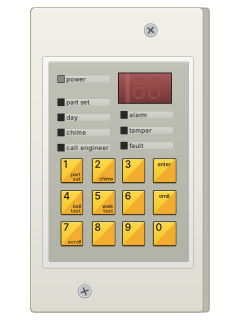
7-segmentRemote keypad with red display and yellow keys (9100 series)
Scantronic 9100 / 9105 manuals
Start hereScantronic 9100 9105 User GuideUser guide · 3 pages · 23 KBRead it nowKeypad cheat sheet
Arm (away)your code
- Key in your user code to set the whole system.
- The same user code unsets it again.
Arm while home1enteryour code
- Scantronic calls this part set. Press 1, then enter, then key in your user code.
- To unset, key in your user code.
Disarmyour code
- Key in your user code to unset the system.
- Keying in a user code also sets the system when it's unset.
Bypass a zoneyour codeomitzoneenter
- Scantronic calls this omitting a zone. Key in your user code, then press omit.
- Key in the zone number, then press enter.
- To omit more zones, key in each zone number and press enter after each one.
Read the log7enter
- Press 7, then enter, to read the event log.
- The guide lists no user code for this one.
Chime on or off2enteryour code
- Press 2, then enter, then key in your user code.
- The same keys turn chime on, or off if it's on.
Test the system4enteryour codeor5enteryour code
- Bell test: press 4, then enter, then key in your user code.
- Walk test: press 5, then enter, then your user code.
- To end the walk test, do the same again.
Why is my keypad beeping or showing a trouble light?
Most keypads beep or light up a trouble indicator when something needs attention, such as a low backup battery, a power cut or a lost phone or internet connection. Your user guide explains what each light or code means on your model. If it keeps happening, or you are not sure, call your installer or monitoring company.
All Scantronic 9100 / 9105 manuals
User guides 1
Nothing here matches that.
Try a shorter search, or search every brand.
More Scantronic models
Is anyone watching your alarm?
An alarm that only makes a noise relies on someone hearing it. A monitored alarm reports to our A1 graded, NZSA approved control room, watched 24/7 by a team that is New Zealand owned and operated. We can monitor most existing alarms, so you may not need a new one. Thinking about a new alarm or security cameras? Ask us for a quote.
Prefer to talk now? Call us on 0800 339 999.
Home: alarm monitoringBusiness: business monitoringInstaller: bureau monitoring


Manuals are the property of their manufacturers and are provided for reference only; their inclusion here does not imply any endorsement by the manufacturer.