
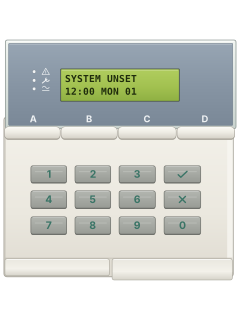
9941 / 9943LCD keypad with A B C D keys
Scantronic 9651 manuals
Start hereScantronic 9651 Mk4 User Guide 11980075User guide · 28 pages · 503 KBRead it nowKeypad cheat sheet
Arm (away)your codeAoryour codethe key with a tick on it
- Close all doors and windows. Key in your code, or hold your tag against a 9943 keypad. The display asks Set?
- Press A to set level A, which covers the whole premises. Pressing the tick key (✓) instead of a level key also sets level A.
- A steady exit tone sounds. It breaks up if the final door is open, or if a detector is being set off.
- Leave by your exit route. A double beep and Set A on the display mean the alarm is on.
- Your installer chose how it finishes: an exit time, shutting or locking the final door, or an exit button.
Arm while homeyour codeB
- The 9651 calls these levels. B, C and D each protect part of the premises while you use the rest.
- Key in your code (or show a tag on a 9943), then press B, C or D. Only one level can be set at a time.
- Once it has set you hear a double beep, and the display shows which level is on.
- Some levels set with no exit tone, or at once with no exit time. The double beep still tells you it's set.
- A three-position keyswitch, if fitted, sets level B without a code.
Disarmyour code
- Come in by your entry route. A galloping entry tone sounds while the entry time runs.
- Go to the keypad and key in your code before the entry time ends. On a 9943, you can show your tag instead.
- The tone stops and you hear a double beep. Every level is now unset.
- Wrong code? Press the cross key (✗) and try again. Four wrong codes lock every keypad for 90 seconds.
- Set it off by mistake? If Alarm Abort is on, your code cancels the alarm within the time your monitoring centre allows.
Bypass a zoneyour code22-digit zonethe key with a tick on itthe key with a cross mark on it
- The 9651 calls this omitting. Only the zones your installer allows can be omitted.
- Key in your code (or show a tag on a 9943), then press 2. The display shows Omit Zone?
- Key in the zone as 2 digits, such as 07, then press the tick key (✓). A double beep and 07o mean it's omitted; 07X means it can't be.
- Press the cross key (✗) to finish. For a normal zone, confirm Omit Zone? with the tick key when setting.
- Normal zones return after you unset. A 24-hour zone stays omitted until you repeat the omission steps; setting needs no confirmation.
Alarm memoryyour codeoryour code5
- Two-tone sound and Fire on the display: get everyone out, call the fire service if there's a fire, and don't unset it.
- For other alarms, key in your code to stop the sounders. The display shows the first zone that went off.
- Press the tick key (✓) at Next to see other zones. If your system allows it, key in your code again to reset: a double beep confirms.
- Call Installer on the display: your alarm company must reset it. A reset code: write it down and ring your monitoring centre.
- Later, your code then 5 shows the event log, newest first. 1 goes to earlier events, 3 to later ones; the cross key (✗) leaves.
Chime on or offyour code7the key with a tick on it
- Chime is a tone when certain doors open while the alarm is off. Your installer picks the doors.
- Key in your code (or show a tag on a 9943), then press 7. This switches chime on, or off if it was on.
- The display shows the setting, such as Chime = ON. Turning it on gives a double beep.
- Press the tick key (✓) to finish.
Panic alarm1+3or4+6or7+9
- These two-key alarms work only if your installer has turned them on.
- Press 1 and 3 together for a panic alarm.
- Press 4 and 6 together to call for medical help, or 7 and 9 together for a fire alarm.
Change a codemaster code4
- Only the master user (user 1) can change codes, with their code, not a tag. If the master code is still the factory one, change it first.
- Key in the master code, then press 4. At Old Code= key in the code you want to change, then press the tick key (✓).
- The user's number and name show: press the tick key. Key in the new code, not starting with 0, and press the tick key to save.
- A user with no code yet starts from a stand-in code at Old Code=: your installer can tell you what to key in.
- To delete a user's code and tag, key in 0000 as the new code.
Set the date and timemaster code6
- Only the master user can do this, with their code, not a tag. The display shows the date, such as D04 M11 Y99.
- Key in the day as 2 digits and press the tick key (✓). Then the month (01 to 12) and tick, then the year and tick.
- The time shows next. Key in the hour on the 24-hour clock and press the tick key, then the minutes and the tick key.
- The new date and time show. Check the clock after daylight saving changes, or a power cut with a low battery.
Trouble lightsyour code1
- Alarms, faults and tampers are kept as alerts. On some systems the lamps stay dark until you key in your code.
- Key in your code, then press 1 to see the first alert. Press the tick key (✓) at Next for each of the others.
- Active means the problem is still there. Inactive means it has cleared, such as mains power coming back.
- With the spanner lamp on, the keypad beeps over and over. If the fault clears, your code stops the beeping.
- Call Installer at the end means your alarm company needs to fix it. The date and time means carry on as normal.
Pages 4 and 5, 13, 18 of the Scantronic 9651 Mk4 User Guide 11980075Alert lamp (triangle) flashing An alarm, fault or tamper you haven't looked at yet Alert lamp (triangle) on steady You've seen the alerts, but something still isn't right Alert lamp off Everything has been put right Service lamp (spanner) on The system needs an installer reset: call your alarm company Mains lamp (wave) on Running on mains power Mains lamp (wave) flashing No mains power: running on the backup battery Battery Missing The backup battery is missing: your alarm company needs to fit one Plugby Line Fail A communications fault: you may still set, but alarms may not reach the monitoring centre
Why is my keypad beeping or showing a trouble light?
Most keypads beep or light up a trouble indicator when something needs attention, such as a low backup battery, a power cut or a lost phone or internet connection. Your user guide explains what each light or code means on your model. If it keeps happening, or you are not sure, call your installer or monitoring company.
All Scantronic 9651 manuals
Installer manuals 1
Nothing here matches that.
Try a shorter search, or search every brand.
More Scantronic models
Is anyone watching your alarm?
An alarm that only makes a noise relies on someone hearing it. A monitored alarm reports to our A1 graded, NZSA approved control room, watched 24/7 by a team that is New Zealand owned and operated. We can monitor most existing alarms, so you may not need a new one. Thinking about a new alarm or security cameras? Ask us for a quote.
Prefer to talk now? Call us on 0800 339 999.
Home: alarm monitoringBusiness: business monitoringInstaller: bureau monitoring


Manuals are the property of their manufacturers and are provided for reference only; their inclusion here does not imply any endorsement by the manufacturer.