
Scantronic 9750 / 9850 manuals
Start hereScantronic 9750 9850 User Guide 496479User guide · 24 pages · 305 KBRead it nowKeypad cheat sheet
Arm (away)your codeA
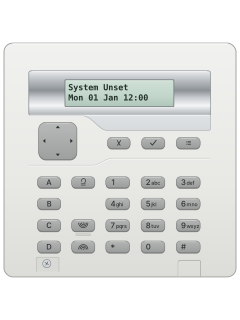
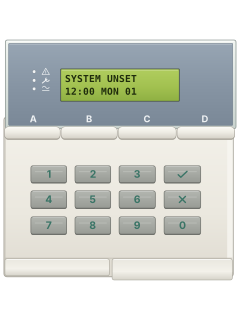
- Close all doors and windows. Key in your code, then press A (or the tick key, ✓) to set level A, the whole premises.
- On a 9925 arming station, key in your code, then press 1 or #.
- A continuous exit tone sounds as you leave. An interrupted tone means something is setting off a detector.
- Close the final door. It sets when the exit time ends, or 7 seconds after the door shuts or you press an exit button.
- The display then shows Level A set. If a detector is still triggered, it alarms instead: key in your code at once, then reset.
Arm while homeyour codeB
- Levels B and C each protect part of the premises while you use the rest. A 9750 has level B only.
- Close the doors and windows in the part being protected. Key in your code, then press B (or C).
- A quieter part-set exit tone sounds. Leave that part by your exit route, closing the final door if you need to.
- The tone stops once it has set, and the display shows the level, such as Level B Set.
- Some levels set silently or at once. On a 9925 arming station, press 2 for level B or 3 for C after your code.
Disarmyour code
- Come in by your entry route. A galloping entry tone sounds while the entry time runs.
- Key in your code at the keypad or arming station. The tone stops and the system is unset.
- Changed your mind while setting? Key in your code again to stop it.
- A keyswitch turned to OFF unsets at once. With a 725r remote, open the entry door, then press OFF.
- With Alarm Abort on a monitored system, you normally have at least 90 seconds to cancel an accidental alarm before police are called.
Bypass a zoneyour codeA
- For the 9930 keypad: omission happens during setting. Read these steps first; the cross key must follow the level key within 5 seconds.
- Key in your code, press the level key, then the cross key (✗) within 5 seconds. Only installer-approved zones can be omitted.
- Key in the zone: 1 to 9 as one digit; for 10 to 16, cross then 0 to 6 (cross 2 is zone 12).
- Press cross again within 5 seconds to omit another. Setting carries on, and the omit lasts for this set only.
- A 24-hour zone, such as a fire door: your code, the cross key, the zone. To put it back, do the same, then the tick key (✓).
Alarm memoryyour code5
- Fire alarm (warbling tone, Fire on the display): get everyone out and call the fire service. Don't unset it.
- Other alarms: key in your code. The sounders stop and the display shows the first zone that went off.
- Spanner lamp dark: reset it yourself with your code, then the tick key (✓). The display clears.
- Spanner lamp lit: your alarm company resets it, with an engineer visit or a reset code over the phone.
- Later, your code then 5 shows the log of the last 250 events. 1 goes back, 3 goes forward, the cross key (✗) leaves.
Chime on or offyour code7
- Chime is a tone when certain doors open while the alarm is off. Your installer chooses the doors.
- Key in your code, then press 7. The display shows Chime = ON.
- Press 7 again to switch it off instead.
- Press the tick key (✓) to finish.
Panic alarm1+3
- This works only if your installer has turned it on.
- Press 1 and 3 together on the keypad for a panic alarm.
- On a 725r remote, press FULL and OFF together.
- A duress code, if your installer has made it available, unsets as normal but sends a silent alarm to your monitoring centre.
Change a codemaster code4
- Codes are changed with user 1's code, the master code. If it is still the factory code, change it first. Up to 8 codes are held.
- Key in user 1's code, then press 4. At Old Code= key in the code you want to change, then press the tick key (✓).
- A user with no code yet starts from a stand-in code at Old Code=: your installer can tell you what to key in.
- Key in the new code, not starting with 0, and press the tick key to save it. A new code of 0000 deletes that code.
- A 9850 can use 4- or 6-digit codes, as your installer sets. A 9750 uses 4.
Set the date and timeyour code6
- Key in your code, then press 6. The display shows the date, such as D04 M11 Y99.
- Key in the day as 2 digits and press the tick key (✓). Then the month (01 to 12) and tick, then the year and tick.
- The time shows next. Key in the hour on the 24-hour clock and press the tick key, then the minutes and the tick key.
- The new date and time show. Check the clock after daylight saving changes, or a power cut with a low battery.
Trouble lights
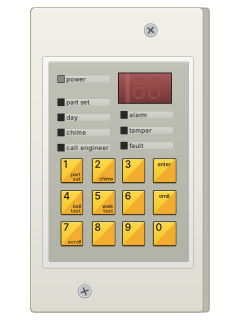
- The mains lamp should always be lit. The other lamps come on when something needs attention.
- After an alarm, the spanner lamp also tells you who can reset it: see Alarm memory.
- The 9930 keypad's log names faults, such as AC Fail or Tel Line Fault: key in your code, then press 5.
- Press 1 for earlier events and 3 for later ones. The tick key (✓) shows when each happened; the cross key (✗) leaves.
- Your installer may have set the display to hide which level is set.
Pages 4 and 5, 7, 15, 17, 19 to 21 of the Scantronic 9750 9850 User Guide 496479Mains lamp (wave) on Mains power is on Mains lamp flashing slowly No mains power: running on the backup battery Mains lamp off The system has no power at all Phone lamp on (9930 keypad) The phone line isn't working properly Spanner lamp on The system needs your engineer or installer Padlock lamp on (9925) The system is set, if your installer has set it up to show this Tick lamp on (9925) Every zone is closed: ready to set Batt Load Fail (in the log) The backup battery failed its test: call your installer
Why is my keypad beeping or showing a trouble light?
Most keypads beep or light up a trouble indicator when something needs attention, such as a low backup battery, a power cut or a lost phone or internet connection. Your user guide explains what each light or code means on your model. If it keeps happening, or you are not sure, call your installer or monitoring company.
All Scantronic 9750 / 9850 manuals
Nothing here matches that.
Try a shorter search, or search every brand.
More Scantronic models
Is anyone watching your alarm?
An alarm that only makes a noise relies on someone hearing it. A monitored alarm reports to our A1 graded, NZSA approved control room, watched 24/7 by a team that is New Zealand owned and operated. We can monitor most existing alarms, so you may not need a new one. Thinking about a new alarm or security cameras? Ask us for a quote.
Prefer to talk now? Call us on 0800 339 999.
Home: alarm monitoringBusiness: business monitoringInstaller: bureau monitoring


Manuals are the property of their manufacturers and are provided for reference only; their inclusion here does not imply any endorsement by the manufacturer.