
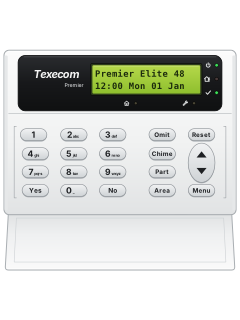
LCD keypad

Texecom Premier 48 / 88 / 168 / 640 manuals
Start hereTexecom Premier 48 68 168 640 User GuideUser guide · 64 pages · 491 KBRead it nowKeypad cheat sheet
Arm (away)your codeYesorArea
- Close all doors and windows: the Ready light should be on.
- Key in your code. At Do you want to Arm System? press Yes. For a silent arm, press 2 before Yes.
- The display shows Areas in Exit. Leave; unless you chose silent arming, the exit tone sounds until the system arms.
- Quick arm, if your installer has turned it on: press Area without a code.
- Repeated bleeps and a zone on the display mean something is open: close it or omit it before the exit time ends.
Arm while homeyour codePart1Yesor1Part
- Part arms 1 to 3 leave chosen zones off. Close doors and windows in the protected area; the Ready light must be on.
- Key in your code, then press Part. Press 1, 2 or 3 to pick the part arm: the display names it.
- Press Yes to arm, or Chime to arm without the exit tone. Leave the part being armed.
- The tone stops once it has armed, and the display shows PART ARMED.
- Quick part arm, if your installer has turned it on: press 1, 2 or 3, then Part.
Disarmyour codeoryour codeYes
- Come in by your entry door. The entry tone starts and the display shows Areas in Entry.
- Key in your code before the entry time ends. The tone stops and the system is disarmed.
- No entry tone running, say you're already inside? Key in your code, then press Yes at Disarm System?
- If the entry time runs out, the inside sounders go off; then the full alarm, straight away or after a second entry time.
- Changed your mind while leaving? Key in your code and press Yes at Cancel Exit?
Bypass a zoneyour codeOmitzoneOmitMenu
- Premier calls this omitting. Only zones set up as omittable can be: they show a star right of the zone number.
- Key in your code and press Omit. Key in the zone as 3 digits, such as 010, or scroll to it.
- Press Omit again: is Omitted shows, and a star appears left of the number. Repeat for other zones.
- Press Menu when finished, then arm as normal. The Omit light stays on while zones are omitted.
- Omitted zones come back when you next disarm, unless your system is set up otherwise.
Alarm memoryyour codethenyour codeResetoryour codeMenuYesYes
- Key in your code. The sounders stop and the display names the zone that caused the alarm. The scroll key slows it down.
- To reset, key in your code again and press Reset. The strobe stops and the keypad chimes.
- Reset won't clear it? Your system needs an engineer reset or an anti-code: ring the number on the display, or your alarm company.
- Anti-code reset: your code, then Reset, shows a number. Quote it to your alarm company and key in the 4-digit code they give.
- Event log: your code, then Menu, Yes and Yes. Scroll through it, then press Menu and Reset to leave.
Chime on or offChime
- With chime on, the sounders inside chime when chosen zones open, such as the front door. Only zones set up for chime will sound.
- Press Chime. The chime tone means it's now on.
- Press Chime again to turn it off: you hear the fault tone.
- Your system may also turn chime on and off by itself, if it has been set up to.
Panic alarmhold1+3orhold4+6orhold7+9
- Press and hold both keys together. They work only if your installer has turned them on for your keypad.
- The UK and export set-ups swap the panic and fire pairs (see the table). Ask your installer which one your panel has.
- Panic can be set up to be silent, or to wait a short time before it goes off.
- They don't work while the keypad is locked (Yes and No pressed together).
Pages 7 and 8 of the Texecom Premier 48 68 168 640 User Guide1 and 3 UK set-up: panic alarm. Export set-up: fire 4 and 6 UK set-up: fire. Export set-up: panic alarm 7 and 9 Medical alarm, on both set-ups Change a codeyour codeMenuYes2Yesnew codeYes
- This changes your own code, the one you key in first, if your code is allowed to. Codes are 4, 5 or 6 digits.
- Key in your code, then press Menu and Yes. At View Event Log? press 2, then Yes at Change Code?
- Key in your new code and press Yes to accept it. Press Reset to leave.
- Write the new code down first: a forgotten code needs an engineer visit, which may cost you.
Set the date and timeyour codeMenuYes7YestimeYesoryour codeMenuYes8YesdateYes
- Time: your code, then Menu, Yes, 7 and Yes. Key in the time as 4 digits (24-hour clock), then Yes.
- Date: your code, then Menu, Yes, 8 and Yes. Key in the date as DDMMYY, then Yes.
- On the time screen, Reset switches between BST and GMT (UK summer and winter time) instead of leaving: save with Yes.
- Press Reset to leave the menu.
- Only codes given this option can set the time and date.
Trouble lights
- Faults show as a message on the display. The keypad may chime every minute: your code or Reset stops the chime.
- Service light on: the system needs attention, so contact your alarm company.
- On the pictured Premier keypad, Ready is the tick light and Service is the spanner light.
Pages 6, 9 and 10 of the Texecom Premier 48 68 168 640 User GuidePower light flashing No mains power: running on the backup battery Ready light off A zone is open: close it or omit it before arming Mains Power Off Clears itself when the power comes back Phone Line Fault Clears itself when the line is working again Battery Fault A backup battery problem: contact your alarm company now Tamper, with the alarm sounding Your code silences it. Contact your alarm company now Service Required Due for a service, or a fault needs checking. It can usually still be used Remote Keypad is now LOCKED out Too many wrong codes: it usually unlocks after 5 minutes
Why is my keypad beeping or showing a trouble light?
Most keypads beep or light up a trouble indicator when something needs attention, such as a low backup battery, a power cut or a lost phone or internet connection. Your user guide explains what each light or code means on your model. If it keeps happening, or you are not sure, call your installer or monitoring company.
All Texecom Premier 48 / 88 / 168 / 640 manuals
Installer manuals 1

Nothing here matches that.
Try a shorter search, or search every brand.
More Texecom models
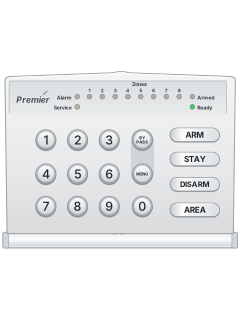
Is anyone watching your alarm?
An alarm that only makes a noise relies on someone hearing it. A monitored alarm reports to our A1 graded, NZSA approved control room, watched 24/7 by a team that is New Zealand owned and operated. We can monitor most existing alarms, so you may not need a new one. Thinking about a new alarm or security cameras? Ask us for a quote.
Prefer to talk now? Call us on 0800 339 999.
Home: alarm monitoringBusiness: business monitoringInstaller: bureau monitoring


Manuals are the property of their manufacturers and are provided for reference only; their inclusion here does not imply any endorsement by the manufacturer.