
Aritech CD7203 / CD7212 manuals
Start hereAritech Advisor CD7203 CD95-15003 User ManualUser guide · 24 pages · 521 KBRead it nowKeypad cheat sheet
Arm (away)0your code✓✓
- Close every door and window first: an open zone stops the alarm arming.
- Key in 0, then your code. Each digit shows as *. Arm Menu appears: press ✓ (Accept), then ✓ again at Normal Set.
- System Arming, then Leave now shows and the buzzer beeps. Leave by your exit route. System Armed shows once it's set.
- Split into areas? After your code, key in the area number within a few seconds, then ✓ twice. For another area, key in its number at Enter Area No., then ✓ twice.
- Open Zone(s) with a zone listed means something is open: press 0 to stop, close it and try again.
Arm while home0your code✓↓✓
- Aritech calls this Partguard: it arms the system with the zones your installer chose left off.
- Key in 0, then your code (and the area number, if split). At Arm Menu press ✓, then ↓ to Partguard, then ✓.
- Leave now shows while the exit time runs, then Area 1 Partguard (or your area's number).
- Open zones are listed as for normal arming: close them, or press ↑ to inhibit one.
Disarm0your code✓✓
- Opening the entry door starts the entry time, and the buzzer may beep. Go straight to the keypad; don't go into other areas.
- Key in 0, then your code. Disarm? shows: press ✓, then ✓ again at Finished?. Some systems make these presses for you.
- Split into areas? After your code, key in the area number within a few seconds, then ✓ at Disarm? and ✓ at Finished?.
- Ten wrong codes in a row lock the system for 90 seconds.
Bypass a zone0your code✓✓↑zoneor0your code↓✓zone
- Aritech calls bypassing inhibiting. Use it only when a zone can't be closed, such as a faulty door contact.
- Arm as usual. When Open Zone(s) lists a zone, press ↑, then the zone number. The display says it Is Inhibited.
- Repeat for any other open zone. Arming then carries on.
- Beforehand instead: at Arm Menu press ↓ to Inhibit, press ✓, then the zone number. Keying an inhibited zone puts it back. X leaves the list.
- A zone shown with T has a tamper: you can inhibit it, but the system won't arm until the tamper is fixed.
Alarm memory0your code✓✓
- After an alarm the red Alarm light is on. The bells may have stopped already.
- Key in 0, then your code (and the area number, if split). Press ✓ at Disarm?.
- Events in Log... lists each zone that went off, with the date, time and area. Press ✓ to confirm the alarm.
- Set it off by mistake? Ring your monitoring centre straight away.
- Later, E. Log/Time/Date then Display Log lists past events. The Operator Log is cleared each time the system is armed.
Chime on or off0your code↓↓✓↓↓✓
- Key in 0, then your code. At Arm Menu, press ↓ until Walk/Bell/Ch Test shows, then ✓.
- Press ↓ twice to Chime, then ✓. The display says Chime Enabled or Chime Disabled.
- Do the same again to switch it back. Press X to leave the list.
Panic alarm↑+↓
- Press ↑ and ↓ together for a personal attack alarm, if your installer has turned it on.
- It can report to your monitoring centre, and the bells and strobe may go off.
Change a code0your code↓↓↓↓↓✓✓new code✓new code✓
- Key in 0, then your code. At Arm Menu, press ↓ until Change codes shows, then ✓.
- Change own code shows: press ✓.
- At New Code, key in your new code and press ✓ to accept it. At Verify, key it in again and press ✓.
- Codes with the right to do it can change other users' codes under Code/Privilege. Press X to leave the menu.
Test the system0your code↓↓✓✓
- Key in 0, then your code. At Arm Menu, press ↓ until Walk/Bell/Ch Test shows, then ✓.
- Total Walk Test shows: press ✓. The display shows zone numbers, such as Zone 001-Zone 016.
- Walk past each detector and open each door. All tested, then Walk Test Pass, shows when every zone has been set off.
- To stop early, press ✓, then ✓ again at Abort Walk Test? (X carries on testing). Walk Test Fail then shows.
- Bell test: from Total Walk Test, press ↓ to Bell Test, then ✓. Timing Bell Test shows.
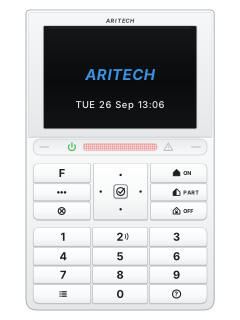
Trouble lights
- Green Power light off for an hour with no power cut you can see: call your installer.
- For a trouble message on the display, call your installer.
- The red light also comes on if a zone is set off during the exit time, and the bells and dialler go off.
- ↓ twice lists open zones (All Closed if none) and ↑ twice lists inhibited zones, if your installer has turned this on. A split system asks which area.
- A split system's status display shows [1] armed, =2= arming, <3> partguard, 4 off; a flashing number is in alarm.
Pages 5 and 6, 11 of the Aritech Advisor CD7203 CD95-15003 User ManualGreen Power light on Mains power is on Yellow Trouble light on A problem in the panel: the display names it Battery fault A problem with the battery Fuse fault A fuse problem Line fault A phone line problem (with a dialler fitted) RKP fault A problem with a keypad EEPROM fault A problem inside the system Red Alarm light on An alarm: your code disarms it and stops the bells
Why is my keypad beeping or showing a trouble light?
Most keypads beep or light up a trouble indicator when something needs attention, such as a low backup battery, a power cut or a lost phone or internet connection. Your user guide explains what each light or code means on your model. If it keeps happening, or you are not sure, call your installer or monitoring company.
All Aritech CD7203 / CD7212 manuals
Installer manuals 2
Nothing here matches that.
Try a shorter search, or search every brand.
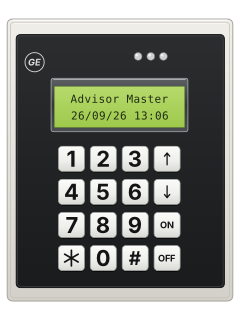
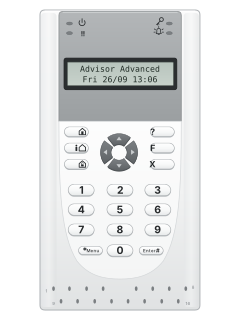
More Aritech models
Is anyone watching your alarm?
An alarm that only makes a noise relies on someone hearing it. A monitored alarm reports to our A1 graded, NZSA approved control room, watched 24/7 by a team that is New Zealand owned and operated. We can monitor most existing alarms, so you may not need a new one. Thinking about a new alarm or security cameras? Ask us for a quote.
Prefer to talk now? Call us on 0800 339 999.
Home: alarm monitoringBusiness: business monitoringInstaller: bureau monitoring


Manuals are the property of their manufacturers and are provided for reference only; their inclusion here does not imply any endorsement by the manufacturer.