
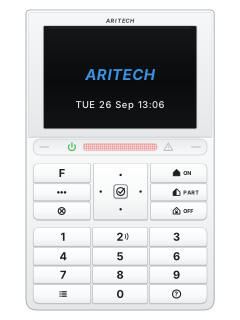
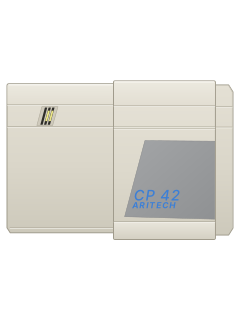
ATS1125Keypad
Aritech AXON manuals
Start hereAXON Control Panel Installation and Programming ManualInstallation · 472 pages · 7.8 MBRead it nowKeypad cheat sheet
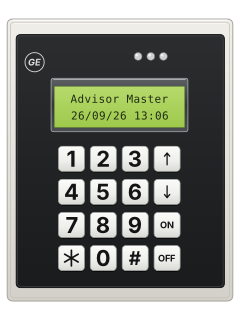
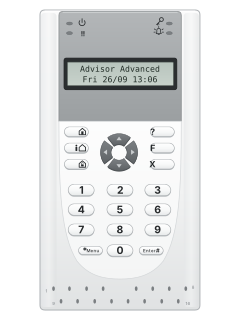
Arm (away)your codethe key with a house with a person in it on itorthe key with a house with a person in it on ityour codeEnteryour codeONorONyour codethe key with a tick on it
- Close the doors and windows. AXON calls arming setting.
- Key in your PIN, then press the full set key (see the table). Or press that key first, then your PIN and Enter: your installer chooses the order.
- When the keypad is ready for a PIN it beeps twice and flashes red and green. Seven beeps mean it didn't work.
- Once set, the ATS111x's area light comes on and the ATS1125's light bar shows red. With quick set on, the full set key alone sets it.
- Three wrong PINs lock the keypad for 120 seconds.
Pages 22 to 24, 66, 69, 73 of the AXON Control Panel Installation and Programming ManualATS1125: ON (house) Full set ATS111x: person beside a house Full set ATS1125: tick key; ATS111x: Enter # Enter Arm while homeyour codethe key with a house on itorthe key with a house on ityour codeEnteryour codePARTorPARTyour codethe key with a tick on it
- Part set watches the outside (perimeter) zones and ignores the inside ones, so you can stay in.
- Key in your PIN, then press the part set key (see the table). Or press that key first, then your PIN and Enter.
- An alarm while part set works like a local alarm: sirens, keypad buzzers and lights. Your installer decides if it's reported.
Pages 22 and 23, 65, 69 of the AXON Control Panel Installation and Programming ManualATS1125: PART Part set ATS111x: top house key Part set Disarmyour codethe key with an open padlock on itorthe key with an open padlock on ityour codeEnteryour codeOFForOFFyour codethe key with a tick on it
- AXON calls disarming unsetting. Key in your PIN, then press the unset key (see the table). Or that key first, then your PIN and Enter.
- If your installer has turned on easy unset, your PIN alone unsets.
- On the ATS111x the area light goes out once the area is unset.
- Under threat, if your installer has set up duress, use your duress code in place of your PIN. It sends a signal, such as to your monitoring centre.
Pages 22 to 24, 69 and 70, 326, 458 of the AXON Control Panel Installation and Programming ManualATS1125: OFF Unset ATS111x: padlock on a house Unset Alarm memoryEnterEnterthe key with a tick on itthe key with a tick on it
- Press Enter twice to see alarms that happened while the system was set, if your installer allows it. Enter is the tick key on the ATS1125 and Enter # on the ATS111x.
- The lights show a current alarm (see the table).
Pages 22 to 24, 70, 314 of the AXON Control Panel Installation and Programming ManualATS111x: area light flashing An alarm in that area ATS111x: red alarm light on An alarm is active ATS1125: light bar flashing red An alarm is active Panic alarm
- Ask your installer which panic method works on your ATS111x or ATS1125 before relying on it.
- The manual lists 1 and 3 together, but limits that option to ATS113x keypads. These are not the pictured models.
- Your installer chooses a silent or audible alarm. A silent panic may show nothing on the keypad.
Pages 70, 211, 329 of the AXON Control Panel Installation and Programming ManualPictured ATS111x and ATS1125 Panic method needs installer confirmation ATS113x, if enabled Press 1 and 3 together Trouble lightsFF
- Press F twice to list the active zones and the faults that need acknowledging, if your installer allows it.
- If the keypad loses contact with the panel and a fault occurs, it may beep until you press any key.
- After three wrong PINs the keypad locks for 2 minutes.
Pages 23 and 24, 69 and 70, 314, 321 of the AXON Control Panel Installation and Programming ManualGreen mains light on Mains power is on Yellow fault light on / flashing A system fault is active / a general alert ATS1125 light bar: flashing orange A system fault is active, or a general alert ATS111x: red alarm light on; ATS1125 light bar: flashing red An alarm is active ATS111x: area light on / off That area is set / unset ATS111x: area light flashing An alarm in that area ATS1125 light bar: red / orange Areas set / part set ATS1125 light bar: green Ready to set Send a test signal
- A supervisor code can make a test call to your monitoring centre; ordinary user codes can't. Ring the monitoring centre before you start.
- Press Menu, key in the supervisor code and press Enter (the table shows these keys on each keypad). Then open menu 8.3, Manual test call.
- If asked, pick your monitoring centre. The display shows how the call is going.
Pages 22 and 23, 70, 77, 80, 82, 132, 189 of the AXON Control Panel Installation and Programming ManualMenu key ATS111x: * Menu. ATS1125: the key with the list picture Enter key ATS111x: Enter #. ATS1125: the tick key Menu 8.3 Manual test call
All Aritech AXON manuals
Installer manuals 1
Nothing here matches that.
Try a shorter search, or search every brand.
More Aritech models
Is anyone watching your alarm?
An alarm that only makes a noise relies on someone hearing it. A monitored alarm reports to our A1 graded, NZSA approved control room, watched 24/7 by a team that is New Zealand owned and operated. We can monitor most existing alarms, so you may not need a new one. Thinking about a new alarm or security cameras? Ask us for a quote.
Prefer to talk now? Call us on 0800 339 999.
Home: alarm monitoringBusiness: business monitoringInstaller: bureau monitoring


Manuals are the property of their manufacturers and are provided for reference only; their inclusion here does not imply any endorsement by the manufacturer.