
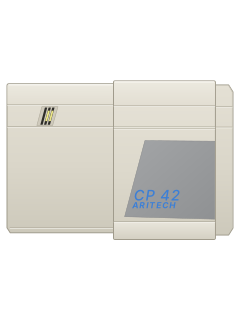
CP 42 keypad (door closed)
Aritech CP4203 manuals
Start hereAritech CP4203 (CP42) Operating InstructionsUser guide · 13 pages · 425 KBRead it nowKeypad cheat sheet
Arm (away)0your codeor0#4
- Check the building is closed up, then press 0 and key in your code.
- The display clears, the set light comes on and the buzzer sounds. Leave by your exit route.
- Close the exit door and wait for the buzzer to stop: the system is on. A dot on the right of the display means armed.
- A zone number on the display means that zone is open. Close it and key in 0 and your code again, or inhibit it.
- Quick set (not on a split system that shares keypads): 0, #, 4 arms with the exit time; 0, #, 5 arms straight away, with no buzzer.
Arm while home0#7
- Aritech calls this Part Guard: it arms everything except the areas your alarm company set up to be left off. Not on a split system that shares keypads.
- Close the outside doors and windows, then press 0, #, 7.
- PH shows, then the display clears and the set light comes on.
- A zone number instead means it's open: close it and press 0, #, 7 again. If it still shows, inhibit that zone.
- To switch off, press 0 and key in your code. The set light goes out.
Disarm0your code
- Opening the entry door starts an on-off buzzer. Go straight to the keypad.
- Press 0 and key in your code before the entry time runs out.
- The buzzer stops and the set light goes out: the system is off.
- Under threat, key in the duress code your alarm company gave you instead of yours. It switches off and gives a silent signal that can reach your monitoring centre.
Bypass a zone0your code*zone
- Aritech calls bypassing inhibiting. Press 0 and key in your code: the exit buzzer sounds as the system starts to arm.
- Press *: the buzzer stops. Press the zone number: H and the number show, such as H2, and the exit buzzer starts again.
- Repeat * and the zone number for each zone to inhibit, then leave by your exit route.
- HH on the display means all zones are inhibited.
- Inhibiting a zone because it shows a fault that won't clear? Call your alarm company as soon as you can.
Alarm memory0your codeor0#8
- After an alarm, come in by the exit route and go straight to the keypad. Press 0 and key in your code.
- The set light goes out and the zone that caused the alarm shows. If several went off, they show one after another.
- Press # while a zone number shows to see its type for a moment, such as A (alarm), t (tamper) or FA (fire). Press 0 to clear.
- Until the system is next armed, 0, #, 8 shows those zones again.
- Always contact your alarm company after an alarm.
Chime on or off0#6
- Chime works while the system is off: it sounds for 2 seconds when a zone set up for chime opens.
- Press 0, #, 6. A c on the display means chime is on.
- To turn it off, press 0. On some systems you press 0, #, 6 again instead.
- Not on a split system that shares keypads.
Fire alarm0your code
- Fire detectors are live all the time, even when the system is off.
- In a fire alarm the sounders go one second on, one second off, and the zone number flashes on the display.
- Press 0 and key in your code to switch it off. The zone that caused it shows.
- That zone stays out of the system until the next time a code is entered.
Change a code0your code*#new code*
- Press 0 and key in your existing code: the exit buzzer sounds. The manual says this is done with the master code your alarm company set up for you.
- Press *, then #. The buzzer stops.
- Key in the new code, 2 to 6 digits, with no 0 in it. The numbers show as you press them.
- Press *. Two boxes at the top of the display mean it's accepted. Press 0 to clear the display.
- The new code works straight away and the old one is cancelled.
Test the system0#9
- Bell test, before you arm: press 0, #, 9. Every warning device sounds.
- Press 0 to stop it.
- Not on a split system that shares keypads.
Display codes
- The two-digit display shows everything. PH means the system is armed in Part Guard.
- Call your alarm company straight away if you see t1 to t4, tP, P1, P3, nd, nC, dn or nA.
- For any other fault, such as P2, LF, FC or CA, call your alarm company without delay.
- Split system with shared keypads: the right-hand dot is System A and the left-hand dot System B.
Pages 2 to 4 of the Aritech CP4203 (CP42) Operating InstructionsDot on the right The system is armed 1 to 48 That zone is open, or has gone off H and a number That zone is inhibited (HH: all zones) P2 Mains power is off: running on the battery P1 / P3 Mains and battery both failed / battery low LF / LC Phone line fault / line fault cleared FC The communicator couldn't send its message CA Can't arm: an engineer reset is needed
Why is my keypad beeping or showing a trouble light?
Most keypads beep or light up a trouble indicator when something needs attention, such as a low backup battery, a power cut or a lost phone or internet connection. Your user guide explains what each light or code means on your model. If it keeps happening, or you are not sure, call your installer or monitoring company.
All Aritech CP4203 manuals
Nothing here matches that.
Try a shorter search, or search every brand.
More Aritech models
Is anyone watching your alarm?
An alarm that only makes a noise relies on someone hearing it. A monitored alarm reports to our A1 graded, NZSA approved control room, watched 24/7 by a team that is New Zealand owned and operated. We can monitor most existing alarms, so you may not need a new one. Thinking about a new alarm or security cameras? Ask us for a quote.
Prefer to talk now? Call us on 0800 339 999.
Home: alarm monitoringBusiness: business monitoringInstaller: bureau monitoring


Manuals are the property of their manufacturers and are provided for reference only; their inclusion here does not imply any endorsement by the manufacturer.