
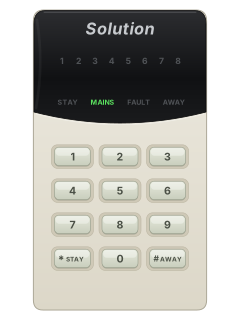
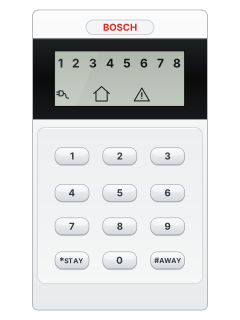
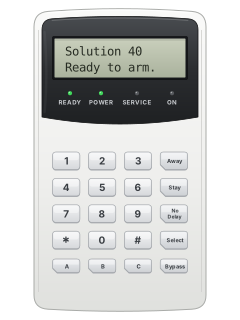
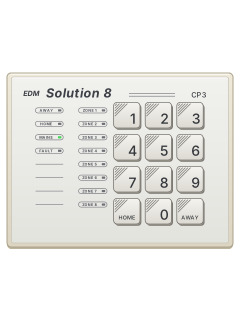
CP5LED codepad

Bosch EDM Solution Classic manuals
Start here6W user manualUser guide · 76 pages · 470 KBRead it nowSolution 16, 862, 6+6 and CC488 cheat sheet
Arm (away)your code#
- For the CP5 and other push-button codepads; for a CP6, ask your installer. Close doors and windows, then key in your code and press # (the key marked AWAY).
- Two beeps: the AWAY light comes on. Leave before exit time runs out; one long beep then means it is set.
- A long beep and no AWAY light means a zone is open: close it or isolate it first.
- If enabled, holding # until two beeps also arms. On a 6+6 with any CP6 connected, use your code then AWAY instead.
- From the factory, code 0 arms but never disarms. Unless your installer removed it, key in 0, then press #.
Arm while homeyour code*
- For the CP5 and other push-button codepads; for a CP6, ask your installer. Key in your code, then press * (the key marked STAY). The panel calls this STAY Mode.
- Two beeps: the STAY light comes on. Zones your installer chose to leave off flash during exit time.
- One short beep when exit time ends: the rest of the system is now set.
- Solution 16, 862 and ICP-CC488 also have STAY Mode 2: hold 0 until two beeps. It leaves off zones a master code user picked.
- Unless your installer removed it, the factory code 0 also arms in STAY: key in 0, then press *.
Disarmyour code#
- For the CP5 and other push-button codepads; for a CP6, ask your installer. Key in your code, then press # before the entry time runs out.
- Two beeps tell you the system has disarmed.
- On a 6+6 that was set in STAY Mode, key in your code, then * (STAY) instead.
- A zone light flashing fast shows the zone that went into alarm while you were out.
- Under threat, key in your code, then 9, then #. It disarms and, if monitored, sends a silent duress alarm.
Bypass a zone**zone*then#
- For the CP5 and other push-button codepads; for a CP6, ask your installer. Press * twice. Three beeps and the STAY light flashes. The panel calls bypassing isolating.
- Key in the zone number, then *. That zone's light starts flashing slowly.
- Repeat for other zones. To undo one, key in its number and * again.
- Press # to finish. Two beeps: the system is back to disarmed, ready to arm.
- If your installer has set up code to isolate, start with *, your code, then * instead.
Alarm memorymaster code3#ormaster code8#
- For the CP5 and other push-button codepads; for a CP6, ask your installer. After you disarm, a zone light flashing fast shows the zone that went into alarm.
- To replay the last 40 events, key in your master code, then 3, then #.
- On an 862 or ICP-CC488, key in your master code, then 8, then # instead.
- Three beeps, then the events show one at a time on the lights, newest first, with a beep each.
Chime on or offhold4
- 6+6 with any CP6: use the last step; held-key shortcuts do not work. Ask your installer to confirm CP6 keys.
- Your installer can set zones 1 to 4 to beep the keypad while disarmed. Hold 4: three beeps means it is now on, two beeps off.
- On a Solution 16, 862 or ICP-CC488, the STAY light flashes once every 3 seconds while it is on.
- Solution 16 with v1.10 software: key in your master code, then 7, then # instead.
- 6+6 with a CP6 console: key in your master code, then 7, then the AWAY key. Three beeps means on, two beeps off.
Panic alarm1+3or*+#
- For the CP5 and other push-button codepads; for a CP6, ask your installer. Press 1 and 3 together, or * and # together. The panic alarm sounds.
- Your installer can make it silent or switch it off.
- Press 4 and 6 together for a fire alarm, or 7 and 9 for a medical alarm.
- Older software (Solution 16 to v1.36, 6+6 to v1.26): 4 and 6, or 7 and 9, give a panic instead.
Change a codemaster code1#user number#new code#
- For the CP5 and other push-button codepads; for a CP6, ask your installer. Key in your master code, then 1, then #. Three beeps and the STAY and AWAY lights flash.
- Key in the user number, then #. Two beeps, and a zone light shows which user you picked.
- Key in the new code, then #. Two beeps and the STAY and AWAY lights go out.
- To delete that user's code instead, press * where you would key in the new code.
- From the factory, user 1 is the master code.
Set the date and timemaster code6#datetime#
- For the CP5 and other push-button codepads; for a CP6, ask your installer. Key in your master code, then 6, then #. Three beeps and the STAY and AWAY lights flash.
- Key in day, month, year, hour and minute, two digits each, using 24-hour time.
- For example, 5 March 2026 at 2:30 pm is 0503261430.
- Press #. Two beeps and the lights go out. A long beep means the entry was wrong.
- Set it again after the power has been off or when daylight saving changes.
Trouble lightshold5
- 6+6 with any CP6: master code, 5, AWAY; AWAY acknowledges faults and leaves. Ask your installer to confirm CP6 keys.
- A new fault flashes the FAULT light and beeps once a minute. On a CP5, # stops the beeps; hold 5 until two beeps to see the fault.
- Zone lights then show the fault (see the table). On a CP5, press # to leave. FAULT stays on until fixed.
- A CC488's lights differ: 1 system fault, 2 low wireless battery, 3 tamper, 6 failed report. Hold that number to see more.
- On a CP5, outside the fault check, a zone light on means that zone is open; fast flashing, an alarm; slow flashing, isolated.
Pages 6 and 7, 11 and 12 of the Solution 16 UserPages 9, 18 and 19 of the 862 user manualFAULT light flashing A new fault: acknowledge it to stop the beeps MAINS light flashing Mains power is off Fault check: light 1 Low battery Fault check: light 2 The clock was lost: set the date and time again Fault check: light 4 The horn speaker is disconnected Fault check: light 5 The phone line is disconnected Fault check: light 6 Internal panel fault (E2): call your installer straight away Fault check: light 8 The panel couldn't get through to the monitoring company Send a test signalhold9
- For the CP5 and other push-button codepads; for a CP6, ask your installer. Hold 9 until you hear two beeps.
- The panel sends a test report to your monitoring company. The sirens stay quiet.
- It works only if your system reports by phone through its dialler. On a 6+6, not while any CP6 is connected.
- On a Solution 16, 844 or CC488, a report that gets through also clears a communication fault.
Why is my keypad beeping or showing a trouble light?
Most keypads beep or light up a trouble indicator when something needs attention, such as a low backup battery, a power cut or a lost phone or internet connection. Your user guide explains what each light or code means on your model. If it keeps happening, or you are not sure, call your installer or monitoring company.
All Bosch EDM Solution Classic manuals
User guides 7
Installer manuals 10
Nothing here matches that.
Try a shorter search, or search every brand.
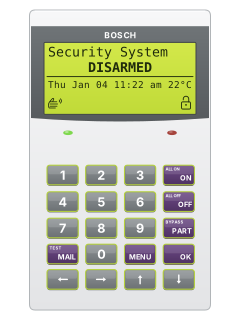
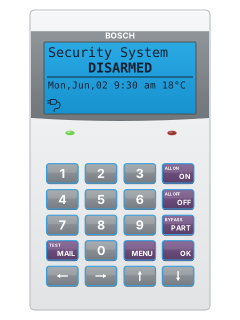
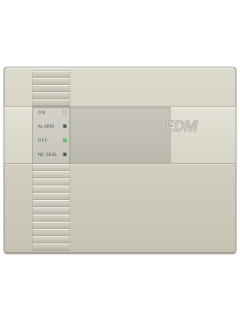
More Bosch EDM models
Is anyone watching your alarm?
An alarm that only makes a noise relies on someone hearing it. A monitored alarm reports to our A1 graded, NZSA approved control room, watched 24/7 by a team that is New Zealand owned and operated. We can monitor most existing alarms, so you may not need a new one. Thinking about a new alarm or security cameras? Ask us for a quote.
Prefer to talk now? Call us on 0800 339 999.
Home: alarm monitoringBusiness: business monitoringInstaller: bureau monitoring


Manuals are the property of their manufacturers and are provided for reference only; their inclusion here does not imply any endorsement by the manufacturer.