

FBII XL-4800 EZ manuals
Start hereXL 4800 UserUser guide · 6 pages · 690 KBRead it nowKeypad cheat sheet
Arm (away)your code
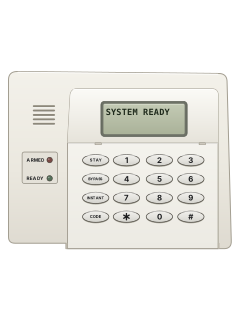
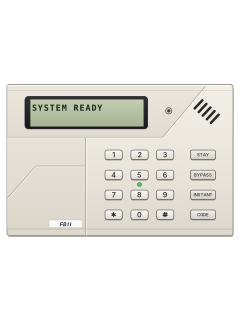
- Close the doors and windows first: the READY light must be on (an LCD keypad shows SYSTEM READY).
- Not ready? An LED keypad's zone lights or the LCD show which zone is open. On an LCD keypad, any key shows that zone's name.
- Key in your 4-digit code. The ARM light comes on and an LCD keypad shows ON:AWAY and EXIT NOW.
- Leave through your entry/exit door before the exit delay ends. An LCD keypad shows EXIT NOW until then.
- If your installer has turned on quick arming, # then 1 arms without a code.
Arm while homeSTAYyour codeorINSTANTSTAYyour code
- Stay arms the outside doors and windows but leaves the inside zones off, so you can move around inside.
- When the system is ready, press STAY, then your code. The ARM light comes on, plus STAY on an LED keypad; an LCD shows ON: STAY.
- INSTANT and STAY in either order, then your code, also drops the entry delay (LCD: ON:STAY INSTANT).
- With no entry delay, anyone coming in through an entry door sets off the alarm straight away.
- Stay and Instant switch off when you disarm. Disarm before you go out.
Disarmyour code
- Key in your code. The ARM light goes out and the keypad shows how the system is.
- Fire and panic zones stay on guard all the time, even when the system is disarmed.
- Your code also resets the system after a false alarm, such as a window opened while armed or too much smoke.
Bypass a zoneBYPASS2-digit zone
- Each detector or door contact is a zone. A bypassed zone isn't protected while the system is armed.
- Press BYPASS, then the zone number as 2 digits (01 to 16). BYPASS 02 bypasses zone 2.
- The keypad gives a steady beep. An LCD keypad shows BYPASS ZONE and the zone's name; on an LED keypad the zone light blinks slowly.
- Repeat for each zone. The same keys unbypass a zone, but not while the system is armed.
- Fire and panic zones can't be bypassed.
Alarm memoryyour codethenyour code
- After an alarm, disarm with your code. The keypad then shows what happened.
- An LED keypad shows it on the zone lights behind the sliding door: a zone that went into alarm blinks fast.
- An LCD keypad names the zone, such as FIRE zn 03 KITCHEN SMOKE.
- Key in your code again to clear the display and silence the keypad.
Chime on or off#6then0
- Chime makes the keypad sound for one second when chosen zones, such as the front door, open while disarmed.
- Your installer picks which zones chime.
- Press # then 6, then 0 to turn chime on or off. To back out without changing it, press * instead of 0.
Panic alarm*+#
- Press * and # at the same time for a panic alarm.
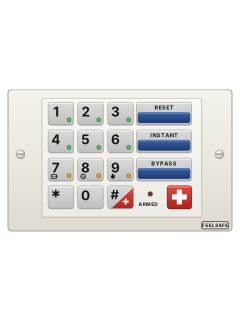
- Your installer has to turn the keypad emergency keys on. Ask them which ones work on your system.
- Forced by someone to go inside? If your installer has set up ambush, user 16's code sends an emergency signal to your monitoring centre.
Change a codeCODEmaster codeuser numberuser numbernew codenew code22
- A master user can add or change codes. There can be up to 16 users.
- Press CODE and key in a master code. Then key in the 2-digit user number twice, then the new 4-digit code twice.
- Finish with 2 2 for a normal user, or 1 1 for a master user.
- Example: CODE, master code, then 03 03 4567 4567 2 2 makes user 3 a normal user with code 4567.
- To delete a user, press CODE, a master code, the user number twice, then #. User 1 can't be deleted.
Set the date and time#30datetime*
- Press #, 3 and 0. Then key in the date as year, month and day, 2 digits each.
- Then key in the time as hour and minute, 2 digits each, on the 24-hour clock. Press * to finish.
- To see the time on an LCD keypad, press # 3 #.
- Ask your installer which # commands your system uses.
Trouble lights
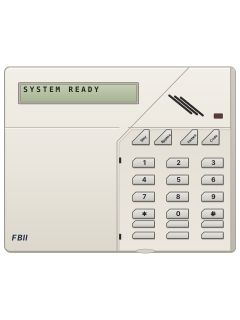
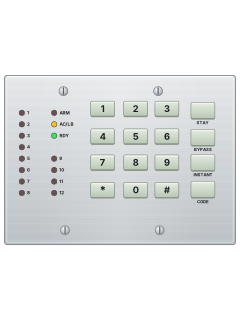
- An LED keypad has a light for each zone behind its sliding door, plus READY, ARM, STAY, INSTANT, COM, LB and AC.
- An LCD keypad has ARMED and AC lights and shows the system's state in words on its display.
- After an alarm or trouble, disarm, then key your code in again to clear the display and silence the keypad.
Pages 2 and 3 of the XL 4800 UserZone light blinking fast Alarm on that zone Zone light blinking slowly and dim That zone is bypassed Zone light pulsing slowly A trouble on that zone Zone light on steady That zone is open (not ready) AC light on Mains power is connected LB (battery) light pulsing slowly The backup battery is low COM light on A fault reporting to your monitoring centre
Why is my keypad beeping or showing a trouble light?
Most keypads beep or light up a trouble indicator when something needs attention, such as a low backup battery, a power cut or a lost phone or internet connection. Your user guide explains what each light or code means on your model. If it keeps happening, or you are not sure, call your installer or monitoring company.
All FBII XL-4800 EZ manuals
User guides 1
Nothing here matches that.
Try a shorter search, or search every brand.
More FBII models
Is anyone watching your alarm?
An alarm that only makes a noise relies on someone hearing it. A monitored alarm reports to our A1 graded, NZSA approved control room, watched 24/7 by a team that is New Zealand owned and operated. We can monitor most existing alarms, so you may not need a new one. Thinking about a new alarm or security cameras? Ask us for a quote.
Prefer to talk now? Call us on 0800 339 999.
Home: alarm monitoringBusiness: business monitoringInstaller: bureau monitoring


Manuals are the property of their manufacturers and are provided for reference only; their inclusion here does not imply any endorsement by the manufacturer.