

Micron Traxx manuals
Start hereTraxx User GuideUser guide · 3 pages · 64 KBRead it nowKeypad cheat sheet
Arm (away)your code#or1#
- Close doors and windows. Key in your code (1 to 4 digits), then press #.
- If every zone is clear, a steady tone sounds and the yellow status lamp comes on, with the lamps of the zones being armed.
- The beeper keeps sounding through the exit time as a leave-now warning.
- Flashing zone lamps with a pulsed tone mean a zone isn't secure. On some systems that's normal: check with your security company.
- If your installer has turned on quick arm, 1 then # arms without a code.
Arm while home09#
- Traxx calls this night mode. Only the area set up for night arming is armed.
- Key in 0, 9, then #. Traxx arms 20 seconds later.
- If a zone is set off, the keypad gives 20 seconds of pulsed beeping before the sirens sound.
- To disarm night mode, key in your code, then #.
Disarmyour code#
- The beeper sounds through the entry time. Key in your code, then #, before it ends, or the alarm goes off.
- Two beeps, and the yellow status lamp goes off. One long tone means a wrong code.
- A flashing red zone lamp now means that zone went into alarm. Note its number and tell your security company.
- Your code, then #, also cancels a fire alarm.
Bypass a zoneyour code*zone#
- Traxx calls this excluding a zone. Each detector or door contact is a zone.
- Key in your code, press *, key in the number of the zone to leave out, then press #. The system arms without that zone.
Chime on7#
- Key in 7, then #. Two beeps confirm chime is on.
- While the system is disarmed, the keypad then beeps about 5 times whenever a sensor is set off.
Panic alarm*+#
- If your installer has set it up, press * and # together for a panic alarm.
- Key in any valid code to cancel it.
Change a code4+6#your code#new code#
- Press 4 and 6 together, then #.
- Key in the old code, then #. Then key in the new code, then #.
- Traxx beeps twice each time a number is accepted. At the end, the new code replaces the old one.
- The new code can be shorter or longer than the old one, up to 4 digits. Traxx holds up to six codes.
Trouble lights
- The yellow status lamp shows what the system is doing (see the table).
- Test the system every week, as the guide advises.
Pages 1 to 3 of the Traxx User GuideYellow lamp on The system is arming or armed Yellow lamp off The system is disarmed Yellow lamp flashing An alarm has happened, there is a system fault, or panic was used Red zone lamp flashing after you disarm That zone went into alarm Zone lamps flashing while you arm Those zones aren't secure
Why is my keypad beeping or showing a trouble light?
Most keypads beep or light up a trouble indicator when something needs attention, such as a low backup battery, a power cut or a lost phone or internet connection. Your user guide explains what each light or code means on your model. If it keeps happening, or you are not sure, call your installer or monitoring company.
More Micron models
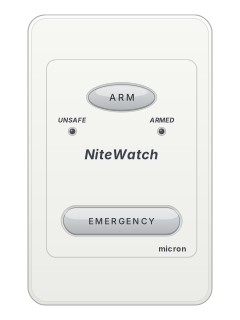
NiteWatch night arming station
Meridian
4 manuals
Also fitsZ4120. Z6020C, Z8020C, 4 manualsZ8040 - 16040, 4 manuals
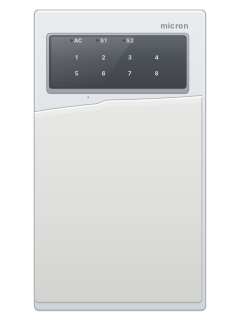
NiteWatch night arming station
Z8040 - 16040
4 manuals
Also fitsZ4120. Z6020C, Z8020C, 4 manualsMeridian, 4 manuals
Is anyone watching your alarm?
An alarm that only makes a noise relies on someone hearing it. A monitored alarm reports to our A1 graded, NZSA approved control room, watched 24/7 by a team that is New Zealand owned and operated. We can monitor most existing alarms, so you may not need a new one. Thinking about a new alarm or security cameras? Ask us for a quote.
Prefer to talk now? Call us on 0800 339 999.
Home: alarm monitoringBusiness: business monitoringInstaller: bureau monitoring

Manuals are the property of their manufacturers and are provided for reference only; their inclusion here does not imply any endorsement by the manufacturer.