
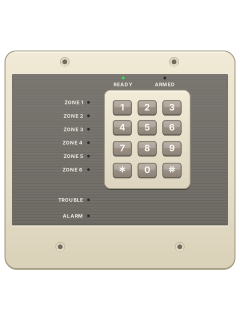
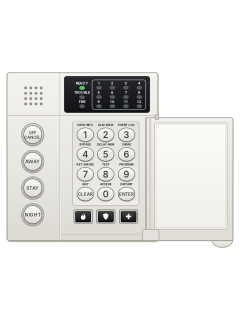
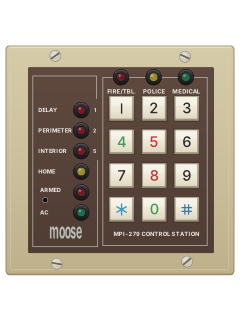
Z700RControl station (wall plate)

Moose Z700 / Z900 manuals
Start herez900 usermanUser guide · 26 pages · 320 KBRead it nowKeypad cheat sheet
Arm (away)your code
- Check the green READY light is on. If it's off, the zone lights show which area is open.
- Key in your user code. The keypad beeps and the red ARMED light blinks during the exit time.
- Leave straight away. The ARMED light goes steady once the system is armed.
- Took too long? The beeping turns steady as the entry time starts: disarm and start again.
- A three-second error tone means it didn't arm because something is open.
Arm while homehold4thenyour code
- To stay inside, turn the inside detectors off first: hold [4] for three seconds.
- The inside zone lights flash. Then key in your user code to arm.
- This also turns off the entry delay: opening the entry door sets the alarm off at once.
- The inside detectors come back on when you disarm, unless your installer changed that.
Disarmyour code
- Come in through your entry door. The keypad sounds a steady tone.
- Key in your user code. The red ARMED light goes out.
- If the red ALARM light is on as you come in, an alarm has happened. Leave and call for help.
Bypass a zone#zone
- Each detector or door contact is a zone (1 to 6). Disarm first.
- Press [#] (the bypass key), then the zone number. Its zone light blinks.
- Repeat for other zones. [#] and the same number again puts a zone back.
- [#] then [9] cancels all bypasses. [#] then [0] bypasses every open zone, if your system allows it.
- The blinking stops 30 seconds after the system arms.
Alarm memoryyour codethen*
- After an alarm, key in your user code to reset it. The red ALARM light stays on.
- The zone lights show which areas went off. No zone light means a panic alarm started it.
- Press [*] to turn the ALARM light off once you've noted the zone.
- False alarm? Ring your monitoring company straight away.
Chime on or offhold6
- With the alarm disarmed, hold [6] for three seconds.
- Three beeps: chime is on. The keypad then beeps twice when a door or window zone opens.
- Hold [6] again: two beeps means chime is off. Inside zones never chime.
Reset smoke detectorshold7
- After a fire alarm, press [*] to quiet the keypad and siren, then key in your user code to clear it.
- A yellow TROUBLE light after clearing the alarm may mean a latched smoke detector or faulty wiring.
- Hold [7] for three seconds to reset the smoke detectors.
- If TROUBLE stays on, call for service.
Panic alarmhold1+3orhold*+#holdthe key with a flame on itorholdthe key with a shield on itorholdthe key with a cross on it
- Z700R: hold [1]+[3] or [*]+[#] together for three seconds.
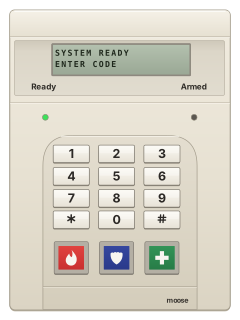
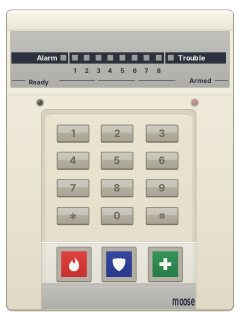
- Z900R: use the separate panic key below the digits: flame, shield or cross. Your installer assigns each key and must enable it.
- Z900R: press the chosen key. Depending on setup, it may need a three-second hold or two presses within three seconds.
- Your installer decides which emergency it sends and whether it is silent.
- To reset, enter your code. Press [*] to clear the ALARM light.
Change a codehold9thenmaster codeuser number#new code
- With the alarm disarmed, hold [9] for three seconds: three beeps.
- Key in the master code: two beeps, and the READY and ARMED lights blink in turn.
- Press the code number (2 to 6, or 1 for the master code), then [#]. Three beeps.
- Key in the new 4-digit code. A short then a long beep means it's saved, and programming ends.
- Made a mistake? Press [*] five times and start again.
Test the systemhold8
- Disarm and close everything so the READY light is on.
- Hold [8] for three seconds: three beeps mean test mode.
- Open each door and window, and walk past each detector. The keypad beeps and that zone's light comes on.
- Press [*] when you've finished.
Trouble lightshold2
- A lit TROUBLE light means the system has a problem. If the keypad beeps, press [*] to quiet it.
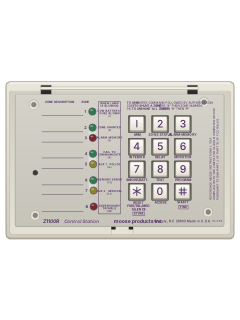
- Hold [2] for three seconds: three beeps, then the zone lights show which trouble (see the table).
- The lights go back to normal after 8 seconds with no key pressed.
- A communication trouble clears once the panel gets through. Tell your security company which lights came on.
Pages 10, 20 and 21, 35 of the Moose Z700 Specifications Installation and Programming GuidePages 10, 20 and 21, 35 of the z900 instZONE 1 Mains (AC) power has failed ZONE 2 Low battery or a blown fuse ZONE 3 A supervised zone, such as a fire zone, is open or shorted ZONE 4 It couldn't get through to the monitoring centre ZONE 5 Memory error: call for service ZONE 6 A control station is missing (its data wire is off) ALARM lit during the check Chime is on: not a trouble READY or ARMED lit during the check Inside zones are off, or the entry delay is off: not a trouble
Why is my keypad beeping or showing a trouble light?
Most keypads beep or light up a trouble indicator when something needs attention, such as a low backup battery, a power cut or a lost phone or internet connection. Your user guide explains what each light or code means on your model. If it keeps happening, or you are not sure, call your installer or monitoring company.
All Moose Z700 / Z900 manuals
Installer manuals 4
Nothing here matches that.
Try a shorter search, or search every brand.
More Moose models
Is anyone watching your alarm?
An alarm that only makes a noise relies on someone hearing it. A monitored alarm reports to our A1 graded, NZSA approved control room, watched 24/7 by a team that is New Zealand owned and operated. We can monitor most existing alarms, so you may not need a new one. Thinking about a new alarm or security cameras? Ask us for a quote.
Prefer to talk now? Call us on 0800 339 999.
Home: alarm monitoringBusiness: business monitoringInstaller: bureau monitoring


Manuals are the property of their manufacturers and are provided for reference only; their inclusion here does not imply any endorsement by the manufacturer.