
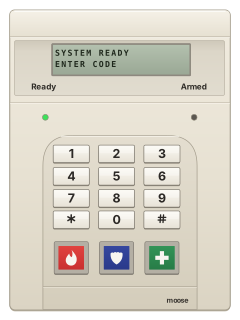
Z800ST / Z800R8 / Z800ICKeypad

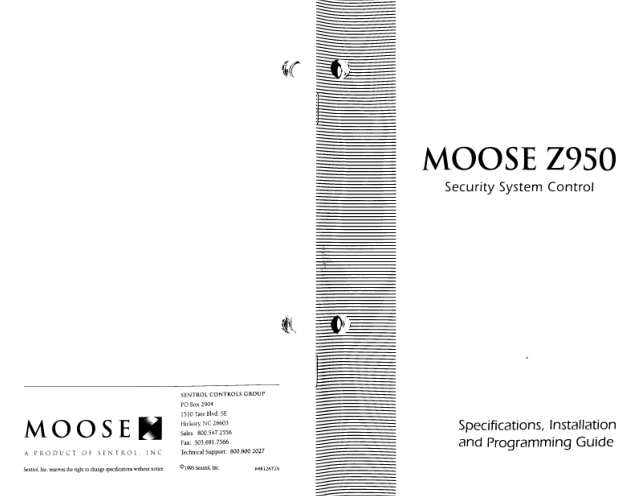
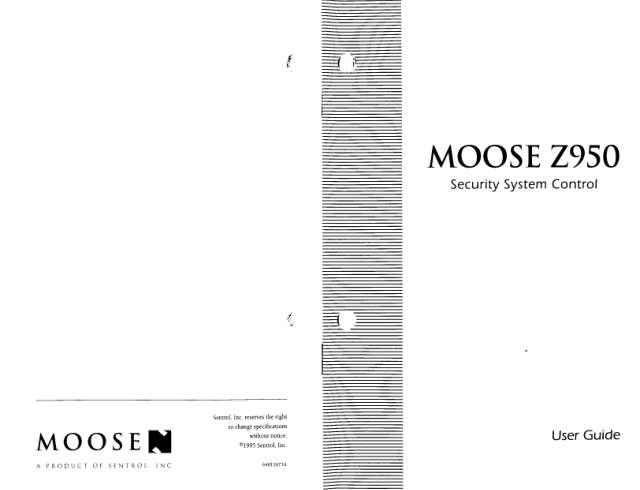
Moose Z950 manuals
Start herez950 manManual · 18 pages · 2.1 MBRead it nowKeypad cheat sheet
Arm (away)your code
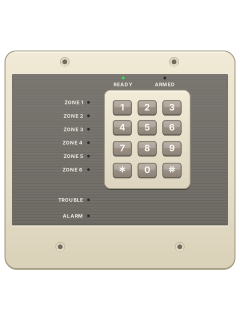
- Check READY is on before arming. On an LED keypad, lit zone indicators show which areas are open.
- Key in your user code. The keypad beeps and the red ARMED light blinks while the exit time runs.
- Leave straight away. The beeps speed up in the last 10 seconds, and the ARMED light goes steady once armed.
- A three-second error tone means it didn't arm because something is still open.
- If your installer set up two-digit arming, the first two digits of your code arm it. Disarming needs the whole code.
Arm while homehold4thenyour code
- Before arming, hold [4] for three seconds to turn off the inside detectors. On an LED keypad, their zone lights flash.
- For instant entry-door alarms too, hold [5] for three seconds before arming. ARMED will not blink after arming.
- Then enter your user code to arm.
- The inside detectors come back on when you disarm, unless your installer changed that.
Disarmyour code
- Come in through your entry door. The keypad sounds a steady tone to remind you.
- Key in your user code. The red ARMED light goes out.
- If an alarm has happened while you were out, stay outside and call for help. On LED keypads, ALARM indicates an alarm.
Bypass a zone#zone
- Each detector or door contact is a zone. Disarm first.
- Press [#], then the zone number. On an LED keypad, that zone indicator blinks.
- Repeat for other zones. [#] and the same number again puts a zone back.
- [#] then [9] cancels all bypasses. [#] then [0] bypasses every open zone, if your system allows it.
- On LED keypads, bypassed zones may flash until 30 seconds after arming, or throughout arming, depending on setup.
Alarm memoryhold3oryour codethen*
- After an alarm, key in your user code to reset it. On an LED keypad, ALARM stays on and the zone lights show what set it off.
- On LED keypads, no zone light means a panic key triggered it. Note the zones, then press [*] to clear ALARM.
- To recall the last alarm while disarmed, hold [3] for three seconds. Three beeps; LED keypads light the relevant zones.
- For the LCD memory display, see its own guide. Tell your monitoring company straight away about a false alarm.
Chime on or offhold6
- With the alarm disarmed, hold [6] for three seconds.
- Three beeps: chime is on. The keypad then beeps twice when a door or window zone opens.
- Hold [6] again: two beeps means chime is off. Inside zones never chime.
Reset smoke detectorshold7
- After a fire alarm, press [*] to quiet the keypad and siren, then key in your user code to clear it.
- On an LED keypad, TROUBLE may remain on because a smoke detector is latched or wiring is faulty.
- Hold [7] for three seconds to reset the smoke detectors. It won't work until the fire alarm is cleared.
- If the trouble remains after resetting, call your installer.
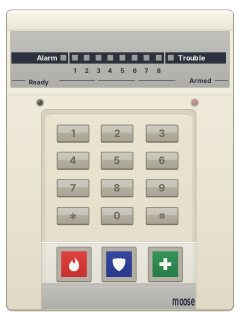
Panic alarmholdthe key with a flame on itorholdthe key with a shield on itorholdthe key with a cross on it
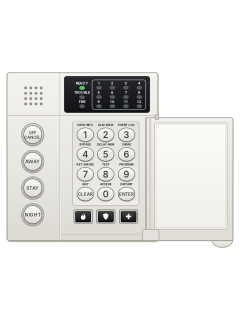
- Use the panic keys below the number keys: a flame on the left, a shield in the middle, a cross on the right.
- The guide's 8-zone wide keypad shows a star in the middle instead of a shield.
- Your installer must enable the keys and tells you which emergency each sends and whether it is silent.
- Hold the chosen key for three seconds. If programmed for double presses, press it twice within three seconds.
- To reset, enter your code. On an LED keypad, [*] clears the ALARM light.
Pages 4, 7 of the z950 manFlame picture Left panic key Shield picture (star on the 8-zone wide keypad) Middle panic key Cross picture Right panic key Change a codehold9thenmaster codeuser number#new code
- With the alarm disarmed, hold [9] for three seconds: three beeps.
- Key in the master code: two beeps, and the READY and ARMED lights blink in turn.
- Press the code number (2 to 8, or 1 for the master code), then [#]. Three beeps.
- Key in the new 4-digit code. A short then a long beep means it's saved, and programming ends.
- Made a mistake? Press [*] five times and start again. Pick a code that is hard to guess.
Test the systemhold8
- Disarm and close everything so the READY light is on. Hold [8] for three seconds: three beeps.
- Open each door and window and walk past each detector. The keypad beeps; on LED keypads, the tested zone indicator lights.
- To sound the siren for a second, press [1] and [*]. If you are monitored, [2] and [*] send a test to the monitoring centre.
- Press [*] when you've finished.
Trouble lightshold2
- If a keypad beeps for a trouble, press [*] to quiet it.
- Keypads with zone lights: TROUBLE lit means a problem. Hold [2] for three seconds; zone lights show which (see the table).
- The lights go back to normal after 8 seconds.
- Once the battery has recharged after a power cut, hold [7] to clear the low-battery trouble.
- A communication trouble clears once the panel gets through. Tell your security company about any trouble.
Pages 2 and 3, 10 of the z950 manPages 7, 14 to 16, 30 of the z950 instZone 1 Mains (AC) power has failed Zone 2 Low battery, or an output is overloaded Zone 3 A supervised zone, such as a fire zone, is open or shorted Zone 4 It couldn't get through to the monitoring centre Zone 5 Memory error: call for service Zone 6 A keypad is missing (its data wire is off) Zone 8 lit during the check (8-zone keypad) Chime is on: not a trouble READY or ARMED lit during the check Inside zones are off, or the entry delay is off: not a trouble Send a test signalhold8then2and*
- Sends a dialler test to your monitoring centre, if your system is monitored. Your installer can switch test mode off.
- Disarm. Hold [8] for three seconds: three beeps mean test mode.
- Press the 2 key and the * key. READY blinks until the test is done; if it fails, the keypad shows a trouble.
- When READY stops blinking, press [*] to leave test mode. A communication trouble clears once the panel gets through.
All Moose Z950 manuals
Nothing here matches that.
Try a shorter search, or search every brand.
More Moose models
Is anyone watching your alarm?
An alarm that only makes a noise relies on someone hearing it. A monitored alarm reports to our A1 graded, NZSA approved control room, watched 24/7 by a team that is New Zealand owned and operated. We can monitor most existing alarms, so you may not need a new one. Thinking about a new alarm or security cameras? Ask us for a quote.
Prefer to talk now? Call us on 0800 339 999.
Home: alarm monitoringBusiness: business monitoringInstaller: bureau monitoring


Manuals are the property of their manufacturers and are provided for reference only; their inclusion here does not imply any endorsement by the manufacturer.