
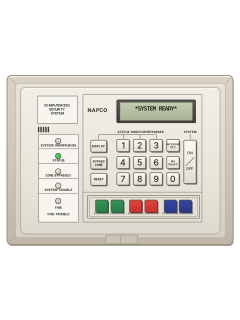
RP2600LCD keypad

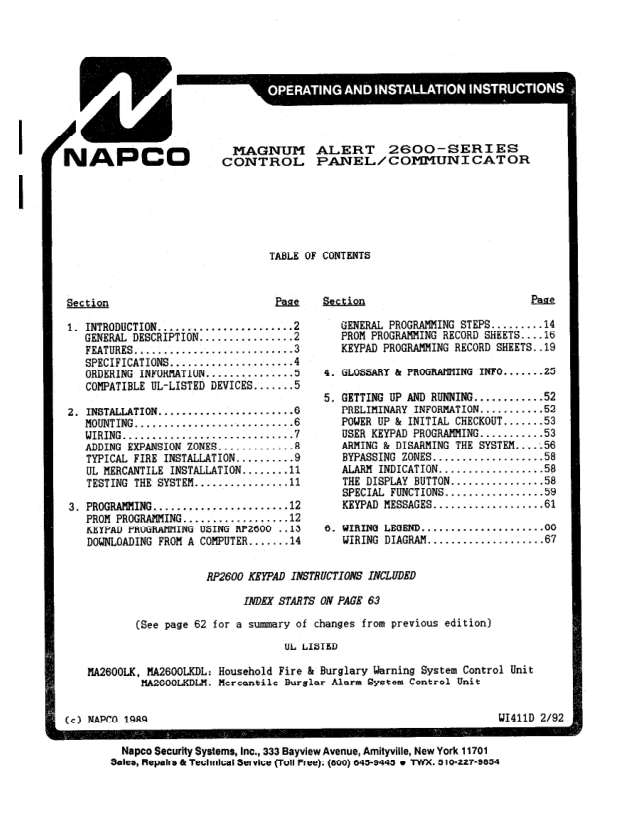
Napco 2600 manuals
Start hereRP2600 OI124 USERUser guide · 16 pages · 761 KBRead it nowKeypad cheat sheet
Arm (away)your codeON/OFF
- Check that only the green STATUS light is on and the display reads *SYSTEM READY*.
- Display says **ZONE FAULT**? With the keypad cover down, press [DISPLAY] then [1] to list the open zones, and close them first.
- Key in your code, then press [ON/OFF]. The green light goes out, the red SYSTEM ON light comes on and the exit time counts down.
- Leave through your usual exit/entry door. At 000 the display reads ARMED.
- If you're monitored, the display may ask you to wait until the monitoring centre answers. The exit time starts after that.
Arm while homeINTERIOR OFFyour codeON/OFF
- With *SYSTEM READY* showing, press [INTERIOR OFF] to bypass all the inside zones at once, if your installer has set this up.
- The yellow ZONE BYPASSED light comes on. Make sure the outside doors and windows are shut.
- Key in your code, then press [ON/OFF]. Once the exit time ends, the display reads ARMED.
- An outside door or window now sets off the alarm at once, except your usual entry door, which keeps its entry delay.
- Press [NO DELAY] to drop the entry delay too: ARMED then shows an I. Both go back to normal when you disarm.
Disarmyour codeON/OFF
- When you come in, the red SYSTEM ON/INTRUSION light is on and the keypad sounds to remind you.
- Key in your code straight away, then press [ON/OFF].
- Red light flashing as you come in? An alarm has gone off. Take care, and if you think someone is inside, call the police from a neighbour's.
- Your code then [ON/OFF] also stops an alarm while the system is armed.
- Forced to disarm? Key in your 2-digit ambush code right before your code, then [ON/OFF]. If one is set up, it sends a silent alarm.
Bypass a zoneBYPASS ZONE2-digit zoneyour codeON/OFF
- A bypassed zone can't set off the alarm. Your installer decides which zones can be bypassed.
- Press [BYPASS ZONE], then the zone as two digits: zone 4 is 04.
- The yellow ZONE BYPASSED light comes on. Bypass each zone the same way, one at a time.
- With the cover down, [DISPLAY] then [3] lists bypassed zones. Check SYSTEM READY, then arm with your code and [ON/OFF].
- Bypassed zones go back to normal when you next disarm.
Alarm memoryDISPLAY3
- To look back later, lift the keypad cover, then press [DISPLAY] and [3] (ALARM HISTORY under the cover).
- After an alarm, the display reads ALARM and runs through the zones that went off.
- Once you disarm it shows ALARM MEMORY and those zones, until you press [RESET] or arm again.
- It keeps the alarms from your last four arm-and-disarm periods. Alarm History #1 is the newest.
- A 24-hour zone alarm doesn't show at the keypad, but it goes into the alarm history.
Chime on or offBYPASS ZONE4
- Lift the keypad cover. Press the FUNCTION button (the [BYPASS ZONE] key), then [4].
- With chime on, the keypad gives a short tone when a chosen zone opens while the alarm is off.
- A C shows on the display while chime is on.
- Do the same again to turn chime off.
Reset smoke detectorsRESETthenRESET
- A fire alarm turns on the red FIRE/FIRE TROUBLE light and the sounder pulses.
- If there is a fire, get everyone out now and call the fire service from outside.
- No sign of fire? Disarm if the system is armed, to stop the alarm. Your installer may have set it to stop by itself.
- Press [RESET] to quiet the sounder. Once the smoke has cleared, press [RESET] again: the keypad resets after a short wait.
Panic alarm
- On RP2600, the emergency buttons are the three pairs along the bottom: green on the left, red in the middle, blue on the right. Press both buttons of the chosen pair together.
- Each pair works only if your installer has turned it on.
- Your installer decides whether each one alerts the monitoring centre, sounds the siren, or both.
Pages 5, 8 of the RP2600 OI124 USERGreen pair (left) Auxiliary emergency Red pair (middle) Fire Blue pair (right) Panic Change a codeyour codeON/OFF
- Use keypad 1 if you have several. Lift the cover, key in your program code, then press [ON/OFF]. USER 01 shows.
- Press [NO DELAY] (NEXT) to step to the user you want, up to 16. The display shows that user's code.
- Hold [4] or [7] to scroll a digit up or down. Press [2] to move right to the next digit, [1] to move left.
- Codes can be up to 6 digits, with no gaps. To delete a code, press [5] (BLANK) on each of its digits.
- Press [ON/OFF] (SAVE) to keep the change. Lower the cover to leave.
Trouble lights
- The SYSTEM TROUBLE light on and CHECK TROUBLE on the display mean a fault in the system.
- Lift the cover and press [DISPLAY] then [2] to see which trouble it is. After you've looked, you can arm in the next 5 minutes.
- Siren test, while disarmed: lift the cover, press FUNCTION (the [BYPASS ZONE] key) then [1]. It sounds for about 2 seconds. No sound? Call for service.
- PRIORITY TROUBLE and a steady tone as you arm: a priority zone has a problem. Press [ON/OFF] to quiet it, then fix the zone before arming.
- Phone line check (if set up): lift the cover and hold the small TEST button below 0. All lights and the sounder come on; TESTING shows once you let go.
Pages 6 and 7, 9, 11 and 12, 15 of the RP2600 OI124 USERPage 36 of the MA2600 WI411D INSTAC POWER LOSS Mains power is off: check the plug-in transformer, the fuse or circuit breaker, and for a power cut LOW BATTERY The backup battery is weak. If it hasn't recharged within 24 hours, have it replaced TELCO LINE FAIL The dial-tone test on the phone line failed: get the line working, then press TEST again FAIL TO COMM The panel couldn't get through to the monitoring centre. Pressing TEST clears it if the line has a dial tone FAIL, HIT RESET The phone line test failed: press [RESET] DAY ZONE TROUBLE A day zone has a problem: press [RESET] to quiet the sounder, then fix the zone KEYPAD FAILURE or OUT OF SYSTEM A keypad isn't working: call for service FIRE TROUBLE Fire-zone wiring fault: disarm if armed, then [RESET] to quiet it. Once repaired, press [RESET] again
Why is my keypad beeping or showing a trouble light?
Most keypads beep or light up a trouble indicator when something needs attention, such as a low backup battery, a power cut or a lost phone or internet connection. Your user guide explains what each light or code means on your model. If it keeps happening, or you are not sure, call your installer or monitoring company.
All Napco 2600 manuals
User guides 1
Installer manuals 2
Nothing here matches that.
Try a shorter search, or search every brand.
More Napco models
Is anyone watching your alarm?
An alarm that only makes a noise relies on someone hearing it. A monitored alarm reports to our A1 graded, NZSA approved control room, watched 24/7 by a team that is New Zealand owned and operated. We can monitor most existing alarms, so you may not need a new one. Thinking about a new alarm or security cameras? Ask us for a quote.
Prefer to talk now? Call us on 0800 339 999.
Home: alarm monitoringBusiness: business monitoringInstaller: bureau monitoring


Manuals are the property of their manufacturers and are provided for reference only; their inclusion here does not imply any endorsement by the manufacturer.