
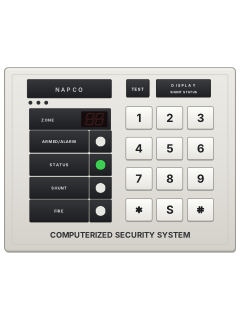
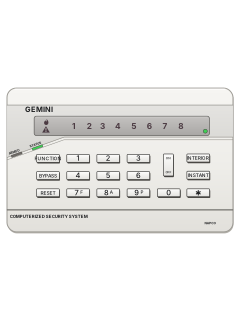
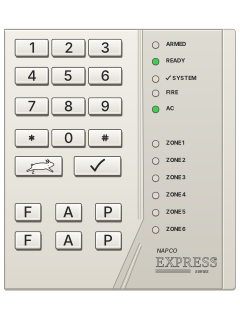
RP1016 (1990 original) keypad

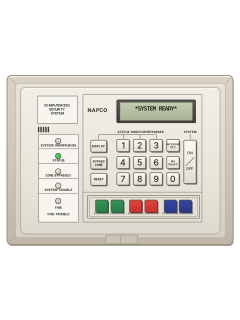
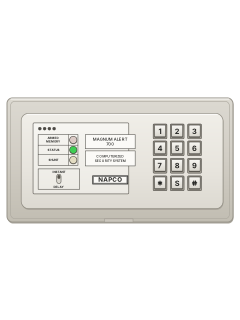
Napco 1016 manuals
Start hereNapco 1016 UserUser guide · 16 pages · 384 KBRead it nowMA1016 / MA1016e cheat sheet
Arm (away)your code
- Look for a steady green STATUS light: every zone is closed (each detector or door contact is a zone).
- Key in your code. The red ARMED/ALARM light comes on and the green light goes out.
- Go out through your usual exit/entry door before the exit time ends.
- Took too long? The keypad sounder starts the entry warning. Go back, key in your code to reset, then arm again.
- If your installer set a siren test on arming, the siren sounds briefly soon after you arm.
Arm while homeBBByour codeSSSyour code
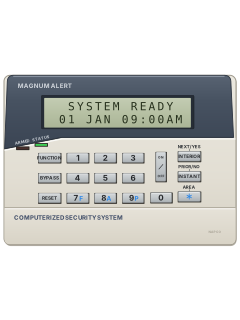
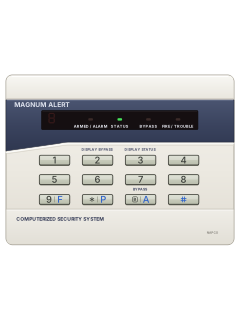
- If your installer set up group bypass, press B/A on RP1016e or S on RP1016/RP1016D three times.
- The yellow BYPASS light (SHUNT on the RP1016) comes on. Key in your code to arm the rest: the red ARMED/ALARM light comes on.
- For no entry delay, hold [4] until it beeps, right before or after you arm. The red light then flashes fast.
- With no entry delay, opening the entry door after the exit time sets off the alarm straight away.
- The bypass and the entry delay go back to normal when you disarm.
Disarmyour code
- Come in through your usual exit/entry door. The keypad sounder runs for the whole entry time.
- Key in your code. The red ARMED/ALARM light goes out and the green light comes on (it flashes if a zone is open).
- Wrong code? Wait at least 3 seconds (2 seconds on the RP1016 and RP1016D) before trying again.
- Red light already flashing as you walk in? There has been an alarm. Leave, and call for help from a neighbour's phone.
- Your code also stops an alarm that is sounding.
Bypass a zoneB2-digit zoneyour codeS2-digit zoneyour code
- A bypassed zone cannot set off the alarm. Use B/A on RP1016e, or S on RP1016/RP1016D.
- Press the bypass key (B/A on the RP1016e, S on older keypads), then the zone as two digits, 01 to 14.
- There is no 0 key: the bypass key stands in for 0. The whole entry for zone 3 is bypass key, bypass key, 3; for zone 10, bypass key, 1, bypass key.
- The yellow BYPASS light (SHUNT on the RP1016) comes on. Hold [2] to see which zones are bypassed.
- Check the green STATUS light is on, then key in your code to arm. The bypass ends when you next disarm.
Alarm memoryholdBholdS
- After an alarm the red light flashes and the zone number stays on display.
- Write the number down, then hold [9] until it beeps to clear the display.
- For alarm history, hold B/A on RP1016e or S on RP1016/RP1016D until it beeps; keep holding for every zone.
- The last alarm is kept until a new one happens, even if you arm again.
- An alarm on a 24-hour zone doesn't show on the keypad when you disarm, but it is kept in this history.
Chime on or offhold5
- With chime on, the keypad beeps each time a chosen zone opens while the alarm is off. Your installer picks the zones.
- Hold [5] until the keypad beeps to turn chime on.
- Hold [5] again until it beeps to turn it off.
- If your installer set up a never-arm zone (a driveway sensor, say), it chimes even while the alarm is on.
Reset smoke detectorshold9thenyour codethenyour codethenhold9
- A fire alarm lights the bottom red fire light and pulses the sounder. The light is marked FIRE on RP1016, FIRE/TROUBLE on RP1016e.
- To reset, hold [9] for 2 seconds, then arm and disarm with your code. Your installer may have set it to stop by itself.
- The sounder and light stay on at first: hold [9] to quiet the sounder. The light should go out in about 30 seconds.
- Light still on? Smoke may still be in a detector. Hold [9] every 30 seconds or so until the light goes out.
Panic alarm*+#
- Press both keys at the same time. Each panic works only if your installer has turned it on.
- RP1016 and RP1016D: [*] and [#] together.
- RP1016e: fire is [9] (marked F) with [#], police is [*] (marked P) with [#], auxiliary is the B/A key with [#].
- Your installer decides whether it sends a silent alarm to the monitoring centre, sounds the siren, or both.
- The auxiliary panic usually only reports: the keypad pulses until the monitoring centre answers. Arm and disarm to quiet it sooner.
Change a codehold8your codeBuser numbernew codeBBBhold8your codeSuser numbernew codeSSS
- Use B/A on RP1016e, or S on RP1016/RP1016D, wherever these steps say bypass key.
- Hold [8] until it beeps; enter your User Program Code. The first three lights flash and the sounder pulses. The alarm is off while programming.
- Press the bypass key, then user 01–15 (use the bypass key for 0). Enter 6 digits, using 1–9 only; RP1016e also accepts shorter codes.
- To delete a code, press the bypass key and the user number, with no code after it.
- Press the bypass key three times to finish.
Trouble lights
- A system trouble flashes a number and the first three lights: ARMED/ALARM, STATUS and BYPASS (SHUNT on RP1016).
- Hold [9] for 2 seconds to stop the trouble beeps. The trouble shows again unless it is fixed.
- To arm anyway, hold [9] until it beeps, then hold [1] to test the siren. If it sounds, arm and have the fault fixed soon.
- A P on the display with a steady tone means something is stopping you arming. Key in your code again, then fix or bypass the zone, or clear the trouble.
- Test the siren and battery weekly by holding [1]. No sound, or a weak one? Call for service.
Pages 6 and 7, 10 and 11 of the RP1016e oi159a userPages 6 to 8, 11 of the RP1016D oi141A user1 Mains power is off: check for a power cut and that the panel's plug-in transformer is plugged in 2 Low battery: hold [9], then hold [1] to test. If it comes back, call for service 3 Communication failed: hold [9], then hold [6] to test the phone line (Area 1 keypad if partitioned). Comes back? Call for service 4, 5 or 6 RP1016e, wireless systems only: a transmitter isn't checking in or has a low battery, or the receiver has trouble. Call for service 7 An automatic download failed: call for service 8 RP1016e: phone line fault. Check for a dial tone; it clears when the line works again Sounder pulsing A day zone has a trouble (hold [3] to see which), or the fire zone has a trouble or an alarm
Why is my keypad beeping or showing a trouble light?
Most keypads beep or light up a trouble indicator when something needs attention, such as a low backup battery, a power cut or a lost phone or internet connection. Your user guide explains what each light or code means on your model. If it keeps happening, or you are not sure, call your installer or monitoring company.
All Napco 1016 manuals
User guides 4
Installer manuals 4
Nothing here matches that.
Try a shorter search, or search every brand.
More Napco models
Is anyone watching your alarm?
An alarm that only makes a noise relies on someone hearing it. A monitored alarm reports to our A1 graded, NZSA approved control room, watched 24/7 by a team that is New Zealand owned and operated. We can monitor most existing alarms, so you may not need a new one. Thinking about a new alarm or security cameras? Ask us for a quote.
Prefer to talk now? Call us on 0800 339 999.
Home: alarm monitoringBusiness: business monitoringInstaller: bureau monitoring


Manuals are the property of their manufacturers and are provided for reference only; their inclusion here does not imply any endorsement by the manufacturer.