
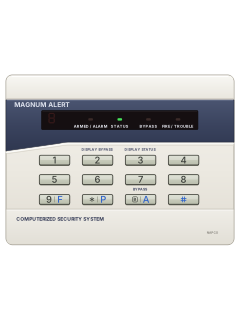
RP1016LED keypad

Napco 1008e manuals
Start hereMA1008e PRGMManual · 7 pages · 478 KBRead it nowRP1054e LED keypad cheat sheet
Arm (away)your code
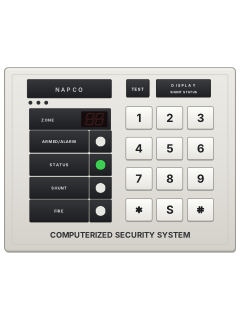
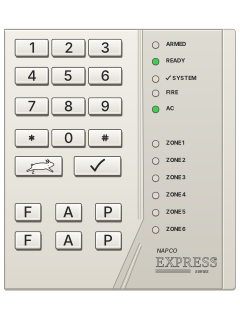
- RP1054e LED keypad only; for an LCD keypad, see its own guide. Check the green STATUS light is steady: the burglary zones are ready.
- Key in your code. The red ARMED/ALARM light comes on and the green light goes off.
- Leave through your usual exit/entry door before the exit time runs out.
- Took too long? The keypad sounder warns you. Go back, key in your code to reset, then arm again.
Arm while homeBByour code
- RP1054e LED keypad only; for an LCD keypad, see its own guide.
- If group bypass is set up, press [B] twice. The yellow BYPASS light comes on. Enter your code to arm; the red ARMED/ALARM light comes on.
- For no entry delay, hold [4] until it beeps, right before or after arming. Wait 10 seconds after disarming before using hold-[4].
- With no entry delay, opening the entry door sets off the alarm straight away.
- Bypasses and entry delay return to normal when you disarm.
Disarmyour code
- RP1054e LED keypad only; for an LCD keypad, see its own guide. Enter through your usual entry door; the keypad sounds.
- Enter your code. The red ARMED/ALARM light goes off; the green light comes on, flashing if a zone is open.
- Wrong code? Wait at least 2 seconds before trying again.
- If the red light is flashing as you walk in, there has been an alarm. Leave, and call the police from a neighbour's phone.
- Your code also turns off an alarm that is sounding.
Bypass a zoneBzoneyour code
- RP1054e LED keypad only; for an LCD keypad, see its own guide. Only zones set up for bypassing can be left out.
- Press [B] (the bypass key), then the zone number. The yellow BYPASS light comes on.
- Hold [2] to see which zones are bypassed.
- Check the green STATUS light is on, then key in your code to arm.
- The bypass clears the next time you disarm.
Alarm memoryholdB
- RP1054e LED keypad only; for an LCD keypad, see its own guide. After an alarm the red light flashes and the zone number stays on display.
- Write the number down, then hold [9] until it beeps to clear the display.
- To see the last alarm again later, hold [B] until it beeps and keep holding while it shows each zone.
- The last alarm stays in the history until a new one, even when you arm again.
- An alarm on a 24-hour zone shows nothing on the keypad, but it is kept in the history.
Chime on or offhold5
- RP1054e LED keypad only; for an LCD keypad, see its own guide. Chime sounds when a chosen zone opens while disarmed.
- Hold [5] until the keypad beeps to turn chime on.
- Hold [5] again until it beeps to turn it off.
- Wait 10 seconds after disarming before you do this.
Reset smoke detectorshold9thenyour codethenyour codethenhold9
- RP1054e LED keypad only; for an LCD keypad, see its own guide. A fire alarm lights FIRE/TROUBLE and pulses the sounder.
- To reset, hold [9] for 2 seconds, then arm and disarm with your code. Your installer may have set it to stop by itself.
- The sounder and the FIRE/TROUBLE light stay on. Hold [9] to silence the sounder.
- The light should go out in about 30 seconds. Still smoke in a detector? Hold [9] every 30 seconds or so until it goes out.
Panic alarm9+#or*+#orB+#
- RP1054e LED keypad only; for an LCD keypad, see its own guide. Press both keys together; each pair must be enabled by your installer.
- Fire: [9] (marked F) with [#]. Police: [*] (marked P) with [#]. Auxiliary: [B] (marked A) with [#].
- Your installer decides whether it sends a silent alarm to the monitoring centre, sounds the siren, or both.
- The auxiliary panic usually only reports. The monitoring centre answers with a short ringback beep at the keypad.
- Forced to disarm? If your installer set up an ambush code, key it in, then your code within 10 seconds. It sends a silent alarm.
Change a codehold8your codeBuser numbernew codeBB
- RP1054e LED keypad only; for an LCD keypad, see its own guide.
- Hold [8] until it beeps, then enter your User Program Code. The first three lights flash and the sounder pulses.
- Press [B], the user number, then up to 4 digits (1–9 only). MA1000e: users 1–8; MA1008e: users 1–7.
- To delete a code, press [B] and the user number, with no code after it.
- Press [B] twice to finish.
Trouble lights
- RP1054e LED keypad only; for an LCD keypad, see its own guide. A trouble flashes a number and the first three lights.
- Hold [9] for 2 seconds to stop the trouble beeps. The trouble shows again until it is fixed.
- Need to arm anyway? Hold [9] until it beeps, then hold [1] to test the siren. If it sounds, arm and get the fault fixed soon.
- A P on the display with a steady tone means a zone or trouble is stopping you arming. Key in your code again, then fix or bypass the zone.
Pages 5 and 6, 8 of the Napco 1000e UserPages 9 and 10 of the MA1000e iNSTALLER MANUAL1 Mains power is off: check for a power cut and that the panel's plug-in transformer is plugged in 2 Low battery: hold [9], then hold [1] to test. Still showing after 24 hours of charging? Call for service 3 Communication failed: disarm, wait 10 seconds, hold [9], then hold [6] to test the phone line. Comes back? Call for service 4, 5 or 6 MA1008e with wireless only: a transmitter has stopped reporting or has a low battery, or the receiver has a fault. Call for service 7 An automatic program download failed: hold [9] to clear it 8 MA1008e (version 2): a fault on the phone line Sounder pulsing A day zone has a trouble (hold [3] to see which), or the fire zone has a trouble or an alarm
All Napco 1008e manuals
Installer manuals 2
Nothing here matches that.
Try a shorter search, or search every brand.
More Napco models
Is anyone watching your alarm?
An alarm that only makes a noise relies on someone hearing it. A monitored alarm reports to our A1 graded, NZSA approved control room, watched 24/7 by a team that is New Zealand owned and operated. We can monitor most existing alarms, so you may not need a new one. Thinking about a new alarm or security cameras? Ask us for a quote.
Prefer to talk now? Call us on 0800 339 999.
Home: alarm monitoringBusiness: business monitoringInstaller: bureau monitoring


Manuals are the property of their manufacturers and are provided for reference only; their inclusion here does not imply any endorsement by the manufacturer.