
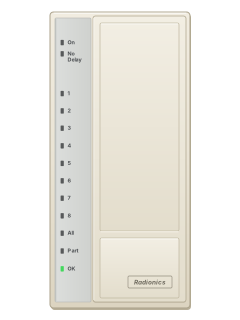
D202 / D202AKeypad (D2112)

Radionics D2112 manuals
Start hereradionics 2112guideManual · 8 pages · 178 KBRead it nowKeypad cheat sheet
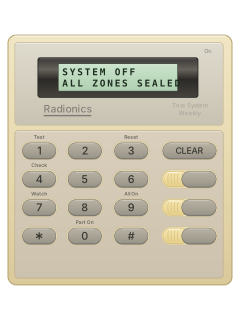
Arm (away)9
- Open the keypad cover first. Close every door and window first. Each detector or door contact is a point, the D2112's word for a zone.
- Press [9] to turn the whole system on (All On). The exit delay starts: your installer sets how long (60 seconds as supplied).
- Leave by your entry door before it ends. The keypad gives three long tones as the exit delay finishes.
- Moving past a detector or opening a door after the exit delay has ended sets the alarm off.
- If your installer has set it to need a passcode, press [9] and then key in your passcode.
Arm while home0
- Open the keypad cover first. Part On arms only the points your installer assigned to Part, such as doors. Check which indoor detectors stay off.
- Close the Part points first. Press [0], then key in your passcode if your system requires one.
- The exit delay runs, then the keypad gives three long tones.
- If your system needs a passcode to arm: [0], your passcode, then [0] again arms Part On with no delay.
- Step Outside, if set up: while armed with no delay, [CLEAR] lets you use a delay door. Press [CLEAR] again to put it back.
Disarmyour code
- Open the keypad cover first. Come in through a door with an entry delay: opening it starts the countdown.
- Key in your passcode before the entry delay runs out, or the alarm goes off.
- Passcodes are 3 to 6 digits. Your installer sets one length for everybody.
- A one-time passcode turns the system off once only, until an Owner renews it.
Reset smoke detectors3your code
- Open the keypad cover first. After an alarm, smoke and glass-break detectors may need resetting.
- Press [3], then key in your passcode. The panel briefly cuts power to the detectors to reset them.
- False alarm? Silence the bell, reset the detectors, then let your alarm company know straight away.
- Fire alarm? Leave the building first and call the fire service from somewhere safe.
Emergency keys
- On the D202, open the cover. The three keys across the top are emergency keys: left, middle and right.
- Use one only after your alarm company has identified its programmed job. Press that key twice to activate it.
- If it sets off the siren, key in your passcode to silence it.
- The guide calls these keys A, B and C; do not assume those letters are printed on your keys.
Page 3 of the radionics 2112guidePage 21 of the Radionics D2112 D2112E Program Entry GuideThree top emergency keys Their jobs are set by your alarm technician; press the chosen key twice Change a code6master code0user numbernew codenew code
- Open the keypad cover first. Use an Owner passcode, and only if your installer has enabled keypad code changes.
- Press [6], key in the Owner passcode, then press [0]. The Part light starts flashing.
- Key in the user number (1 to 8), then the new passcode, the same length as yours. The OK tone sounds.
- Key the new passcode in again. The OK tone confirms it; an error tone means start again at the user number.
- Press [CLEAR] once and check the user type: fast flash = Owner, slow blink = User, steady = One-Time. Press [CLEAR] again.
Test the system1your code
- Open the keypad cover first. Ring your alarm company before you test.
- Press [1], then key in your passcode. Light 1 winks while the test runs.
- Depending on how it's set up, it rings the bell for 2 seconds, runs on the battery for 4 minutes and sends a test report.
- [CLEAR] ends the battery test early.
- A flashing OK light afterwards means the battery or the call failed: ring your alarm company.
Trouble lights
- The OK light stays on steady when all is well.
- A winking OK light means a trouble. It goes steady again once the fault clears.
- If the panel can't reach the monitoring station, the keypad also sounds a tone: [CLEAR] silences it.
- Power off at the alarm only? Check the transformer is plugged in and its circuit breaker hasn't tripped.
Pages 13 and 14 of the Radionics D2112 D2112E Installation ManualPage 16 of the Radionics D2112 D2112E Program Entry GuideOK light on steady Mains power is on and the backup battery is fine OK light winking A trouble, such as the mains power off, a low battery, or a failed call to the monitoring station Tone and winking OK light A failed call to the monitoring station ([CLEAR] silences the tone), or mains power off if your installer set it to sound
All Radionics D2112 manuals
Installer manuals 3
Nothing here matches that.
Try a shorter search, or search every brand.
More Radionics models
- D91122 user guides, 1 quick guide and 4 more7 manuals
- D41121 user guide, 1 installation manual and 4 more6 manuals
- D6412 D94121 user guide, 1 quick guide and 4 more6 manuals
- Access Easy Controller2 user guides, 1 installation manual and 2 datasheets5 manuals
- Radionics-Bosch RPS1 datasheet and 1 manual2 manuals
Is anyone watching your alarm?
An alarm that only makes a noise relies on someone hearing it. A monitored alarm reports to our A1 graded, NZSA approved control room, watched 24/7 by a team that is New Zealand owned and operated. We can monitor most existing alarms, so you may not need a new one. Thinking about a new alarm or security cameras? Ask us for a quote.
Prefer to talk now? Call us on 0800 339 999.
Home: alarm monitoringBusiness: business monitoringInstaller: bureau monitoring


Manuals are the property of their manufacturers and are provided for reference only; their inclusion here does not imply any endorsement by the manufacturer.