
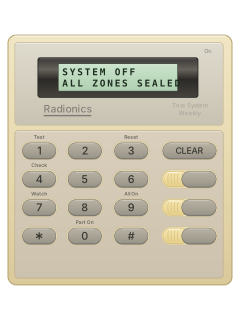
D206Two-line LCD keypad

Radionics D2212 manuals
Start hereRadionics D2212 Security System User's Guide (D206 LCD keypad)User guide · 51 pages · 989 KBRead it nowKeypad cheat sheet
Arm (away)9
- Close every door and window. Each detector or door contact is a point, the D2212's word for a zone.
- Press [9]. The display counts down the exit delay in seconds (30 SEC TO EXIT, for example).
- Leave before it reaches zero. Pressing [CLEAR] during the countdown cancels the arming.
- When the time is up the keypad beeps three times and shows ALL ON SYSTEM OK.
- If your installer has set it to need a passcode, key yours in after [9].
Arm while home0
- Part On arms only the points your alarm company chose, such as the outside doors and windows. Close those points first.
- Press [0], then your passcode if required. The display counts down; [CLEAR] cancels arming.
- At the end the keypad beeps three times and shows PART ON SYSTEM OK.
- If no-delay arming is enabled, press [0] again during exit time. Opening the entry door then alarms immediately.
- Step Outside, if set up: while armed with no delay, [CLEAR] lets you use the door. Press [CLEAR] again once back in.
Disarmyour code
- Come in through your entry door. The keypad beeps to remind you to turn the system off.
- Key in your passcode before the entry delay runs out. The display goes back to its usual message.
- Came in the wrong door or took too long? If it alarms, key in your passcode to silence it, then ring your alarm company.
- Keying in your passcode before the panel dials out cancels the alarm report.
- Press [CLEAR] to take the alarm messages off the display.
Bypass a zone9thenzone*
- If your installer has turned bypassing on, it leaves an open point out when you arm. Turning the system off puts them all back.
- Press [9], or [0] for Part On, then your passcode if required. An open point gives an error tone and POINTS FAULTED.
- The display then names the open point and asks for its number and [*]: for point 5, press [5] then [*]. PT 5 BYPASSED confirms it.
- Once no open points are left, the exit delay starts and the display says how many points are bypassed.
- Bypassed the wrong one? Press [CLEAR] and start again. During the exit delay, [*] also starts bypassing and the display leads you through it.
Alarm memory4thenhold6
- With the system off (On light out), press [4]. ALARM MEMORY HOLD 6 TO VIEW means something went off.
- Hold [6]. The display steps through each point that went into alarm, for example ALARM PT 8.
- CANCELED PT means someone keyed in a passcode before the panel dialled your alarm company.
- Arming the system again clears the memory.
Chime on or off7master codethen2or7master codethen1
- The D2212 calls chime Watch. With the system off, opening a watched door or window shows its name, and can beep.
- Press [7] to see the current Watch tone. To change it, key in an Owner passcode (the master-level type).
- Press [1] for no tone, [2] for a short beep, [3] to beep until [CLEAR], or [4] to beep until shut. [CLEAR] also quiets option 4.
- To choose which doors: press [8], key in the Owner passcode, then a point number and [*] to swap Watch on or off. [CLEAR] finishes.
- Fire points can't be watched.
Reset smoke detectors3master code
- After an alarm, smoke detectors and shock sensors need resetting.
- With the system off, press [3]. The display shows ENTER CODE TO RESET SENSORS.
- Key in an Owner passcode. RESETTING shows for about 20 seconds, then the display goes back to normal.
- False fire alarm? Silence it with your passcode, reset, then tell your alarm company there's no emergency.
- If a point won't reset, ring your alarm company.
Emergency keys
- The pictured D206 has three unlabelled emergency buttons down the right. Your alarm company sets their jobs.
- Ask your alarm company to identify each button before you need it. The guide calls them A, B and C.
- Press the button for the confirmed emergency function twice to activate it.
Page 6 of the Radionics D2212 Security System User's Guide (D206 LCD keypad)Page 25 of the Radionics D2212 Program Entry GuideThree unlabelled right-hand buttons Confirm their programmed jobs with your alarm company; press the chosen button twice Change a code5your codenew codenew code
- With the system off, press [5]. You hear the OK tone and the display shows ENTER OLD CODE.
- Key in your passcode, then the new one when asked. It must have the same number of digits.
- Key the new one in again. CODE CHANGED confirms it; an error tone means start again.
- An Owner passcode can change anyone's: [6], the Owner passcode, [0], the user number (1 to 8), then the new passcode twice.
- Your installer can turn off changing passcodes at the keypad.
Trouble lights4
- A trouble makes the keypad warble, pause and warble again, and the display shows SYSTEM TROUBLE.
- Turn the system off if it's on, then press [4]. The tone stops and the troubles scroll past.
- Press [CLEAR] to go back.
Pages 8, 25, 39, 41, 45, 50 of the Radionics D2212 Security System User's Guide (D206 LCD keypad)SYSTEM RUNNING ON BATTERY ONLY Mains power is off. Check the transformer is plugged in and its circuit breaker hasn't tripped PHONE TROUBLE CHECK DIAL TONE Check the phone line has a dial tone CALL FOR SERVICE Ring your alarm company FIRE TROUBLE HOLD 1 TO VIEW Hold [1] to see the fire fault POINT TROUBLE HOLD 2 TO VIEW Hold [2] to see which point has a fault LOW BATTRY PT That detector's battery is low: ring your alarm company MISSING PT A wireless point is in trouble: ring your alarm company AUTOBYPASS PT The panel has bypassed that point itself: ring your alarm company Send a test signal1master code
- Ring your alarm company first. With the system off, press [1]: the display shows ENTER CODE TO START TEST.
- Key in an Owner passcode. If set up, the bell rings for about 3 seconds, then a battery test runs (up to 4 minutes).
- Then the phone test sends a test report, if your installer set it up. It can take up to 10 minutes.
- PHONE TEST PASSED or PHONE TEST FAILED shows (if it failed, ring your alarm company), then the system goes back to off.
Why is my keypad beeping or showing a trouble light?
Most keypads beep or light up a trouble indicator when something needs attention, such as a low backup battery, a power cut or a lost phone or internet connection. Your user guide explains what each light or code means on your model. If it keeps happening, or you are not sure, call your installer or monitoring company.
All Radionics D2212 manuals
Installer manuals 3
Nothing here matches that.
Try a shorter search, or search every brand.
More Radionics models
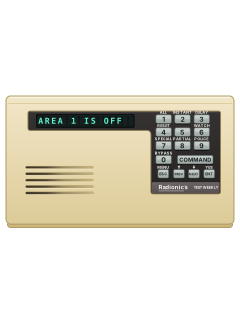
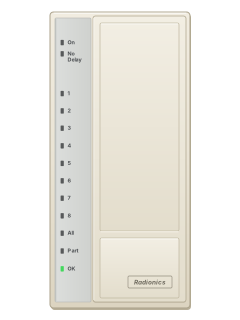
- D91122 user guides, 1 quick guide and 4 more7 manuals
- D41121 user guide, 1 installation manual and 4 more6 manuals
- D6412 D94121 user guide, 1 quick guide and 4 more6 manuals
- Access Easy Controller2 user guides, 1 installation manual and 2 datasheets5 manuals
- Radionics-Bosch RPS1 datasheet and 1 manual2 manuals
Is anyone watching your alarm?
An alarm that only makes a noise relies on someone hearing it. A monitored alarm reports to our A1 graded, NZSA approved control room, watched 24/7 by a team that is New Zealand owned and operated. We can monitor most existing alarms, so you may not need a new one. Thinking about a new alarm or security cameras? Ask us for a quote.
Prefer to talk now? Call us on 0800 339 999.
Home: alarm monitoringBusiness: business monitoringInstaller: bureau monitoring


Manuals are the property of their manufacturers and are provided for reference only; their inclusion here does not imply any endorsement by the manufacturer.