
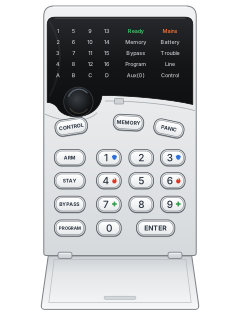
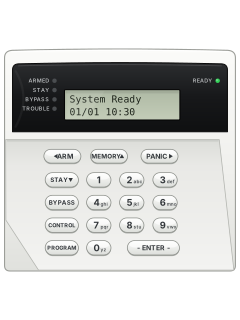
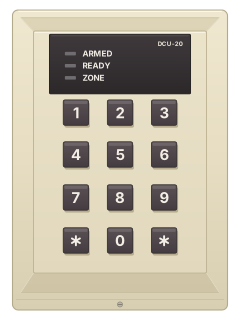
Crow PowerWave 8 / 16 LED keypad

Arrowhead Elite V8 / V6 Powerwave manuals
Also known as Crow PowerWave
Start hereV6.20 PW-16 User Operating GuideUser guide · 22 pages · 131 KBRead it nowKeypad cheat sheet
Arm (away)your codeENTERorARM
- Close the doors and windows. On the LED keypad, a zone light that stays on shows a zone still open.
- Key in your code and press [ENTER]. Slow beeping in the exit delay reminds you to leave.
- On the LED keypad the A light (or B, C) comes on when armed. It may go out a few seconds later.
- Changed your mind? Your code and [ENTER] disarm. [ARM] during the exit delay also disarms, if your installer allows it.
- Your installer may set arming to [ARM] alone (Quick Arm), or to [ARM], your code, then [ENTER].
Arm while homeSTAYyour codeENTERorSTAY
- Stay mode guards the outside doors and windows while movement inside is ignored.
- Press [STAY], key in your code, then press [ENTER]. On the LED keypad the A light (or B, C) flashes while in Stay.
- If your installer allows it, [STAY] on its own arms Stay mode.
- Pressing [ENTER] during the exit delay arms at once and removes the entry delays.
Disarmyour codeENTER
- Come in through your entry door. The keypad beeps slowly during the entry delay.
- Key in your code and press [ENTER]. On the LED keypad the A light (or B, C) goes off.
- The same keys stop an alarm and turn off the sirens.
- From Stay mode, [STAY] on its own may disarm, if your installer allows it.
- Made a mistake while keying? Press [ENTER] and start again.
Bypass a zoneBYPASSzoneENTER
- Each detector or door contact is a zone. Bypass zones you cannot close, before arming.
- Press [BYPASS], key in the zone number, then [ENTER]. On the PW-16 use 2 digits (05).
- On the LED keypad the zone light comes on, then the Ready Byp (PW-8) or Bypass (PW-16) light flashes. An LCD keypad shows the zone numbers.
- Repeat the same keys to un-bypass a zone. Disarming clears bypasses.
- A bypassed 24-hour zone may stay bypassed until you remove it yourself.
Alarm memoryMEMMEMORY
- LCD keypad: press [MEM]. LED keypad: press [MEMORY].
- Current system problems show first. On LCD keypads, keep pressing [MEM] for past events, newest first, with the time and date.
- The LED keypad plays them back itself, one every 2.5 seconds with a beep. Zone lights show the zones in each event.
- Press [ENTER] to stop. The PW-8 keeps 127 events and the PW-16 keeps 255.
Chime on or offCHIMECONTROLthenPROGRAM
- LCD keypad: press [CHIME]. The screen shows CHIME OFF; press it again for CHIME ON.
- LED keypad: press [CONTROL], then [PROGRAM]. PW-8: the Program light flashes while chime is off. PW-16: the Control light comes on.
- On the LED keypad, [CONTROL] then [PROGRAM] again switches chime back on, and that light goes off.
- Chime (day zone) warnings work only if your installer has set them up.
Panic alarmCHIME+CONTROLPANICor1+3
- LCD keypad (with A, B and CHIME keys): [CHIME] and [CONTROL] together for panic, [A] and [B] for fire, [B] and [CHIME] for medical.
- LED keypad: press [PANIC]. If your installer has turned them on, [1]+[3] also sends a panic, [7]+[9] medical and [4]+[6] fire.
- Your installer decides what a panic does, such as sounding the siren or calling a monitoring centre.
- Under threat, if set up, enter the duress digit, your code, then [ENTER]. This disarms and quietly sends an alert.
Change a codePROGmaster codeENTERthenPROGuser numberENTERnew codeENTERPROGRAMmaster codeENTERthenPROGRAMuser numberENTERnew codeENTER
- LCD keypad: use [PROG]. LED keypad: use [PROGRAM] throughout. Disarm, then press that key, your master code and [ENTER].
- An LCD keypad then shows CLIENT MODE; the LED keypad lights Program. A single long beep means your code can't change codes.
- Press the program key, the user number and [ENTER]. Users: 1 is master, 2 to 10 (PW-8), 2 to 50 (PW-16).
- Key in the new code, 1 to 6 digits, and [ENTER]. Three short beeps means it is saved.
- Delete: LED, [BYPASS]; LCD, hold [CONTROL], then [0] within 2 seconds. Press [ENTER]. Finish with the program key, [ENTER].
Test the systemPROGmaster codeENTERthenPROG627ENTERorPROGmaster codeENTERthenPROG836ENTERPROGRAMmaster codeENTERthenPROGRAM627ENTERorPROGRAMmaster codeENTERthenPROGRAM836ENTER
- LCD keypad: use [PROG]. LED keypad: use [PROGRAM] throughout. Press that key, your master code and [ENTER].
- Your code must allow walk tests. Press the program key, 627 (PW-8) or 836 (PW-16), then [ENTER].
- The keypad beeps every second. Set off every detector, then come back to the keypad.
- The zones you triggered are shown. Press [ENTER] to finish; the results are saved in memory.
Trouble lights
- LED keypad: a flashing Trouble or System light (PW-8), or Memory light (PW-16), means a new event is waiting. Press [MEMORY].
- Current problems show first: the System light (PW-8), or the Memory, Mains and Battery lights (PW-16), with a zone light.
- The zone light shows the problem (see the table). Press [ENTER] to stop.
- LCD keypad: press [MEM] to read the events on the screen, each with its time and date.
- Beeping: a wireless detector or zone gone quiet, or a PW-16 phone line fault, depending on your installer's set-up. PW-16: any key stops it.
Pages 11 and 12 of the PW-8 User Operating Guide V8.69Pages 11 and 12 of the V6.20 PW-16 User Operating GuideZone light 1 Backup battery low Zone light 2 Mains power, or a 12 V fuse, has failed Zone light 3 Phone line has failed Zone light 4 A wireless detector's battery is low Zone light 5 A wireless remote (pendant) battery is low Zone light 6 A supervised detector has failed Zone light 7 A zone has not been triggered for too long Zone light 8 The dialler got no confirmation from the monitoring centre
Why is my keypad beeping or showing a trouble light?
Most keypads beep or light up a trouble indicator when something needs attention, such as a low backup battery, a power cut or a lost phone or internet connection. Your user guide explains what each light or code means on your model. If it keeps happening, or you are not sure, call your installer or monitoring company.
All Arrowhead Elite V8 / V6 Powerwave manuals
User guides 5
Installer manuals 10
Nothing here matches that.
Try a shorter search, or search every brand.
More Arrowhead models
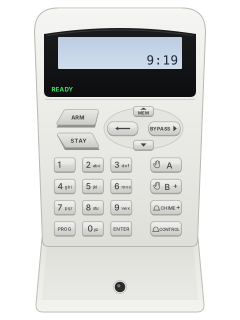
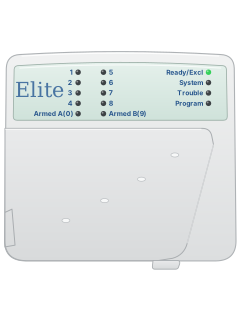
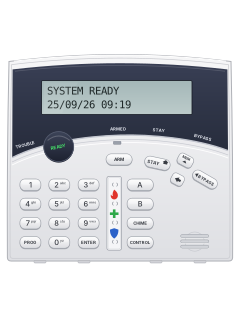
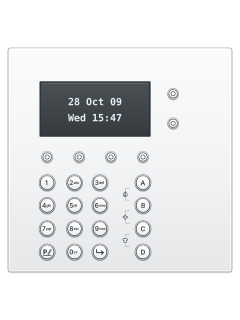
Crow wide LCD keypad (PowerWave CR16M)
Keypads
8 manuals
Also fitsElite V8 / V6 Powerwave, 15 manualsElite 16D / 64, 7 manuals
Is anyone watching your alarm?
An alarm that only makes a noise relies on someone hearing it. A monitored alarm reports to our A1 graded, NZSA approved control room, watched 24/7 by a team that is New Zealand owned and operated. We can monitor most existing alarms, so you may not need a new one. Thinking about a new alarm or security cameras? Ask us for a quote.
Prefer to talk now? Call us on 0800 339 999.
Home: alarm monitoringBusiness: business monitoringInstaller: bureau monitoring


Manuals are the property of their manufacturers and are provided for reference only; their inclusion here does not imply any endorsement by the manufacturer.