
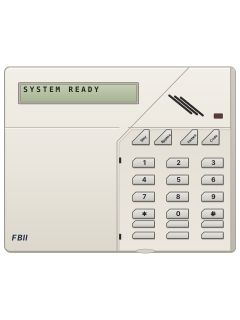
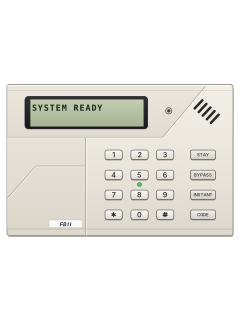
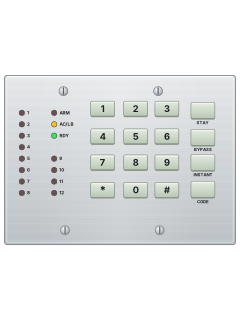
XK-5LC / XK-516 +2Keypads with key cover

FBII XL-2 manuals
Start herexl-2userManual · 19 pages · 651 KBRead it nowKeypad cheat sheet
Arm (away)your code
- An LED keypad's READY (RDY) light must be on; an LCD shows SYSTEM READY. You can't arm with a zone open.
- Not ready? An LED keypad lights the zones that aren't ready; an LCD shows NOT RDY and the zone. Close them, or bypass them.
- Key in your 4-digit code. The ARM light comes on and an LCD shows ON AWAY.
- Leave through your entry/exit door before the exit delay ends.
- If your installer has set up quick arming, [#][1] arms without a code. You still need a code to disarm.
Arm while homeSTAYyour codeorSTAYINSTANTyour codeStayyour codeorStayInstantyour code
- Stay arms the outside doors and windows but leaves the inside zones off, so you can move about.
- When the system is ready, press [STAY], then your code. The ARM light comes on, and a STAY light if your keypad has one; an LCD shows ON: STAY.
- No entry delay as well: [STAY], [INSTANT], then your code (ON:STAY INSTANT). Anyone coming in sets it off at once. XL-2T: if your installer turned it on.
- [INSTANT] on its own arms the inside zones too, so it's not for staying home.
- Stay and Instant are cleared when you disarm. Disarm before you go out.
Disarmyour code
- Key in your code. The ARM light goes out and an LCD shows SYSTEM READY.
- Your code also resets the system after a false alarm, such as smoke setting off a fire alarm.
- Alarm while you were away? Don't go in. Call for help from a neighbour's house and wait for the police.
Bypass a zoneBYPASSyour codezoneBypassyour codezone
- Each detector or door contact is a zone. A bypassed zone is not protected while the system is armed.
- Press [BYPASS], key in your code, then the zone number (1 to 6; 1 to 7 on an XL-2T).
- A continuous beep confirms it. An LED keypad blinks the zone's light slowly; an LCD shows BYPASS and the zone.
- Do the same again to unbypass it.
Alarm memoryyour code
- When you disarm after an alarm, an LED keypad blinks the light of each zone that went into alarm fast.
- An LCD keypad shows ALARM MEM and the zone. A burglary alarm sounds steady at the keypad; a fire alarm pulses.
- Key in your code again to clear the display and silence the keypad.
Chime on or off#6
- XL-2T only: press [#][6] to show chime and turn it on or off.
- It only works if your installer has set chime on some zones.
- Press [*] to leave, or wait and the keypad leaves by itself.
Panic alarm*+#or7+9or1+3
- Press both keys at the same time: [*]+[#] for Panic, [7]+[9] for Fire, [1]+[3] for Auxiliary.
- Your installer has to turn these on. Ask how they are set up on your system.
- An XL4600SM keypad also has two keys marked P below its function keys: press them together.
- Forced to disarm? If your installer has set up ambush, user code 6 (15 on an XL-2T) also sends an emergency signal.
Change a codeCODEmaster codeuser numbernew codeCodemaster codeuser numbernew code
- Only the master (user 1) can add or change codes. There are up to 6 users. Do this while disarmed.
- Press [CODE], key in the master code, the user number (1 to 6), then the new 4-digit code.
- Four quick beeps mean it didn't take: start again from [CODE].
- To delete a user: [CODE], master code, user number (2 to 6), then [*]. User 1 can't be deleted.
- XL-2T: user numbers are 2 digits (01 to 15), and users 01 and 02 are both masters.
Test the systemyour code
- Monitored? Tell your monitoring company before you start.
- Arm the system, then open a protected door or window.
- Check the siren or bell sounds. If you're monitored, the keypad gives a ringback to show the signal got through.
- Key in your code to disarm and silence it. The manual suggests testing once a week.
Trouble lights
- On an LED keypad, each zone light shows its zone's state. The keypad sounder pulses for troubles such as mains loss or low battery, and in a fire alarm.
- Key in your code to silence a trouble. After disarming, key it in again to clear the display.
- Fast beeps from the keypad mean a message has been sent to the monitoring centre.
- Call your installer about any trouble you can't clear.
Pages 4 and 5, 8 of the xl-2userPages 7, 12 and 13, 15 of the xl-2-instZone light blinking fast That zone went into alarm Zone light blinking slowly and dim That zone is bypassed Zone light pulsing slowly A trouble on that zone Zone light on steady That zone is open (not ready) AC/LB light off, or blinking slowly Off: no mains power, running on the backup battery. Blinking slowly: the battery is low ARM light blinking slowly The panel couldn't reach the monitoring centre READY light blinking slowly (LCD: PROGRAMMING MODE STANDBY) Installer programming mode: alarms are off. Call your installer if it stays READY blinking fast (XL-2T with XL4600SM: ARM) After disarming: alarm memory. Key your code again to clear it.
All FBII XL-2 manuals
Installer manuals 3
Nothing here matches that.
Try a shorter search, or search every brand.
More FBII models
Is anyone watching your alarm?
An alarm that only makes a noise relies on someone hearing it. A monitored alarm reports to our A1 graded, NZSA approved control room, watched 24/7 by a team that is New Zealand owned and operated. We can monitor most existing alarms, so you may not need a new one. Thinking about a new alarm or security cameras? Ask us for a quote.
Prefer to talk now? Call us on 0800 339 999.
Home: alarm monitoringBusiness: business monitoringInstaller: bureau monitoring


Manuals are the property of their manufacturers and are provided for reference only; their inclusion here does not imply any endorsement by the manufacturer.