
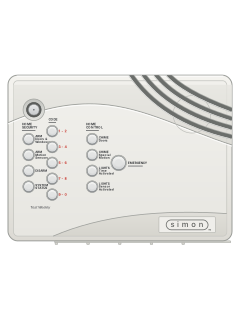
Simon / Simon 2 all-in-one panel

ITI Simon manuals
Start hereSimon XT User GuideUser guide · 60 pages · 2.0 MBRead it nowSimon, Simon 2 and Simon 3 cheat sheet
Arm (away)Doors & WindowsMotion Sensors
- Close all doors and windows. One left open is bypassed (not protected) when the exit delay ends.
- Press Doors & Windows, then Motion Sensors. Some systems also need your code to arm.
- Both buttons light up, the exit delay starts and the panel beeps in fours.
- Leave by a door that has an entry/exit delay before the delay ends.
Arm while homeDoors & Windows
- Close the doors and windows you want protected.
- Press Doors & Windows once, with your code if your system needs it.
- Doors and windows are armed. Motion sensors stay off, so you can move about inside.
- The button lights and the panel beeps in twos. A Simon 3 also says 'Doors and windows on'.
- Press it twice to turn off the entry delay; the button blinks while the delay is off.
DisarmDisarmyour code
- Come in by a door with an entry delay. The panel beeps while the delay counts down.
- Press Disarm, then key in your code. On a Simon 3 the code alone also works.
- Each CODE button stands for two numbers: for 1-2-3-4, press 1/2 twice, then 3/4 twice.
- The panel beeps once and the Disarm button lights. A Simon 3 also says 'System disarmed'.
- Smoke detectors and panic buttons stay on while the system is disarmed.
Bypass a zoneDoors & WindowsorBypassmaster code
- Simon calls each door, window or detector a sensor. A bypassed sensor is not protected.
- Leave that door or window open and arm. The panel names it, then bypasses it when the exit delay ends.
- Already armed? Disarm, open it, then arm again.
- Simon 3 Bypass key, while armed: press it until you reach the sensor, then key the master code. Repeat to undo.
- The Bypass key only works if you have no special motion chime sensors.
Alarm memorySystem StatusthenDisarmyour code
- Come home to sirens, or lights on that should be off? Leave straight away and call for help.
- A blinking System Status button means an alarm has gone off.
- Press System Status to hear what happened. On a Simon 2, press it twice.
- Then disarm to clear it.
- Set it off by mistake? Key in your code straight away. If you are too late, ring your monitoring centre.
Chime on or offChime Doors
- Disarm first. Press Chime Doors to turn door chime on or off.
- With chime on, the panel beeps twice when a protected door or window opens.
- The button stays lit while chime is on. A Simon 3 also says 'Chime on' or 'Chime off'.
- Chime Special Motion does the same for motion sensors watching an area, such as a patio.
- If no sensor is set up for chime, the panel says 'Function not available'.
Panic alarmholdEMERGENCYorholdPOLICEorholdFIREorholdAUX
- Simon and Simon 2: hold EMERGENCY for 2 seconds, or press it twice quickly.
- Simon 3: do the same with POLICE, FIRE or AUX (a non-medical emergency).
- The panel calls your monitoring centre for help.
- Handheld touchpad: hold both EMERGENCY buttons for 3 seconds.
- Keychain touchpad: hold LOCK and UNLOCK together for 3 seconds.
Change a codemaster codeAddAccess CodeDONEnew code
- Open the panel cover. When it asks for your ID, key in the master code.
- Press Add, then Access Code. The panel says 'Master code'.
- Press Access Code again to step through codes 1 to 5. Press DONE at the one to change.
- Key in the new code, then close the cover.
- Simon 3: to delete a code, press Delete instead of Add, then choose it the same way.
Test the systemmaster codeTestDONE
- Open the panel cover and key in the master code.
- Press Test once, then DONE. The panel names each sensor still to be tested.
- Set each one off, such as opening a door. Each sensor that works drops off the list.
- When it says 'Sensor test complete', press DONE. It should then say 'Sensor test OK'.
- Phone test: press Test twice, then DONE. 'Phone test OK' should follow within a few minutes.
Trouble lightsSystem Status
- A lit System Status button means a trouble or an open sensor. Press it to hear which (Simon 2: twice).
- Trouble beeps come six at a time, every minute. Pressing System Status stops them for 4 hours.
- Once it is fixed, press System Status, listen, then disarm to clear it.
Pages 5, 7, 12 of the Simon user manualPages 21 to 23 of the Simon ITI user manualAC power failure Mains power is off and the battery has taken over. The panel goes dark after 15 seconds. System battery failure The backup battery has run down or failed. Call your alarm company. Sensor failure A sensor has stopped talking to the panel. Run a sensor test. Sensor low battery A sensor's battery is low. Some you can change yourself. Fail to communicate It could not reach your monitoring centre. Call your alarm company if it keeps happening. 'Sensor (number, name) open' A door or window is open, or a sensor has been knocked. Close it or reseat the sensor. 'Sensor (number, name) tampered' Simon 3: a sensor has been interfered with, such as its cover taken off. System access alarm Simon 3: the panel cover was opened while armed, so it reports a tamper alarm.
Why is my keypad beeping or showing a trouble light?
Most keypads beep or light up a trouble indicator when something needs attention, such as a low backup battery, a power cut or a lost phone or internet connection. Your user guide explains what each light or code means on your model. If it keeps happening, or you are not sure, call your installer or monitoring company.
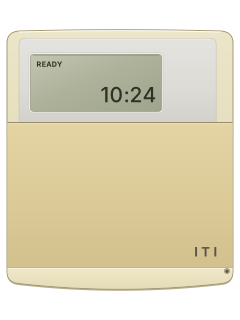
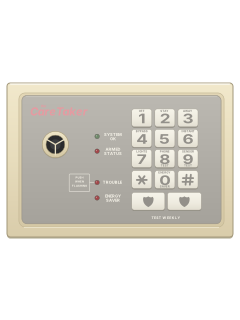
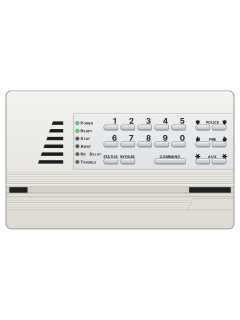
More ITI + Simon models
Is anyone watching your alarm?
An alarm that only makes a noise relies on someone hearing it. A monitored alarm reports to our A1 graded, NZSA approved control room, watched 24/7 by a team that is New Zealand owned and operated. We can monitor most existing alarms, so you may not need a new one. Thinking about a new alarm or security cameras? Ask us for a quote.
Prefer to talk now? Call us on 0800 339 999.
Home: alarm monitoringBusiness: business monitoringInstaller: bureau monitoring

Manuals are the property of their manufacturers and are provided for reference only; their inclusion here does not imply any endorsement by the manufacturer.