
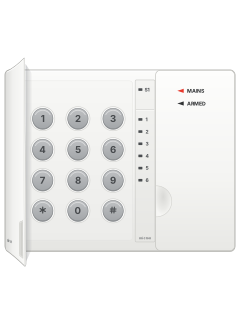
KP660Scorpion six-zone LED keypad

Micron Z4120 / Z6020C / Z8020C manuals
Start here4120-6020-8020 User ManualUser guide · 18 pages · 125 KBRead it nowKeypad cheat sheet
Arm (away)your code#or1#
- Use a numbered keypad to arm away. For NiteWatch, see Arm while home.
- Close doors and windows. Key in your code (2 to 4 digits), then #. Three short beeps repeat through the exit time.
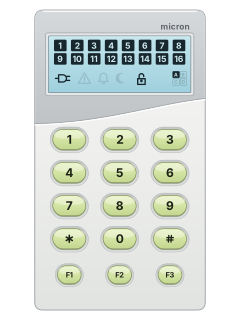
- The zones being armed light up, and the LCD keypad's padlock locks. When the exit time ends the zones go out: the system is armed.
- A flashing zone with two long beeps means it is not secure. Disarm, close it, then arm again.
- If your installer has turned on quick arm, 1 then # arms without a code. On a split 8020, 2 then # arms area B.
Arm while home91#or81#ARMorholdARM
- Scorpion calls this night arming. Only the night zones your installer chose are armed.
- 9, 1, # arms them with delays: no exit beeps unless a zone is open, then three beeps as the exit time ends. The LCD keypad shows a moon.
- In delayed mode, a night zone gives an entry warning. Key in your code and # before it ends.
- 8, 1, # arms them instantly: any night zone sets the alarm off at once. A split 8020 uses 9, 2, # or 8, 2, # for area B.
- NiteWatch: press ARM to night arm; hold for 2 seconds for instant arming. ARM disarms only before sirens sound.
Disarmyour code#ARM
- NiteWatch: ARM disarms night mode only before sirens sound. Otherwise, use your code and # at a numbered keypad.
- Key in your code, then # before the entry beeps end. Two beeps mean it has disarmed (the LCD keypad's padlock unlocks); one long tone means a wrong code.
- Flashing zones show what went into alarm. They keep flashing until you next arm.
- On a 4120, under threat, key in your code and hold # until a second beep. A duress message goes to the monitoring station.
- A 4120 or 6020 armed with user code 15 can only be disarmed with code 15.
Bypass a zoneyour code*zone#
- Use a numbered keypad. Scorpion calls this excluding a zone; each detector or door contact is a zone.
- Key in your code, then press *. Every zone lights up.
- Press the numbers of the zones to leave out. Their lights go out.
- Press # to arm. For example code, *, 4, 5, # arms with zones 4 and 5 left out.
Alarm memory80#
- Use a numbered keypad to view alarm memory.
- After an alarm, the zones that went off keep flashing until you arm again; the LCD keypad also shows the bell.
- Press 8, 0, then # to look back at past alarms. The zones from the latest one flash.
- Press # to step back one event at a time, up to 128.
- Press any other key to leave.
Chime on or off71#
- Use a numbered keypad. Your installer picks the chime zones.
- Press 7, 1, then # to turn chime on, and the same again to turn it off.
- While disarmed, a chime zone makes the keypad beep for a few seconds when it is set off.
- Arming turns chime off for the time being. A split 8020 uses 7, 2, # for area B.
Reset smoke detectors7#
- Use a numbered keypad. Ask your installer whether your smoke detectors need resetting after an alarm.
- Key in your code, then #, to silence the sirens.
- If your installer has set it up, press 7, then # to reset latching smoke detectors.
- False alarms again and again? Call your alarm company, and do not arm the system in the meantime.
Panic alarm*+#or1+3or4+6
- Numbered keypad: if your installer has set it up, press * and # together for a panic alarm.
- If set up, 1 and 3 together is a fire alarm, and 4 and 6 together a medical alarm.
- The medical alarm only reports; it does not sound.
- Key in your code, then #, to cancel.
- NiteWatch: press both ends of the EMERGENCY key together.
Change a codemaster code1+3new code#user number
- At a numbered keypad, key in the master code, then press 1 and 3 together.
- Key in the new code (2 to 4 digits), then #.
- Then key in the user number. The master code is user 1.
- For example: master code, 1 and 3 together, 1912, #, 1 changes the master code to 1912.
- To delete a code, leave out the new code: master code, 1 and 3 together, #, then the user number.
Trouble lights89#
- Use a numbered keypad to check faults.
- On the LCD keypad, a flashing system fault symbol means something needs a look. At a keypad, press 8, 9, then #.
- The zones then light up to show the fault (see the table). Press any key to leave.
- On the LCD keypad, the power lead symbol flashes with the fault symbol after a mains power cut.
- On a Nitewatch station, UNSAFE lit means a zone is not secure, and ARMED lit means the system is armed.
Pages 3 and 4, 8 of the 4120-6020-8020 User ManualPage 5 of the 4120 INSTALL MANUAL pdf1 A Nitewatch, keypad, fire or medical panic was used 2 Backup battery low or faulty 3 Mains power has failed 4 A report to the monitoring company failed 5 Phone line faulty or disconnected 6 12 V power overloaded 7 Siren fault Send a test signalhold9
- With every area disarmed, hold 9 on a numbered keypad until a second beep. No code is needed.
- The panel makes a test call to your monitoring company. The keypad beeps all through it.
- Zone lights 1 to 6 (zone numbers on the LCD keypad) come on in turn: see the table. With other reports waiting, 4 and 5 take turns.
- Zone 6 lights only if the call worked. The display ends 5 seconds later.
Pages 4, 8 of the 4120 INSTALL MANUAL pdfPage 8 of the Z608020 Installer Manual1 Phone line taken 2 Dialling 3 The monitoring company's receiver answered 4 Sending the report 5 The receiver acknowledged it 6 Call worked, hanging up
Why is my keypad beeping or showing a trouble light?
Most keypads beep or light up a trouble indicator when something needs attention, such as a low backup battery, a power cut or a lost phone or internet connection. Your user guide explains what each light or code means on your model. If it keeps happening, or you are not sure, call your installer or monitoring company.
All Micron Z4120 / Z6020C / Z8020C manuals
User guides 1
Installer manuals 3
Nothing here matches that.
Try a shorter search, or search every brand.
More Micron models
Is anyone watching your alarm?
An alarm that only makes a noise relies on someone hearing it. A monitored alarm reports to our A1 graded, NZSA approved control room, watched 24/7 by a team that is New Zealand owned and operated. We can monitor most existing alarms, so you may not need a new one. Thinking about a new alarm or security cameras? Ask us for a quote.
Prefer to talk now? Call us on 0800 339 999.
Home: alarm monitoringBusiness: business monitoringInstaller: bureau monitoring


Manuals are the property of their manufacturers and are provided for reference only; their inclusion here does not imply any endorsement by the manufacturer.