
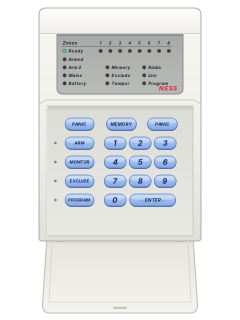
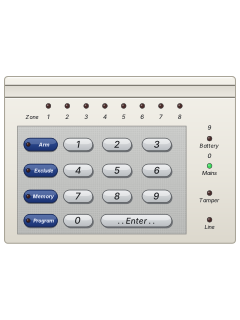
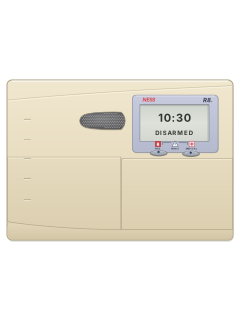
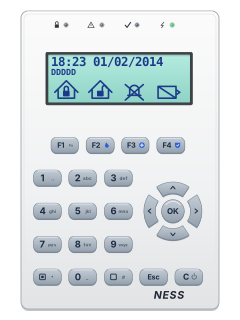
LED keypad

Ness D8 / D16 manuals
Start hereD8 user rev4.7User guide · 32 pages · 1.2 MBRead it nowKeypad cheat sheet
Arm (away)ARMyour codeEorARMEARMyour codeENTERorARMENTER
- On the LED keypad, use ENTER wherever these steps say E.
- Close doors and windows: the Not Ready light must be off (LCD keypad) or the Ready light on (LED keypad).
- Press [ARM], key in your code, then [E]. If your installer turned on the arming shortcut, [ARM] then [E] is enough.
- You hear 3 beeps and ARMED comes on. Leave before the exit time ends; 3 more beeps mark its end.
- 10 beeps instead of 3: mains off or battery low. A 2-second siren at the end: an open zone was excluded.
Arm while homeHOMEyour codeEorHOMEEMONITORyour codeENTERorMONITORENTER
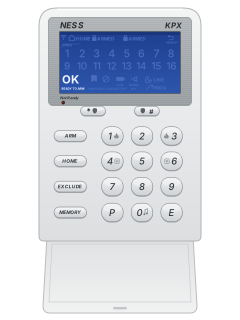
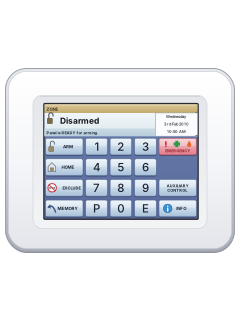
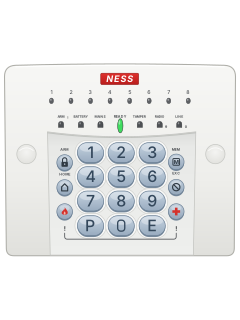
- KPX: use HOME and E. LED keypad: use MONITOR and ENTER for the same steps.
- Ness calls this Monitor mode. Only the zones your installer chose, usually doors and windows, are armed. Disarm fully first.
- Press [HOME], key in your code, then [E]. If your installer turned on the shortcut, [HOME] then [E] is enough.
- On the LED keypad the Armed light flashes; the older LCD keypad shows MONITOR.
- Key in your code and [E] to come out of Monitor mode. This also stops an alarm; re-arm if needed.
Disarmyour codeEyour codeENTER
- On the LED keypad, use ENTER wherever these steps say E.
- Come in through your usual entry door; the keypad beeps as a reminder if entry beeps are on. Key in your code, then [E]: ARMED goes off.
- Made a mistake? Press [E] and start again. Five wrong codes in a row set off the alarm.
- Your code and [E] also stop an alarm. A flashing strobe light outside means there was an alarm while you were out.
- If your installer turned on duress, 5, 6, 8 or 9 before your code disarms and sends a silent alarm.
Bypass a zoneEXCLUDEyour codeEzoneEEorEXCLUDEEzoneEEEXCLUDEyour codeENTERzoneENTERENTERorEXCLUDEENTERzoneENTERENTER
- On the LED keypad, use ENTER wherever these steps say E.
- Ness calls this Exclude: an excluded zone can't set off the alarm. Press [EXCLUDE], your code, then [E]; the EXCLUDE light comes on.
- Key in the zone number and press [E]; its light comes on. Repeat for more zones. Doing it again includes the zone.
- Press [E] to finish. EXCLUDE keeps flashing while any zone is excluded.
- Excluded zones come back when you next disarm. [EXCLUDE] [E] without a code works only while disarmed, if your installer allows it.
Alarm memoryMEMORYyour codeEorMEMORYEMEMORYyour codeENTERorMEMORYENTER
- On the LED keypad, use ENTER wherever these steps say E.
- A flashing MEMORY light means there has been an alarm. Disarm first: memory only opens while disarmed.
- Press [MEMORY], key in your code, then [E]. [MEMORY] [E] is enough if your installer has turned on the shortcut.
- Press [MEMORY] once for each event, newest first: up to 30 (20 on older D8 panels). The lights show what happened (see the table).
- Press [E] to leave. The MEMORY light stops flashing once you've looked.
Pages 15, 28 of the D16 user rev4.5Pages 6, 15, 32 of the D8 user rev4.7A zone number lit That zone went into alarm No lights The panel was disarmed ARMED or ARM2 The panel (or area 2) was armed MAINS Mains power failed BATTERY The battery was low TAMPER Tamper alarm, such as the siren cover or panel box EXCLUDE Panic alarm LINE Phone line failure Chime on or off0E0ENTER
- On the LED keypad, P is labelled PROGRAM and E is labelled ENTER.
- On a D8 V4.7, a day zone works like a shop door chime, if your installer has turned it on. The D16 manual doesn't cover this.
- Press [0] then [E] to turn Day mode on or off. With it on, opening a day zone sounds for 2 seconds.
- To pick the zones while disarmed: press [P] then [E], key each zone number and [E], then [E] to save.
- A D8 doesn't show on the keypad whether Day mode is on. Your installer sets whether it beeps the keypad, siren or strobe.
Panic alarmPANIC+PANIC
- LED keypad: press both PANIC keys together. KPX owners: ask your installer which panic method your system supports.
- LED keypad: one PANIC key, your code, then ENTER also works; PANIC then ENTER needs the installer-enabled shortcut.
- Panic may sound the sirens or send a silent report, as set by your installer. To stop the siren: code then ENTER (E on an LCD keypad).
- If your installer turned them on: fire is 3 then ENTER, medical is 2 then ENTER (a silent report, no siren). Use E for ENTER on an LCD keypad.
- The KPX keypad's two-key panic works only with D8x or D16x panels, not a D8 or D16. Panic doesn't work in Program, Memory or Exclude mode.
Change a codePmaster codeEP11Enew codeEnew codeEPEPROGRAMmaster codeENTERPROGRAM11ENTERnew codeENTERnew codeENTERPROGRAMENTER
- On the LED keypad, P is labelled PROGRAM and E is labelled ENTER.
- Disarm first: only the master code (user 1) can do this. Press [P], the master code, then [E]: the PROGRAM (PROG) light comes on.
- Press [P], the user's option number, then [E]: 11 for user 1 (master), up to 25 for user 15.
- Key in the new code (3 to 6 digits, not starting with 0) and [E], then the same code again and [E].
- To delete a code, press [MEMORY] [E] instead (older D8 panels: set the code to 000). Press [P] then [E] to leave.
Trouble lights
- 10 beeps mean mains power is off or a battery is low: the panel's, or a wireless device's.
- Check the plug-pack is plugged in and the power point is switched on. If the battery light keeps flashing, call your installer.
- A wireless detector fault, such as a tamper, can beep non-stop with RADIO (the KPX aerial) flashing. Any key stops it.
- A siren while disarmed means a 24-hour zone went off, such as a tamper or panic button.
- To stop it, key in your code then E on an LCD keypad, or your code then ENTER on the LED keypad. Then call your installer.
Pages 6 and 7, 26 of the D16 user rev4.5Pages 7, 10, 30 of the D8 user rev4.7MAINS flashing (MAINS OFF on the KPX) Mains power is off BATTERY flashing (LOW BATTERY on the KPX) The backup battery is low LINE flashing Phone line fault, or the panel couldn't reach the monitoring company TAMPER flashing Tamper alarm: call your installer RADIO flashing (an aerial on the KPX) A radio key or wireless device has a low battery EXCLUDE flashing One or more zones are excluded MEMORY flashing New alarms in memory: view them to clear the light Not Ready on (LCD) or Ready off (LED) Not ready to arm: a zone is open. The Ready light also goes off for a power or phone line fault Send a test signalPmaster codeEP66666666EPEPROGRAMmaster codeENTERPROGRAM66666666ENTERPROGRAMENTER
- Sends a test report to your monitoring company, if your alarm is monitored. D8 panels older than version 4 may not have it.
- LED keypad: P is PROGRAM and E is ENTER. Disarm, then press P, the master code and E: three beeps, and the Program light (PROG on the KPX) comes on.
- Press P, then 6 eight times, then E. The LINE light comes on while the dialler is on line.
- Press P then E to leave program mode. LINE flashing afterwards means a phone line fault or a failed call.
Why is my keypad beeping or showing a trouble light?
Most keypads beep or light up a trouble indicator when something needs attention, such as a low backup battery, a power cut or a lost phone or internet connection. Your user guide explains what each light or code means on your model. If it keeps happening, or you are not sure, call your installer or monitoring company.
All Ness D8 / D16 manuals
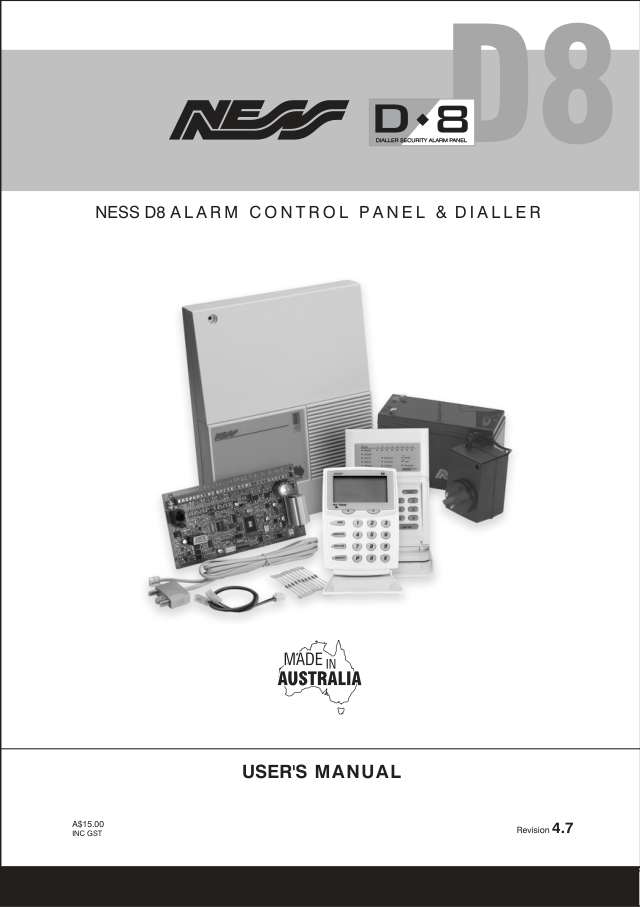
User guides 3
Installer manuals 15
Nothing here matches that.
Try a shorter search, or search every brand.
More Ness models
Is anyone watching your alarm?
An alarm that only makes a noise relies on someone hearing it. A monitored alarm reports to our A1 graded, NZSA approved control room, watched 24/7 by a team that is New Zealand owned and operated. We can monitor most existing alarms, so you may not need a new one. Thinking about a new alarm or security cameras? Ask us for a quote.
Prefer to talk now? Call us on 0800 339 999.
Home: alarm monitoringBusiness: business monitoringInstaller: bureau monitoring


Manuals are the property of their manufacturers and are provided for reference only; their inclusion here does not imply any endorsement by the manufacturer.