
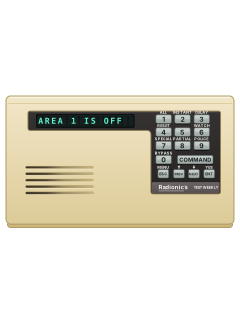
D1255Alpha keypad

Radionics 9412 manuals
Start hereD1255 LCD User ManualUser guide · 56 pages · 137 KBRead it nowKeypad cheat sheet
Arm (away)COMMAND1oryour codeENTCOMMAND1oryour codeENTER
- Close protected doors and windows before arming.
- If quick arming is enabled, press [COMMAND] [1]. If prompted, enter your code, then ENT on D1255 or ENTER on D1260.
- You can also arm with your code, then ENT on D1255 or ENTER on D1260.
- The display counts down the exit time and the keypad beeps. Leave before it reaches zero.
- On D1255, if force arming is allowed: at CHK AREA, press NEXT until FORCE ARM shows, then ENT. Bypassed points are unprotected.
Arm while homeCOMMAND3orCOMMAND2
- If your installer has enabled perimeter arming, it leaves the interior off.
- Close perimeter doors and windows. Press [COMMAND] [3] for entry and exit delays.
- If prompted, enter your code, then ENT on D1255 or ENTER on D1260. The display counts down, then confirms perimeter arming.
- For no entry or exit delay, use [COMMAND] [2] instead.
- With no-delay arming, disarm before opening any protected outside door.
Disarmyour codeENTyour codeENTER
- D1255 has ENT; D1260 has ENTER. Use the final key shown for your keypad.
- Come in through your entry door. Enter your code and press ENT (D1255) or ENTER (D1260) before entry time ends.
- Press that final key within 8 seconds of entering the code. The display returns to its disarmed message.
- Your code and the same final key also silence an alarm. If it was a mistake, ring your alarm company.
- Under threat? If your alarm company has set up duress, your code with its last digit 1 or 2 higher disarms and sends a silent alarm.
Bypass a zoneCOMMAND0
- Disarm first. A bypassed point (zone) is unprotected.
- If bypassing is enabled, press [COMMAND] [0]. If prompted, enter your code, then ENT on D1255 or ENTER on D1260.
- On D1255, enter the point number, press ENT, check the point shown, then press ENT again. PT ## BYPASSED confirms it.
- On D1260, enter the point number and press ENTER. Check the point shown, then press the button beside Bypass> or ENTER.
- To restore a point, use [COMMAND] [0] [0] and follow that keypad’s unbypass prompts. Close the door or window.
Alarm memoryCOMMAND40
- Disarm, then press [COMMAND] [4] [0].
- If prompted, enter your code, then ENT on D1255 or ENTER on D1260.
- On D1255, press NEXT to review events and ESC to finish. No stored events shows as NO EVENTS.
- On D1260, press the screen-side button beside Next> to review events and <Exit to finish.
- Arming clears event memory. On D1255, entering your code then ESC also clears it.
Chime on or offCOMMAND6
- Watch chimes when a selected door or window opens while disarmed.
- If Watch is enabled, disarm and press [COMMAND] [6]. If prompted, enter your code, then ENT on D1255 or ENTER on D1260.
- The display confirms Watch is on. Repeat the command to turn it off.
- Your installer chooses the watched points and whether Watch comes on automatically when you disarm.
- The chime is muted while the keys are lit, for 20 seconds after a key press.
Reset smoke detectorsCOMMAND47
- In a fire alarm, get everyone out first.
- Once safe, silence and disarm with your code, then ENT on D1255 or ENTER on D1260.
- If reset is enabled, press [COMMAND] [4] [7]. If prompted, enter your code and the same final key.
- D1255 shows SENSORS RESETING, then goes blank. D1260 shows a reset message, then retrieves panel information.
- Wait for the disarmed display. If the detector alarms again or will not reset, contact your alarm company.
Change a codeCOMMAND55your codeENTnew codeENTnew codeENT
- D1255 only, if code changes are enabled. For D1260 code changes, ask your alarm company for instructions.
- Press [COMMAND] [5] [5]. At ENTER PASSCODE, enter your current code and press ENT.
- At ENTER NEW CODE, enter a new code of 3 to 6 digits and press ENT.
- At ENTER NEW AGAIN, enter it again and press ENT. PASSCODE CHANGED confirms it.
- A buzz means the code is already used. Codes within 2 of another code are refused to avoid duress-code conflicts.
Set the date and timeCOMMAND45
- D1255 only, if enabled: press [COMMAND] [4] [5]. For D1260 clock changes, ask your alarm company for instructions.
- Enter your code and press ENT if prompted. At ENT TIME, enter the 12-hour time and press ENT.
- At AM ?, press ENT for morning; for afternoon, press NEXT to show PM ?, then ENT.
- At ENT DATE, enter the date in the format confirmed by your alarm company, then ENT. Check it and press ESC to finish.
Trouble lightsCOMMAND4
- A trouble may sound three warble tones and a pause repeatedly.
- Press [COMMAND] [4] to quiet it. If prompted, enter your code, then ENT on D1255 or ENTER on D1260.
- Your code and that final key also quiet the tone, but disarm the system too.
- D1255 SERVC messages remain until the fault clears. The table lists D1255 messages; D1260 uses different wording.
- Review cleared events with [COMMAND] [4] [0].
Pages 3 and 4, 12 to 14, 29, 47 and 48 of the D1255 LCD User ManualPages 6, 19, 21, 31, 51 of the D1260 Alpha LCD User's GuideSERVC AC FAIL Mains power to the alarm is off: check its plug-in transformer and circuit breaker SERVC BATT LOW The backup battery is low: call for service if it stays or keeps coming back SERVC BATT MSING The backup battery is disconnected or shorted SERVC COMM FAIL The alarm couldn't get through to your monitoring company: let them know SERVC PH LINE #1 or #2 Phone line trouble: report it to your phone company from another phone SERVC KEYPAD Another keypad has a fault: tell your alarm company CALL FOR SERVICE or SERVC PANEL The panel may not be working: call for service FIRE TROUBLE A fire point has a fault. It clears once the fault is fixed Send a test signalCOMMAND41thenENT
- D1255 keypad, if your security company has allowed it for your passcode. Ring them before you send a test.
- At the normal display, press [COMMAND], [4], [1]. If asked, key in your passcode and press [ENT].
- When TEST REPORT? shows, press [ENT]. SENDING REPORT shows, then REPORT SENT for 5 seconds.
- COMM FAIL means it couldn't get through. COMMAND DISABLED or NOT AUTHORIZED: ask your security company.
Why is my keypad beeping or showing a trouble light?
Most keypads beep or light up a trouble indicator when something needs attention, such as a low backup battery, a power cut or a lost phone or internet connection. Your user guide explains what each light or code means on your model. If it keeps happening, or you are not sure, call your installer or monitoring company.
All Radionics 9412 manuals
User guides 6
Installer manuals 9
Nothing here matches that.
Try a shorter search, or search every brand.
More Radionics models
- D91122 user guides, 1 quick guide and 4 more7 manuals
- D41121 user guide, 1 installation manual and 4 more6 manuals
- D6412 D94121 user guide, 1 quick guide and 4 more6 manuals
- Access Easy Controller2 user guides, 1 installation manual and 2 datasheets5 manuals
- Radionics-Bosch RPS1 datasheet and 1 manual2 manuals
Is anyone watching your alarm?
An alarm that only makes a noise relies on someone hearing it. A monitored alarm reports to our A1 graded, NZSA approved control room, watched 24/7 by a team that is New Zealand owned and operated. We can monitor most existing alarms, so you may not need a new one. Thinking about a new alarm or security cameras? Ask us for a quote.
Prefer to talk now? Call us on 0800 339 999.
Home: alarm monitoringBusiness: business monitoringInstaller: bureau monitoring


Manuals are the property of their manufacturers and are provided for reference only; their inclusion here does not imply any endorsement by the manufacturer.